Best AI for Legal Writing for In-House Counsel: Get 14 Hours Back (2026)
Josh Bertini, Head of GrowthPublished Updated
Hayley McAllister leads commercial legal at Jasper, the AI writing platform. As Senior Counsel and Head of Commercial Legal, she negotiates every go-to-market contract on the sell side and every vendor agreement, work that fills roughly 75% of her day. Then she started drafting inside GC AI for Word, the legal AI platform that lives inside Microsoft Word, and the math changed:
What used to take me an hour now takes me 10 minutes.
A scene like Hayley's is becoming the default for in-house counsel. Which platform a legal team picks decides whether the compression lands.
The best AI for legal writing shares three traits with the platforms winning real adoption inside in-house legal departments: they live inside Microsoft Word, they have legal guardrails built in, and they invest in teaching the team to use them.
Trust, precision, and craft are the standards in-house counsel hold themselves to, and the AI tools that meet that bar earn permanent space in the workflow. We've heard the same pattern across more than 30 conversations on the CZ and Friends podcast, hosted by GC AI's co-founder and 3x general counsel, Cecilia Ziniti.
Inside an In-House Counsel's Day With AI for Legal Writing
The vendor MSA hit your inbox at 11pm Thursday. The procurement team wants it signed by Friday. Sales pulled you into a Slack thread about a partnership agreement they “already agreed to over coffee” that uses indemnity language no in-house lawyer would accept. The CFO needs a memo on whether the company can offer ESPP to Canadian contractors by tomorrow morning.
This is the rhythm in-house counsel runs every week, and it is the reason the AI tools winning real adoption inside legal departments all work inside Microsoft Word.
You open the vendor MSA in GC AI for Word. The sidebar reads the document, applies your team's Playbook for vendor MSAs, and returns tracked-change redlines on indemnity, limitation of liability, IP, and warranties. You accept the edits that match your team's positions, push back on the ones that miss, and send the counter-redline back in fifteen minutes.
You switch to a chat tab and upload your team's standard partnership template. You ask GC AI to compare the new agreement against the standard and draft a four-sentence note to sales explaining the indemnity gap and a workable path forward.
You open another tab and run Research on the Canadian contractor ESPP question. GC AI pulls authoritative-source citations through Exact Quote, drafts a one-page memo, and lets you verify each source before sending to the CFO.
By the time procurement opens their inbox Friday morning, all three are done.
Key Features to Look for in AI for Legal Writing Software
The six capabilities below separate the AI legal writing tools worth evaluating from the ones built for a different buyer.
Microsoft Word Integration Without Context Switching
The lawyer's actual writing surface is Word. A platform that requires the lawyer to copy text out, paste it into a web app, run a prompt, and copy the result back creates a 30-second tax on every draft. Across a 40-contract month, that becomes 20 minutes of pure context-switching tax. Across a year, it is the reason the AI sits unused.
Ask vendors:
-
Does the tool install as a Microsoft Word add-in?
-
Can it see the document open on screen?
-
Does it accept and reject tracked changes the way Word natively does?
Built-In Legal Guardrails Against Hallucinated Citations
General AI tools hallucinate case citations confidently. The 2023 Mata v. Avianca sanctions order remains the cautionary citation for this failure mode. ABA Formal Opinion 512 (issued July 2024) sets the floor for attorney competence, confidentiality, and independent verification duties when using generative AI tools.
Ask vendors:
-
How does the platform handle citation requests when evidence is uncertain?
-
What is the hallucination rate on a verified test set of legal queries?
-
Does the model decline to answer when it lacks grounding?
For more examples of how AI-generated citation errors have resulted in court sanctions and disciplinary action, see our AI Hallucination Legal Cases Tracker.
Playbook-Driven Drafting Against Your Team's Standards
A first draft is only useful if it reflects the positions your team takes on indemnity, limitation of liability, and IP ownership. Legal AI worth buying lets your team encode those positions once, then applies them automatically against every counterparty markup.
Ask vendors:
-
Does the platform ship pre-built playbooks for NDAs, DPAs, and MSAs?
-
Can your team build custom playbooks without an implementation engineer?
-
How does the playbook update when a team position changes?
Verifiable, Character-Level Citations
When the AI says “Section 7.2 caps the liability at the lower of fees paid and $1M,” the lawyer needs to know that the words “$1M” came directly from the document, not from the model's pattern-matching on similar contracts.
Ask vendors:
-
How does the platform ground its citations?
-
Does the citation link back to the exact passage?
-
What happens when the answer is in a hyperlinked source rather than the document itself?
Security Designed for Confidential Client Work
In-house counsel writes about active litigation, M&A targets, employee disputes, and product launches that have not been announced. The AI tool needs SOC 2 Type II at minimum, zero-data-retention agreements with the underlying LLM providers, and encryption that meets the standard a Fortune 500 CISO would sign off on.
Ask vendors:
-
Which LLM providers does the platform use?
-
Are zero-data-retention contracts in place for each provider?
-
Where is data stored, and is SOC 3 (the public-facing report) available in addition to SOC 2?
Onboarding and Training That Turns the Team Into Power Users
The teams who report 14 hours saved per lawyer per week did not get there by buying a license and walking away. They invested in classes, prompt libraries, and shared playbooks.
Ask vendors:
-
Is formal training included with the license?
-
Are classes CLE-eligible?
-
Who teaches them, and does the curriculum map to the workflows your team runs every week?
The Seven Best AI Tools for Legal Writing
In-house counsel evaluates a different shortlist than law firms. Below are the seven AI legal writing platforms in-house teams test in 2026, in order of fit for in-house workflows:
-
GC AI, purpose-built for in-house counsel
-
Spellbook, contract-focused Word assistant
-
Harvey, law firm enterprise platform
-
Claude, general-purpose long-document AI
-
ChatGPT, consumer-grade general AI
-
BriefCatch, final-stage brief editing
-
Clearbrief, litigation cite-checking
GC AI
GC AI is for in-house counsel prioritizing Word-native drafting, playbooks, citations, and training. GC AI is the strongest fit.
It is the enterprise-ready legal AI platform purpose-built for in-house legal teams, with a 20,000-line legal system prompt, a native Microsoft Word integration that drafts inside the document on screen, pre-built Playbooks for NDAs, DPAs, and MSAs, Exact Quote for character-level citations, Research for multi-agent legal intelligence with primary law sources, and a Skill Library of ready-to-use workflows.
More than 2,100 legal teams, including Riot Games, Jasper, Tonal, SKIMS, and Gusto, use the platform. The roster also includes more than 300 public companies and 25+ unicorns.
Cameron Clark, Head of Legal at Arc'teryx, described how GC AI changed his counseling work as the only lawyer at the company:
It's like having a senior legal peer to think with. It helps me brainstorm and refine ideas in real time, which makes a huge difference when you're leading a small team.
In GC AI's December 2025 ROI study of more than 100 active customers, teams reported saving an average of 14 hours per lawyer per week, reducing outside counsel spend by 14%, and achieving 21% greater accuracy compared to generic AI tools. 97.5% of teams saw value from GC AI before month one. The math on the $252,000 in median annual savings: 14% reduction × $1.8M median outside counsel spend per the ACC Law Department Management Benchmarking Report.
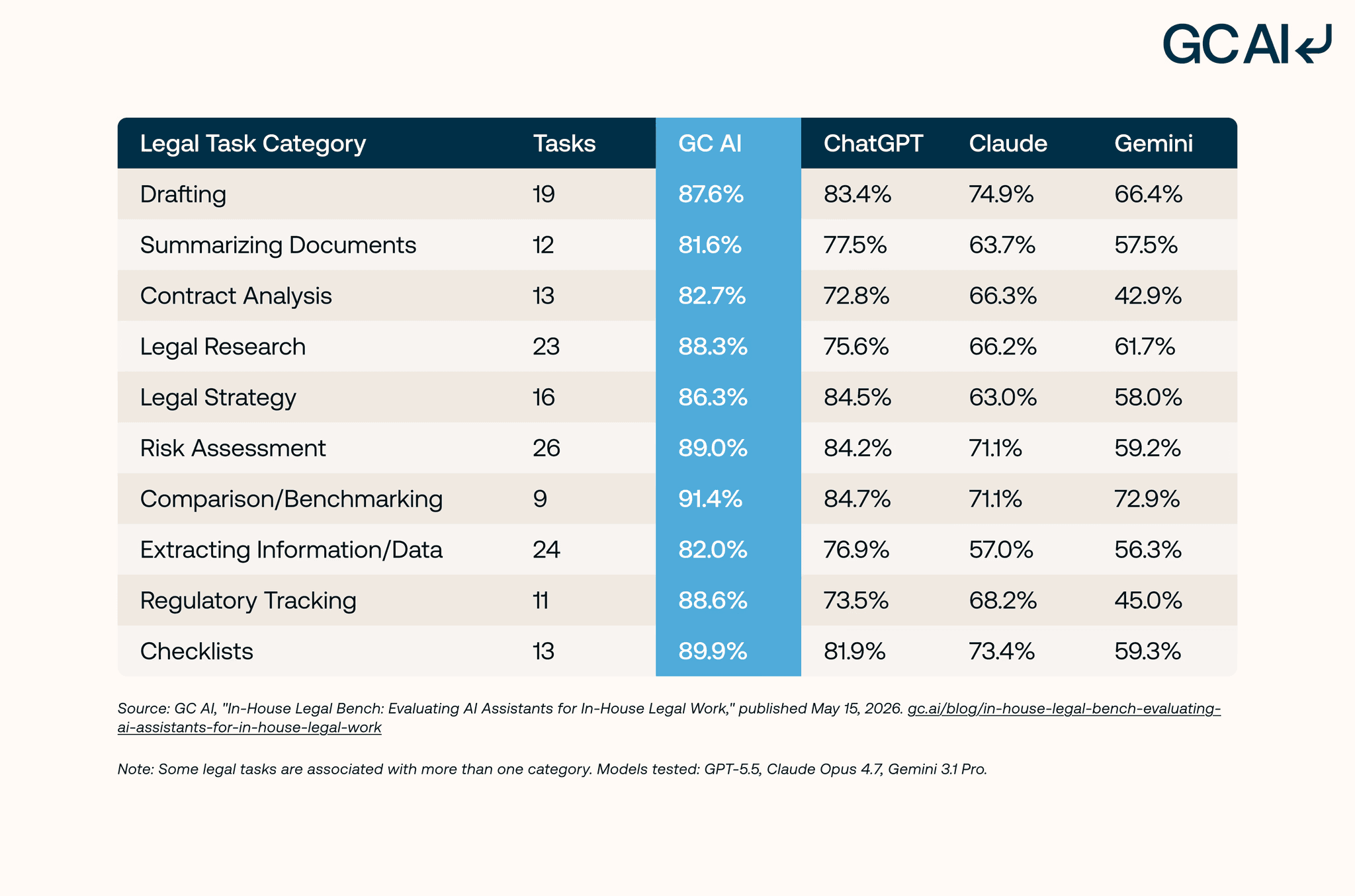
In a separate May 2026 head-to-head benchmark of 100 in-house legal tasks scored against 1,200+ attorney-developed criteria (the In-House Legal Bench, run by GC AI's R&D Attorneys), GC AI achieved an 86.8% pass rate, leading ChatGPT (79.8%), Claude (68.4%), and Gemini (57.5%). GC AI outperformed all three across all 10 task categories tested, with the largest advantages in research-intensive tasks (regulatory tracking, legal research, and checklists).
For a deeper look at these results, see our Legal AI Technology in 2026 guide, which compares the major categories of legal AI across 100 in-house legal tasks.
Best for: AI-powered contract drafting, brief writing, memo writing, redlining, and research for in-house legal teams. Word-native workflow, in-house guardrails, and a CLE-eligible class library.
Choose GC AI if you lead an in-house legal team and you want a platform that drafts inside Microsoft Word, ships with playbooks your team can adapt, and pairs with a CLE-eligible class library taught by former general counsels.
Spellbook
Spellbook is a Word-native legal AI platform that drafts and redlines contracts. It serves both law firms and in-house teams, with historical investment in contract review playbooks. Spellbook's Benchmarks feature compares proposed contract terms against an aggregated dataset.
Best for: High-volume contract drafting and redlining for solo attorneys, small firms, and lean in-house teams who want a Word-first contract assistant.
Pricing: Custom pricing as of May 2026; demo required.
Choose GC AI if you draft beyond contracts, including memos, research, briefs, and internal communications, and you want a CLE-eligible class library to train the team. The GC AI vs Spellbook comparison walks through the full feature breakdown, and the Spellbook alternatives guide covers the broader category.
Harvey
Harvey is a legal AI platform that initially launched with law firms, specifically the Am Law 100 and large enterprise legal departments. The platform handles drafting, research, memo writing, and multi-practice analysis. Harvey publishes its work through partner law firm case studies (as of September 2026).
Best for: Law firms and large enterprise legal departments with a six- to seven-figure annual platform budget and a dedicated legal innovation team to run implementation.
Pricing: Not publicly disclosed as of May 2026, which can delay procurement decisions for in-house teams that need to compare options without committing to a demo cycle first.
Choose GC AI if you lead a lean in-house team that needs to be productive in week one without a six-figure rollout or a custom implementation engagement. The GC AI vs Harvey comparison covers the architectural differences, and the Harvey alternatives guide lists the broader options for in-house teams.
Teams deciding between Harvey and a Word-native contract platform should also see Spellbook vs Harvey: Which One Fits Your Legal Team?, which breaks down differences in contract review, workflow design, and fit for in-house legal teams.
Claude
Claude is Anthropic's general-purpose AI platform. It is widely respected for long-document reasoning, a long context window that comfortably handles full agreements, and strong performance on legal-style writing tasks. Claude for Work adds enterprise controls including data residency, SSO, and an admin console.
Best for: General-purpose drafting and long-document reasoning when the team already pays for an enterprise AI license and the use case is not specifically legal. For a closer look at Anthropic's legal workflows, see our Claude Legal Plugin guide.
Pricing: Pro is $20/month and Team is $30/seat/month annual as of May 2026. Enterprise pricing is custom.
Choose GC AI if you want a platform calibrated to legal voice with character-level citations, pre-built legal playbooks, and Word-native drafting that handles legal-domain workflows without prompt engineering. For the deeper read, see GC AI vs Claude or Claude Legal AI review.
ChatGPT
ChatGPT is OpenAI's general-purpose AI and the most-named brand in consumer AI. In-house lawyers commonly start with ChatGPT before evaluating a purpose-built legal platform. ChatGPT can draft a serviceable memo, summarize a long agreement, and respond to a research question. Its consumer tiers train on user inputs by default per OpenAI's chat retention policy, and OpenAI began testing advertising on the Free and Go tiers in February 2026.
Best for: Personal legal writing experimentation and learning the shape of an AI workflow.
Pricing: Plus is $20/month, Pro is $100 or $200/month, and Business is $25/seat/month month-to-month or $20/seat/month annual as of May 2026. Business and Enterprise tiers do not train by default.
Choose GC AI if you handle confidential client work and want SOC 2 Type II plus zero-data-retention agreements with our LLM providers wherever feasible, character-level citations where source verification is available, and a model trained for legal-domain voice rather than consumer chat. For the privacy deep dive, see Is ChatGPT Private? and Is ChatGPT Confidential? What Counts as a Breach in 2026, and for the head-to-head: GC AI vs ChatGPT.
Teams evaluating ChatGPT for legal workflows should also understand the distinction between legal information, legal work product, and true AI legal advice, since each category carries different supervision, confidentiality, and liability requirements.
BriefCatch
BriefCatch is a legal writing assistant focused on the editing stage of legal writing. It analyzes finished drafts for clarity, concision, and consistency with brief-writing conventions taught by legal writing scholars.
Best for: Final-stage editing and clarity polishing on briefs and memos already written by a lawyer.
Pricing: Not publicly disclosed on its website as of May 2026.
Choose GC AI if you want the AI to draft from a blank page, run playbook-driven contract review, and handle legal research alongside the editing stage your team already does well.
Clearbrief
Clearbrief is a litigation-focused legal AI platform that assists with brief drafting and cite-checking. The platform's strongest feature is automated cite-checking against record evidence, including the ability to generate hyperlinked exhibits and tables of authorities.
Best for: Litigation teams writing briefs that need cite-checking against record evidence and a hyperlinked final exhibit set.
Pricing: $300 per user per month on the Solo tier as of May 2026. Enterprise Unlimited pricing is custom.
Choose GC AI if your work spans contracts, memos, counseling, and litigation in one platform, with character-level citations across all four work types.
Comparison Table: AI Legal Writing Tools
| Platform | Word-Native | Pre-Built Playbooks | Character-Level Citations | Best For | Public Pricing |
|---|---|---|---|---|---|
| GC AI | Yes | Yes (NDAs, DPAs, MSAs) | Yes (Exact Quote) | AI-powered contract drafting, brief writing, memo writing, redlining, and research for in-house teams | $500/seat/month, 14-day free trial (as of May 2026) |
| Spellbook | Yes | Yes (contract focus) | Aggregated contract benchmarks only, no document-locked grounding (as of May 2026) | High-volume contract drafting and redlining for solo and small-firm attorneys | Custom; demo required (as of May 2026) |
| Harvey | Public product documentation limited (as of May 2026) | Custom enterprise buildouts (as of May 2026) | Public product documentation limited (as of May 2026) | Law firms and large enterprise legal departments | No public pricing (as of May 2026) |
| Claude | No (browser-based) | No | No | General-purpose drafting and long-document reasoning | $20/month Pro, $30/seat/month Team (as of May 2026) |
| ChatGPT | No (browser-based) | No | No | Personal legal writing experimentation | $20/month Plus, $25/seat/month Business monthly (as of May 2026) |
| BriefCatch | Yes (Word add-in) | No | No | Final-stage editing of briefs and memos | No public pricing (as of May 2026) |
| Clearbrief | Yes (Word add-in) | No | Yes (cite-check against record) | Litigation brief cite-checking | $300/user/month Solo, custom Enterprise (as of May 2026) |
Capability and pricing columns reflect public product state as of May 2026. Verify current vendor documentation before purchase.
Five Legal Writing Workflows AI Handles Today
The list below maps the five highest-leverage workflows in-house counsel runs through AI for legal writing today.
-
Drafting commercial contracts
-
Writing internal memos
-
Drafting briefs and litigation responses
-
Redlining counterparty markups
-
Composing diplomatic internal communications
Drafting Commercial Contracts
Drafting commercial contracts is the fastest ROI use case for AI in legal writing.
The lawyer opens a counterparty's template, applies a playbook the team encoded for sell-side MSAs, and gets back a redlined draft that reflects their team's position on indemnity, limitation of liability, IP, and warranties. The lawyer reviews, accepts the edits she agrees with, and sends.
Across an in-house team negotiating 40 commercial contracts a month, the per-contract compression Hayley described in the opener returns roughly 33 hours of capacity per month (50 minutes saved × 40 contracts), the better part of an attorney week the team can redirect to strategic work.
Writing Internal Memos
Writing internal memos is the second-highest-leverage workflow for in-house counsel. An in-house lawyer fields a question from the business (a HIPAA question, a contractor classification question, a privacy question), drafts a short answer, and either sends the memo or files it for the next time the question comes up.
KT Farley, Chief Privacy Officer and Associate General Counsel at Helix, described what this looks like in practice:
A partner asked me to quickly draft a response to a HIPAA compliance question. Usually this would take me an hour, switching context, creating a doc, writing it up. With GC AI it was much faster.
Drafting Briefs and Litigation Responses
Brief drafting historically belonged to litigators at law firms, and the workflow is rising in-house as legal teams take more litigation work in-house. AI drafts a structural skeleton: facts section, procedural posture, legal standard, argument. The lawyer fills the strategy. Tools with cite-checking against record evidence are worth the extra step here. Mata v. Avianca remains the reason every brief drafted with AI requires a human pass on every citation.
Teams evaluating platforms specifically for motions, litigation responses, and citation-verified brief drafting should also see our guide to the best AI for legal brief writing, which compares Word-native tools, cite-checking capabilities, and brief-specific workflows.
Redlining Counterparty Markups
The lawyer uploads the counterparty's markup, applies the team's playbook, and receives a redlined response with explanations for each accepted, modified, or rejected change. The redlined response is on the lawyer's screen inside Microsoft Word ready for review. Maury Bricks, General Counsel at ARKO Corp, captured the moment AI gave him back the redlining workflow:
I type in 'please redline this document' and it's like, did you mean you wanted to know these 40 things? And I'm like, yes, that's exactly what I wanted.
For a deeper dive on this specific workflow, see the Contract Redlining Software playbook.
Composing Diplomatic Internal Communications
Drafting diplomatic internal communications is the hidden hero of in-house AI use. Sales emailed a customer something that contradicts the company's terms. Procurement asked for an indemnity carve-out the team cannot accept. AI drafts a four-sentence note that lands the legal answer without burning a relationship. Joys Choi, Senior Director, Legal at Tipalti, described what this looked like for her team:
Say sales emailed a customer something that conflicts with our online terms. I'll ask GC AI to draft a diplomatic note to the sales team explaining the impact, how to fix it, and how to avoid it next time.
The Free AI Tradeoff: ChatGPT and Claude vs. Purpose-Built Legal AI
The cost of free AI for legal work shows up in three places. ChatGPT's Free and Go tiers train on user inputs unless the lawyer toggles the setting off, and OpenAI began testing advertising on those tiers in February 2026, layering ad targeting on top of the training-defaults question. Claude's consumer tiers also require careful review of training and retention settings. The teams that tried generic AI first and migrated to purpose-built legal AI cited the same three reasons:
The first is hallucinated citations. Buyers evaluating any general AI tool for legal use should ask the vendor how its model handles citation requests when the answer is uncertain, what its hallucination rate is on a verified test set of legal queries, and whether the model is configured to refuse rather than guess.
GC AI's classes have trained more than 6,000 in-house lawyers as of May 2026 on the principle that ChatGPT and Gemini “tend to hallucinate, they don't give you what you need.” The point comes from co-founder Cecilia Ziniti, a 3x general counsel who designed the curriculum after building GC AI to address what she saw firsthand. The risk to the lawyer's bar license is why in-house teams pay for legal-specific AI. Many of these risks have already been tested in court.
See our guide to the 7 AI legal cases that should shape your AI policy, including Mata v. Avianca, Heppner, Anthropic's citation error, and other landmark rulings.
The second is the content-policy hedge. General AI tools are designed for non-specialist consumer use, and their content policies often route legal questions to generic guidance about consulting a licensed attorney. Purpose-built legal AI is calibrated for users who are licensed attorneys writing for their company.
The third is the missing infrastructure. Legal AI ships with playbooks, exact-quote citations, document libraries, and Word integration. General AI ships with a chat interface and a prompt box. The lawyer who tries to recreate playbook logic in ChatGPT spends the first three hours building scaffolding the legal platform shipped with on day one.
How to Roll Out AI for Legal Writing on Your Team
The teams who hit 14 hours saved per lawyer per week followed a similar implementation pattern. They picked one high-leverage workflow (usually contract redlining), encoded one playbook against the team's standards, and got the whole legal team using it inside a week. Then they layered in research, memo drafting, and internal communications over the next month.
The same rollout principles apply to broader generative AI adoption across legal departments, including research, compliance, and contract management workflows.
The 30-60-90 Day Rollout
Days 1 to 30: One workflow, one playbook, full team. Pick the highest-leverage workflow (contract redlining or vendor NDA review for most teams). Encode the team's standard positions into one playbook. Schedule the GC AI 101 class for the whole legal team in week 1. By day 30, every lawyer on the team has redlined at least one contract inside GC AI for Word.
Days 31 to 60: Memo drafting and internal communications. Add the second workflow. Build a shared prompt library for the questions the business asks most often (HIPAA, contractor classification, privacy review). Run GC AI 105 (AI in Word) for the team. Measure time-to-first-draft on memos and compare to baseline. For the 15 prompt templates in-house teams use daily, see AI Prompts for Lawyers.
Days 61 to 90: Research and team-wide playbook authoring. Layer in Research for jurisdictional questions and authoritative-source review. Run GC AI 106 (Building Playbooks) so the team can author its own playbooks without waiting on a vendor implementation engineer. By day 90, the team is reporting hours saved and reduced reliance on outside counsel.
The class library closes the gap between “we bought the license” and “we got 14 hours back.” Without the training, the platform sits unused after week one. With it, the team builds the prompt-and-verify habits that make the 14-hour ROI real.
The classes are 1.25-hour California CLE-eligible sessions on prompting, AI in Word, using playbooks, and building playbooks. Former general counsels teach them. See all our legal AI classes or check out our guide on AI Courses for Legal Professionals.
What Is the Best AI for Legal Writing for In-House Counsel?
The best AI for legal writing for in-house counsel in 2026 meets the standards in-house counsel hold themselves to: trust, precision, and craft, all expressed inside Microsoft Word where the work actually happens.
GC AI is that platform. The supporting cast (Spellbook for high-volume contract review, Harvey for law firm enterprise, Claude for general-purpose long-document work, Clearbrief for litigation cite-checking) covers narrower use cases when the buyer profile is different. For the in-house lawyer drafting briefs, memos, and contracts inside Microsoft Word, GC AI is the answer.
Join the In-House Counsel Community Writing Inside GC AI
Three doors into the GC AI community:
-
Take the free GC AI 101 class, a 75-minute California CLE-eligible session taught by former general counsels.
-
Subscribe to the CZ and Friends podcast, where Cecilia talks with in-house counsel from across the country.
-
Start your 14-day free trial inside Microsoft Word and run your first contract against a playbook this week.
FAQ
What is the best AI for legal writing?
For in-house counsel in 2026, the best AI for legal writing is purpose-built for the in-house buyer, drafts inside Microsoft Word, ships with playbooks the team can adapt, and pairs the platform with CLE-eligible training. GC AI meets all four criteria, with character-level citations through Exact Quote, pre-built Playbooks for NDAs, DPAs, and MSAs, and Solutions Attorneys who train the team during onboarding.
Is there a free AI for legal writing?
Yes, for early experimentation. ChatGPT and Claude both offer free tiers that handle basic legal writing tasks. Some free tiers, including ChatGPT Free and Go, may use content for training unless users opt out; Claude consumer accounts require users to manage model-improvement settings, and OpenAI began testing advertising on its Free and Go tiers in February 2026. For confidential client work, a purpose-built legal AI with SOC 2 Type II certification and zero-data-retention agreements is the right path.
Can AI write a legal brief?
Yes, for the structural skeleton. AI drafts the facts section, the procedural posture, the legal standard, and an argument framework that a litigator fills with strategy. Mata v. Avianca remains the reason every AI-drafted brief requires a human pass on every citation before filing.
What is the best AI for legal brief writing?
For litigators writing briefs at law firms, Clearbrief's cite-checking against record evidence is the closest fit. For in-house counsel drafting briefs alongside contracts, memos, and counseling work, GC AI is the better platform because it handles all four work types in the same tool.
Is AI legal writing safe for confidential client work?
Yes, on platforms with the right security posture. A safe platform has SOC 2 Type II certification at minimum, zero-data-retention agreements with the underlying LLM providers, and encryption that meets enterprise security review. GC AI is SOC 2 Type II and SOC 3 certified, GDPR compliant, and AES-256 encryption. We maintain zero-data-retention agreements with our LLM providers wherever feasible.
Can AI cite legal cases accurately?
Yes, with character-level citation features. GC AI's Exact Quote returns citations character-locked to source documents the lawyer can click through to verify. Any AI-drafted citation requires human verification before filing, especially outputs from general-purpose AI tools that lack character-locked source grounding.
How much does AI for legal writing cost? (as of May 2026)
Pricing ranges from $20 to $500 per seat per month depending on the platform, as of May 2026. GC AI is $500 per seat per month with a 14-day free trial. Spellbook moved to custom pricing in 2026; demo required. Claude Pro is $20/month and Team is $30/seat/month annual. ChatGPT Plus is $20/month and Business is $25/seat/month month-to-month. Harvey pricing is not publicly disclosed.
Will AI replace legal writers?
No. AI accelerates the first-draft and editing stages of legal writing. Legal judgment, client counseling, strategy, and the responsibility for filings stay with the lawyer. The teams hitting 14 hours saved per week describe the AI as a force multiplier on their existing work and on the legal expertise that produces the final filing.
How do I get started with AI legal writing?
Start with one high-leverage workflow your team runs every week, usually contract redlining or vendor NDA review. Pick one platform, run a 14-day pilot inside Microsoft Word, and measure time-to-first-draft against your current baseline. GC AI's free 14-day trial covers the full platform including Playbooks, Exact Quote, and the class library.