Contract redlining software helps legal teams propose changes to agreements and compare versions during negotiation. AI redlining adds a first-pass review against your instructions or contract playbook, with proposed edits for a lawyer to assess.
Take a familiar hypothetical: a thirty-eight-page vendor MSA arrives late in the afternoon, with a subrogation waiver buried on page 22. Sales wants the redline back by morning.
You need to decide which provisions to change and explain the positions you take. A useful first pass should reduce the work between opening that agreement and returning a redline you can stand behind.
Key Takeaways
Choose software for the work you need to complete: drafting proposed changes, checking differences between versions, or managing the wider contracting process.
AI review and contract lifecycle management overlap. A CLM can include AI redlining and a Word integration, so compare the specific products and packages.
For in-house counsel handling contract review and the legal questions around a negotiation, GC AI combines Playbooks with research and drafting inside Word.
Evaluate the complete review: material misses, proposed language, and the effort needed to produce a usable redline.
GC AI is enterprise legal AI for general counsel and law departments of all sizes, trusted by 2,100+ teams including 300+ public companies. It combines contract review and redlining in Microsoft Word, Playbooks based on the company’s positions, and legal research.
Best Contract Redlining Software in 2026
Start with the review workflow, then assess the proposed language and the effort required to check it.
The table compares eight products using their published capabilities. The buyer-fit descriptions are editorial recommendations; the scorecard later in this guide lets you evaluate performance on your own contracts.
Software | Best For | Review or Comparison Workflow | What to Test |
|---|---|---|---|
GC AI | GCs, legal operators, and law departments of all sizes seeking enterprise legal AI for everyday legal work | Contract review and redlining in Microsoft Word, company Playbooks, and legal research | How its suggested redlines apply your preferred positions and fallbacks across a complete agreement |
Lawyers who want contract drafting and reusable review instructions inside Word | Word-based review with redline and comment suggestions, plus custom playbooks | How its reusable checks handle your preferred language and exceptions | |
Teams evaluating contract review within a broader Harvey deployment | Word integration, playbooks, and work on redlines and comments | How your review standards and existing Harvey workflows work together | |
Teams evaluating structured contract review and suggested revisions in Word | AI Revise proposes edits through Word’s native Track Changes | How the review handles missing provisions and the team’s fallback language | |
Teams considering standalone AI review or a connection to Ironclad CLM | Playbook-based redlining with Jurist; standalone and add-on seat options | Which Word and CLM capabilities the proposed package includes | |
Sirion | Organizations evaluating redlining within an enterprise contracting system | AI redlining in Word or an online editor, with issue summaries and library clauses | How review connects to the approvals and contract records your team needs |
DocJuris | Legal and procurement teams that want playbook-based review and a returned markup | Quick Pass or Guided Review, with a redlined Word document and screening report | The returned document, report, and process for the next negotiation round |
Litera Compare | Teams whose immediate task is identifying differences between contract versions | Document comparison with a Word integration | How clearly the comparison captures changes in your documents |
Product information checked against current vendor sources in September 2026. Confirm the available configuration and commercial terms for your organization.
GC AI
GC AI is legal AI software for in-house law departments that want an enterprise legal AI workspace spanning contract review, company Playbooks, and legal research. With GC AI for Word, lawyers can review proposed revisions and comments in Microsoft Word. Playbooks apply the department’s review standards across agreements, while legal research supports questions that arise during negotiation.
GC AI offers Individual and Team plans. The Individual plan costs $500 per month when billed monthly or $5,000 per year when billed annually for one seat, with Team pricing on request.
Spellbook
Spellbook places contract drafting and review inside Word. Its custom playbooks let lawyers reuse review instructions across agreements, with suggested redlines and comments.
For a broader comparison, read GC AI’s Spellbook legal AI review and compare GC AI with Spellbook. Shortlist Spellbook when that Word-based drafting and review workflow matches your priority. Test how its instructions handle a provision that falls between your preferred position and an acceptable fallback.
Harvey
Harvey initially focused on law firms and still serves them as its largest customer segment. It now supports corporate legal departments through its Word integration and playbooks, with redlines and comments in the negotiation workflow. For in-house teams, test how the platform carries your commercial positions across a complete agreement and the next negotiation round.
For teams evaluating Harvey more broadly, read GC AI’s Harvey legal AI review and compare GC AI with Harvey.
LegalOn
LegalOn’s AI Revise proposes changes through Word’s native Track Changes. Its Word functionality also addresses missing provisions.
LegalOn merits a close look when your priority is structured contract review with suggested language in Word. The evaluation should cover both revising an existing clause and adding a protection the agreement omits.
Ironclad Jurist
Ironclad offers Jurist seats as a standalone product or an add-on. Its redlining workflow uses playbooks, so a buyer can evaluate AI review both within and outside an Ironclad CLM purchase.
For a team already using Ironclad, assess how Jurist fits the existing contracting process. For a standalone purchase, confirm the included capabilities and test the Word workflow on its own.
Sirion
Sirion combines AI redlining with enterprise contract lifecycle management. Its published workflow supports Word or an online editor, with issue summaries and suggested revisions.
Sirion is most relevant when the purchase also needs to connect review with a wider contracting process. For that decision, approval routing and the resulting contract record matter alongside the proposed clause.
DocJuris
DocJuris offers Quick Pass and Guided Review against contract playbooks. Its workflow returns a redlined Word document and a screening report, which gives legal and procurement teams two outputs to assess.
DocJuris fits a process organized around receiving a review package. The key handoff is from the screening report to the lawyer preparing the outgoing redline, with a clear process for the counterparty’s next draft.
Litera Compare
Litera Compare addresses a distinct negotiation task: comparing document versions. Its Word integration helps a reviewer inspect differences between drafts.
Choose a comparison product when the immediate question is what changed. Evaluate AI-generated replacement language separately if your team also needs software to propose the next redline.
Redlining Software vs. Microsoft Word Track Changes vs. a CLM
Track Changes is Microsoft Word’s feature for recording edits so reviewers can see, accept, or reject them. AI redlining proposes changes, while contract lifecycle management, or CLM, coordinates contracting activities that can include AI review.
These functions overlap within products. A CLM can offer redlining inside Word, and a legal AI platform can work alongside an existing approval process.
Buying Question | Microsoft Word Track Changes | AI Contract Redlining Software | Contract Lifecycle Management |
|---|---|---|---|
What work does it support? | Recording and reviewing insertions and deletions; Word comments carry discussion | Reviewing provisions and proposing language against instructions or standards | Coordinating contracting activities such as intake, approvals, execution, and storage |
Where do proposed terms come from? | The reviewer making the edits | AI-generated suggestions that counsel evaluates | Users, templates, clause libraries, and AI features, depending on the product |
Where does review happen? | Inside the Word document | Inside Word, a browser editor, or a workflow that returns a marked-up file | Inside the CLM or an integrated editor, including Word where supported |
What should you evaluate? | Whether reviewers can see and resolve the changes | The quality of the analysis, proposed language, and review controls | The review capabilities and the wider process your organization needs |
If returning a first-pass markup consumes your team’s time, test the redlining workflow first. If agreements stall between business owners and approvers, include that handoff in the buying decision.
For broader AI contract review, examine how the software identifies an issue before it proposes a change. A polished redline still needs the right underlying analysis.
How to Choose Contract Redlining Software
Use a contract your team has already reviewed, with an agreed issue list and approved negotiation positions. That gives you a basis for judging the result before you rely on the software for unfamiliar paper.
Run the same evaluation across your shortlist:
Set the expected answers: record material issues, acceptable fallbacks, and provisions that should remain unchanged.
Supply the same context: identify the party you represent and provide the relevant agreement materials and standards.
Inspect the complete result: compare proposed edits with the issue list, then check for missed provisions and unsupported flags.
Exchange the file: open the returned redline in the Word environment the counterparty uses and inspect the document.
Record the review effort: include setup, verification, corrections, and preparation of the version you would send.
Score the Work You Can Inspect
Use this proposed demo scorecard to record your own observations. Published product pages establish available workflows; your trial supplies the performance evidence.
Assign each check a score:
0 points: the result fails the requirement you set.
1 point: the result needs material correction or a workaround.
2 points: the result meets the requirement you set.
Record untested items separately. Add the seven completed scores for a total out of 14, and keep a critical missed issue as a separate stop condition regardless of the total.
Check | Full-Credit Standard: 2 Points | Evidence to Keep |
|---|---|---|
Issue Detection | Finds the material issues on your agreed list without adding unsupported material flags | Expected issues beside detected issues, misses, and unsupported flags |
Preferred and Fallback Positions | Applies the appropriate position and respects its conditions | The approved standard beside the proposed revision |
Source Verification | Identifies supporting contract language that matches its explanation | The cited or identified provision and your verification note |
Editing Restraint | Makes the needed change while preserving acceptable language and meaning | The original clause beside the proposed redline |
Word Exchange | Preserves usable tracked changes and comments through the tested file exchange | The exported file opened and inspected in Word |
Reviewer Control | Lets the lawyer inspect and revise suggestions before preparing the outgoing document | The demonstrated review and editing steps |
Total Review Time | Meets the time target you set before the test, including verification and corrections | Time for the manual review and the complete AI-assisted review |
Apply this scorecard to AI review products. For a comparison purchase such as Litera Compare, assess version fidelity and the surrounding document workflow against that narrower task.
Test a Clause With a Conditional Fallback
A limitation of liability provision can reveal more than a general request to identify risks. Use an example in which the software has to choose between an opening position and a conditional fallback.
For illustration, assume:
The vendor draft caps liability at three months of fees.
Your preferred position is twelve months of fees.
Your approved fallback is six months, subject to a named business approval.
These are assumed company positions for the test. They are not market-standard recommendations.
An illustrative request could read:
Review this vendor MSA from the customer’s perspective using the attached approved playbook. For the liability cap, propose our preferred position and explain the supporting contract language. Identify when the approved fallback could apply and what approval it requires. Preserve acceptable wording, and identify related provisions that could change the cap’s effect.
A useful result distinguishes the preferred redline from the fallback and identifies the approval condition. Counsel then checks the related definitions and provisions to see whether the revised cap produces the intended result across the agreement.
This test also exposes unnecessary rewriting. If the existing sentence works after changing the relevant words, assess whether the proposed replacement introduces new negotiation points.
How to Redline Contracts in Word With GC AI
You can review a Word document with GC AI by working on selected provisions or requesting review of the document. For a repeat agreement type, a Playbook gives the first pass the team’s standards.
Build the Playbook From Approved Materials
To create a Playbook, start with your materials and instructions. You can provide a contract template or existing playbook, then supplement it with negotiated examples.
The Playbook Builder Agent creates structured checks, and the review process identifies questions about the resulting standards. Resolve those questions and inspect the preferred and fallback positions before using the Playbook for recurring review.
Run the Review With the Deal Context
When you run a Playbook, identify whose paper you are reviewing and add context about the negotiation.
Confirm the document information: check the agreement type and the party you represent.
Select the Playbook: choose the standards appropriate to this agreement and supply the relevant deal context.
Review the classifications: inspect the reasoning behind Pass, Fallback, and Flag results.
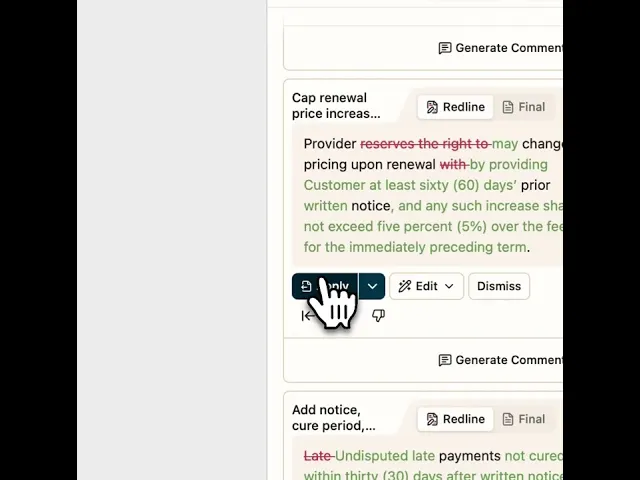
Work through proposed changes: edit, apply, or dismiss suggestions, and use the document navigation to check the relevant provision.
The results also include issues outside the Playbook’s existing checks. Assess those on their merits and decide whether the team’s standards need an update.
Verify the Language and Refine the Explanation
GC AI’s Exact Quote supports verbatim extraction from source documents. Use the source language to check what the agreement says, then assess whether the analysis follows from it.
For a provision that raises a legal research question, the Word add-in also provides access to GC AI’s research capabilities. Review the cited authority before using it to support a revision.
The explanation matters when the counterparty needs to understand why you made the change. In Jasper’s customer story, Senior Counsel and Head of Commercial Legal Hayley McAllister describes how the Word integration became part of her review process:
“Once the Word plugin rolled out, I pretty much exclusively started using it for all of my redlining and contract review”
Her workflow includes targeted redlines and comments explaining Jasper’s positions. She also used sample comments to help develop the company’s commercial playbook, connecting individual negotiations to reusable team guidance.
Continue in the Browser When That Fits the Work
Easy Edit opens a Word document beside a GC AI chat. It supports tracked changes and comments, with download back to Word.
Check Security, Cost, and Rollout Before You Buy
A useful demo should leave you with a reviewed document and a clear understanding of the purchase. Ask the vendor to identify the package supporting the workflow it demonstrated.
For security review, request:
The relevant independent security reports and their scope.
Access controls and available organization settings.
Retention and deletion terms for uploaded agreements.
Model-provider training policies and applicable processing terms.
The current subprocessor list.
GC AI’s security documentation describes AES-256 encryption at rest and TLS 1.2+ in transit. It also states that its providers do not train on customer data; review the subprocessor list and applicable terms for the configuration your organization enables.
For budgeting, distinguish the seat purchase from adjacent products. Contract Intelligence, GC AI’s portfolio-analysis product, is a separate paid add-on.
During rollout, document the review steps and train the team on how to resolve suggestions. GC AI’s legal AI classes can support the team’s use of Word and Playbooks.
Prepare the Redline and the Response With GC AI
A useful first pass leaves you better prepared for the negotiation. With GC AI, you can work through proposed changes, research the legal questions they raise, and draft your response inside Word.
Frequently Asked Questions
What Is Contract Redlining Software?
Contract redlining software helps legal teams propose edits to agreements and compare contract versions during negotiation. AI redlining adds analysis against your instructions or playbook, with suggested changes for a lawyer to assess.
Is It Legal to Redline a Contract?
Yes. Redlining is a way to communicate proposed contract changes during negotiation.
The parties’ agreement and applicable contract-formation rules determine what becomes binding; make proposed changes visible and confirm the agreed terms before execution.
What Is the Best Contract Redlining Software for In-House Counsel?
The strongest choice fits your agreement types, applies preferred and fallback positions, and returns a redline your team can review and exchange in Word. For in-house counsel who also need legal research and negotiation drafting, we recommend GC AI.
GC AI for Word and Playbooks support that work. The Jasper customer story describes a commercial lawyer using GC AI for targeted redlines and comments explaining the company’s positions.
Can ChatGPT Review and Redline a Contract?
ChatGPT can analyze a supplied contract and draft proposed replacement language. The resulting document workflow depends on the available features and configuration, so inspect the output and confirm how proposed changes reach the agreement.
For repeat in-house review, GC AI provides Playbooks and a Word integration that support applying company positions and reviewing proposed edits in the document.
Which Contract Redlining Tools Work in Microsoft Word?
GC AI, Spellbook, Harvey, LegalOn, Ironclad Jurist, and Sirion describe Word integrations for contract work. Litera Compare also provides a Word integration for comparing versions.
Confirm the relevant Word environment and test tracked changes, comments, and file exchange in your intended workflow.
How Accurate Is AI Contract Redlining?
Accuracy depends on the agreement, instructions, and review task. Compare the AI output with a lawyer-reviewed issue list, recording material misses and unsupported flags as well as the quality of proposed language.
Source citations help you inspect an answer, and your evaluation should also check the provisions the AI leaves unchanged.
Can AI Redline Complex Enterprise and Multi-Party Agreements?
AI can assist with clause analysis and proposed language in complex agreements, while counsel evaluates the transaction as a whole. Test how the software handles cross-references, defined terms, schedules, and the allocation of obligations among parties.
Include the relevant documents and assess which unresolved questions require specialist or business input.
What Security Controls Should Contract Redlining Software Have?
Assess access controls, encryption, retention and deletion terms, provider training policies, and independent security reports against your company’s requirements. GC AI publishes security documentation and a subprocessor list for that review, and states that its providers do not train on customer data.
Check the terms applying to the specific features and providers your organization enables.
How Much Does Contract Redlining Software Cost?
As of September 2026, GC AI lists its Individual plan at $500 per month when billed monthly or $5,000 per year when billed annually for one seat, with Team pricing on request. Compare the total cost of the configuration you need, including any add-ons and implementation charges.
GC AI’s Contract Intelligence is a separate paid add-on, so confirm that scope separately if portfolio analysis is part of the purchase.
About the Author: Josh Bertini is Head of Growth at GC AI.