Best AI for Legal Brief Writing 2026: 7 Platforms Review
Caitlin Price, Social Media & Content MarketerUpdated Published
Ritesh Patel is Chief Legal Officer at Viant Technology, a public ad-tech company with a lean in-house legal team and no dedicated litigator on staff.
When the business asks him to brief them on a regulatory question, an employment matter, or a dispute landing in an unfamiliar jurisdiction, the answer has to come back fast and carry citations the team can verify before anyone signs anything. He described what changed once he made the best AI for legal brief writing his first stop:
It's also replaced Googling. Now my first stop is GC AI. I describe the setup, get an answer with citations, and use that to brief my team or our business partners.
Having sources and links right there builds trust. You can check the law yourself, and that trust drives adoption across the team.
The risk on the other side of Ritesh's workflow is the one Mata v. Avianca burned into the profession's memory: a hallucinated citation in a filed brief, a sanctions order, a sentence in every legal-AI vendor pitch ever since.
The best AI brief-writing tools for in-house counsel share three traits:
-
They ground every citation to a verifiable source
-
They live inside Microsoft Word where the writing happens
-
They invest in training the team to verify before they file
Trust, precision, and craft are the standards in-house counsel hold themselves to. A brief-writing tool either clears that bar and becomes part of how the team works, or it gets opened once and never again.
We've heard the same pattern across more than 30 conversations on the CZ and Friends podcast, hosted by GC AI's co-founder and 3x general counsel Cecilia Ziniti.
Inside an In-House Counsel's Day Writing a Brief With Legal AI
The dispute landed in your inbox Friday afternoon. A vendor invoiced for work the business says it never received. The vendor's counsel sent a demand letter citing a contract clause that, on first read, looks like it might support their position. You have three days to respond with a position, and the GC needs a one-page memo that turns into a draft motion to dismiss if it goes the wrong way.
You open GC AI for Word and start the workflow.
You upload the demand letter and the underlying contract.
The model surfaces three contract clauses the vendor is leaning on, summarizes two counter-positions, and pulls breach-of-services case law for your jurisdiction with Exact Quote citations clickable to the source. Research returns the controlling cases. The first one is on point. The second turns out to be from a Texas court ruling on a different procedural posture, so you cut it. The third is the one you flag for the GC.
Inside Word, you paste the AI-drafted memo skeleton: facts section, procedural posture, the Rule 12(b)(6) standard, and an argument framework with the two surviving case citations slotted in. You spend an hour sharpening the strongest counter-position in your team's voice. The memo lands on the GC's desk by Monday morning with verified citations the GC can click through without leaving the document.
If the dispute escalates, the same skeleton becomes the motion to dismiss draft, with the verified citations already in place.
See the GC AI for Word workflow in action:
Key Features to Look for in AI Brief Writing Software
That Friday-to-Monday workflow only holds together if the tool clears a specific bar. These six capabilities separate a brief-writing tool you can file behind from one built for a different job.
Verified Character-Level Citations
Verified character-level citations are the single most important capability for AI brief writing.
Mata v. Avianca sanctioned counsel $5,000 for filing a brief with hallucinated case citations. ABA Formal Opinion 512 (July 2024) sets the duty of independent verification when using AI tools for legal work. The platform should either refuse to invent citations or return citations character-locked to a source the lawyer can click through to verify before filing.
Ask vendors:
-
Does the platform return citations grounded in source documents, or paraphrase from the model's training data?
-
Can the lawyer click through every citation to verify it before filing?
-
What happens when the model is asked for a citation it does not have grounding for?
Microsoft Word Integration
In-house counsel writing a brief is writing inside Microsoft Word. A platform that lives in a separate browser tab adds a copy-paste tax on every citation, every paragraph, every revision. The lawyer who has to switch surfaces 30 times during a brief draft will close the tab and revert to the old workflow. GC AI's free 105 class on AI in Word walks through the add-in workflow live for in-house teams.
Ask vendors:
-
Does the platform install as a Microsoft Word add-in?
-
Can it see the brief on screen and edit inside the document?
-
Does it accept and reject tracked changes the way Word natively does?
For a comparison of the leading legal AI tools built for Microsoft Word, see The 4 Best Legal AI for Word for In-House.
Cite-Checking Against the Case Record
For litigation briefs, citations to the record evidence (depositions, exhibits, prior pleadings) are as important as citations to case law. The strongest brief-writing tools verify record cites against the evidence, generate hyperlinked exhibits, and produce a final exhibit set ready for filing.
Ask vendors:
-
Does the platform check brief citations against the uploaded case record?
-
Can it generate a hyperlinked table of authorities and exhibit set?
-
How does it handle conflicting citations or citations to language that does not appear in the cited source?
Skeleton-to-Final Draft Workflow
A brief starts as a skeleton (facts, procedural posture, legal standard, argument framework) and ends as a filed document. The strongest tools support both ends of the workflow: they draft credible skeletons fast, and they assist the revision and citation-verification stages without forcing the lawyer to switch tools.
Ask vendors:
-
Does the platform draft skeletons from a fact pattern and target relief?
-
Can it generate first-draft argument sections with case citations?
-
Does it support revision and final cite-check in the same workflow?
Security Designed for Confidential Litigation
Briefs reference active litigation, employee disputes, M&A targets, regulatory enforcement, and other confidential matters. The AI tool needs SOC 2 Type II at minimum, zero-data-retention agreements with its model providers, and encryption that meets the standard a Fortune 500 CISO would sign off on.
Ask vendors:
-
Which LLM providers does the platform use, and are zero-data-retention contracts in place for each?
-
Where is brief content stored, and for how long?
-
Is SOC 3 (the public-facing report) available alongside SOC 2?
Five Brief Workflows AI Handles Today
Before comparing tools, it helps to know what the job looks like. These five workflows are where in-house counsel get the most leverage out of AI on brief writing today. For the broader picture of AI for legal writing across contracts, memos, and counseling work, see our AI Legal Writing guide.
-
Drafting motion to dismiss skeletons
-
Writing summary judgment briefs
-
Cite-checking record references
-
Drafting employment dispute responses
-
Writing regulatory enforcement responses
Drafting Motion to Dismiss Skeletons
Motion to dismiss skeletons are the fastest-ROI brief workflow for an in-house team without a dedicated litigator. Upload the complaint and the contract or facts at issue, get back a skeleton with facts, procedural posture, the relevant standard, and an argument framework with case citations slotted in. The lawyer fills the strategic argument, verifies each citation, and either files the motion or hands the skeleton to outside counsel at a fraction of the original brief-drafting hours.
Writing Summary Judgment Briefs
Summary judgment briefs follow the same pattern at higher complexity. AI drafts the skeleton (Rule 56 standard, fact section pulled from depositions and exhibits, argument that ties record facts to controlling case law). Tools that cite-check against the record reduce the verification burden on this workflow specifically.
Cite-Checking Record References
Cite-checking record references is the verification step that protects against the Mata outcome. AI confirms that every record reference (e.g., “Smith Dep. at 142:5”) points to language that appears in the cited source. The strongest tools generate a hyperlinked exhibit set, so every citation in the filed brief is clickable for the judge.
Drafting Employment Dispute Responses
Employment disputes are the litigation type lean legal teams handle internally most often. When an employee files a charge with the EEOC, a state agency, or a court, AI drafts the response framework (factual recitation, legal sections, point-by-point response to allegations) and pulls the controlling case law for the jurisdiction and claim type. Jimmy Toy, Chief Legal Officer at Articore Group, described a similar research problem:
He used AI to compare what his team had said in a case in France with an argument in India, then checked the output against the original documents. The tool surfaced exact passages he otherwise would not have found.
Writing Regulatory Enforcement Responses
Regulatory enforcement responses are the most jurisdiction-specific brief workflow. When a regulator (CFPB, FTC, state AG, SEC) sends a request for information or a notice of proposed enforcement, AI pulls the regulatory framework, identifies controlling precedents, and drafts the position section. The lawyer verifies every citation and refines the strategic position before filing.
The Seven Best AI Tools for Legal Brief Writing
In-house counsel writing briefs work from a different shortlist than law firm litigators. Below are the seven AI legal brief writing platforms in-house teams test in 2026, in order of fit for in-house workflows:
-
GC AI, purpose-built for in-house counsel
-
Clearbrief, litigation cite-checking against the case record
-
BriefCatch, final-stage editing for clarity and concision
-
Spellbook, broader Word-native legal AI with brief-adjacent capabilities
-
Harvey, AmLaw enterprise platform
-
Claude, general-purpose long-document AI
-
ChatGPT, consumer-grade general AI
GC AI
GC AI is the best enterprise-grade AI for legal brief trained specifically for in-house legal work.
It is legal AI software and a legal AI platform purpose-built for in-house legal teams, with a 20,000-line legal system prompt, a native Microsoft Word integration that drafts inside the document on screen, Exact Quote for character-level citations, Research for multi-agent legal intelligence with primary law sources, pre-built Playbooks for common in-house workflows, and a Skill Library of ready-to-use brief and memo workflows.
2,100+ legal teams use the platform as of September 2026, including 300+ public companies and 25+ unicorns. The customer base spans industries, with published case studies from in-house teams at Columbia Sportswear, Snyk, and Jasper.
In our head-to-head benchmark of 100 in-house legal tasks scored against 1,200+ attorney-developed criteria (the In-House Legal Bench, run by GC AI's R&D Attorneys), GC AI achieved an 86.8% pass rate, leading ChatGPT (79.8%), Claude (68.4%), and Gemini (57.5%).
For a closer look at where Gemini works well for lawyers and where its limitations matter see our Gemini for Lawyers guide.
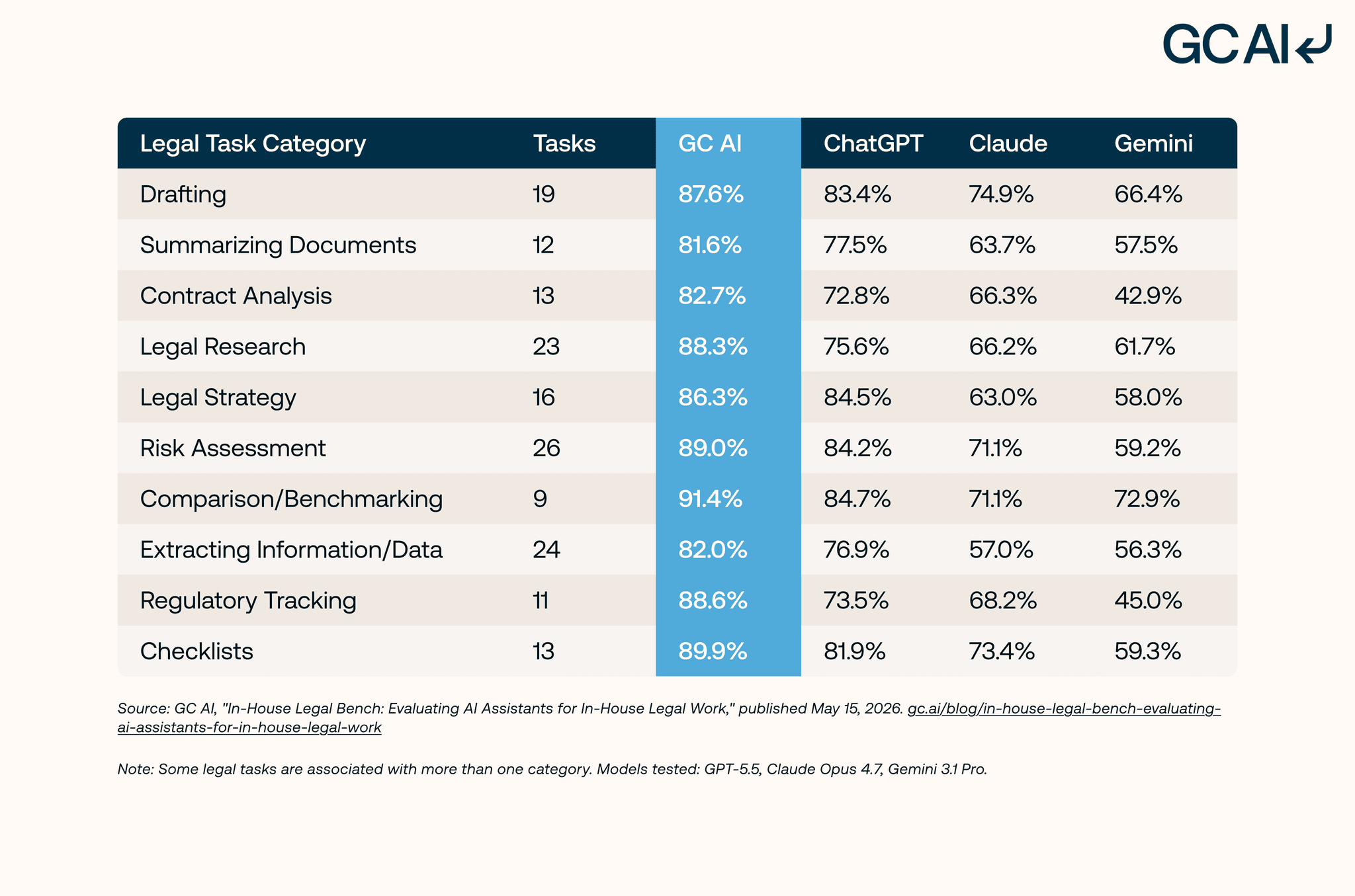
The largest advantages appeared in research-intensive tasks where the tool needs to locate, synthesize, and organize current regulatory requirements grounded in authoritative sources, the same capabilities a brief writer needs for case law research and cite verification.
Joys Choi, Senior Director, Legal at Tipalti, described what verifiable citations changed in her cross-jurisdictional research:
Instead of spending hours translating Colombian labor law, I ask GC AI questions and it provides me with links and summaries in English.
Clickable links to source-grounded citations are the same workflow the brief writer needs: faster than open-source research, defensible at filing time.
Best for: AI-powered brief drafting, memo writing, contract drafting, redlining, and research for in-house legal teams. Verified character-level citations, Word-native workflow, in-house guardrails, and a CLE-eligible class library.
Pricing: $500 per seat per month with a 14-day free trial, as of June 2026.
Choose GC AI if your in-house team writes briefs alongside contracts, memos, and counseling work in the same platform, and your team is ready to be productive in week one without a custom implementation engagement.
Clearbrief
Clearbrief is a litigation-focused legal AI tool that checks brief citations against the record evidence. As of May 2026, it runs as a Microsoft Word add-in and generates hyperlinked tables of authorities
Best for: Litigation teams writing briefs that need cite-checking against record evidence and a hyperlinked final exhibit set ready for filing.
Pricing: $300 per user per month on the Solo tier as of June 2026. Enterprise Unlimited pricing is custom; multi-year agreements available at lower rates.
Choose GC AI if your in-house team's work spans contracts, memos, counseling, and the occasional litigation brief in one platform, with character-level citations across all four work types and a CLE-eligible class library that trains the whole team.
BriefCatch
BriefCatch is a legal writing assistant focused on the editing stage of legal writing. It analyzes finished drafts for clarity, concision, and consistency with brief-writing conventions taught by legal writing scholars. The strongest fit is for teams that already draft confidently and want a final-stage polish before filing.
Best for: Final-stage editing and clarity polishing on briefs and memos already written by a lawyer.
Pricing: Not publicly disclosed on its website as of June 2026; contact the vendor for a quote.
BriefCatch lives at the editing end of the brief workflow. Drafting from a blank page, running citation-verified research, and connecting briefs to the rest of in-house work happen inside GC AI.
Spellbook
Spellbook is a Word-native legal AI platform that drafts and redlines contracts. It serves both law firms and in-house teams, with the deepest historical investment in contract review playbooks. Briefs are an adjacent capability for Spellbook as of September 2026, with the product's center of gravity on contracts.
Best for: High-volume contract drafting and redlining for solo attorneys, small firms, and lean in-house teams who want a Word-first contract assistant.
Pricing: Custom pricing as of June 2026; demo required.
Choose GC AI if brief writing is a real part of your workflow and you want a platform that handles briefs as a primary capability with character-level citations, alongside contracts, memos, and counseling work. The GC AI vs Spellbook comparison walks through the full feature breakdown.
Harvey
Harvey is a legal AI platform that initially launched with law firms, specifically the Am Law 100 and large enterprise legal departments. The platform handles brief drafting, research, memo writing, and multi-practice analysis. Harvey publishes its work through partner law firm case studies (as of September 2026).
Best for: Law firms and large enterprise legal departments with a six- to seven-figure annual platform budget and a dedicated legal innovation team to run implementation.
Pricing: Not publicly disclosed as of May 2026, which can delay procurement decisions for in-house teams that need to compare options without committing to a demo cycle first.
Lean in-house teams need to be productive in week one inside a tool that ships with a 14-day free trial and no implementation engineer required. The GC AI vs Harvey comparison covers the architectural differences.
Claude
Claude is Anthropic's general-purpose AI platform. It is widely respected for long-document reasoning, a long context window that comfortably handles full briefs and exhibit sets, and strong performance on legal-style writing tasks. Claude for Work adds enterprise controls including data residency, SSO, and an admin console (as of June 2026).
Best for: General-purpose drafting and long-document reasoning when the team already pays for an enterprise AI license and the use case is not specifically legal.
Pricing: Pro is $20/month and Team is $25/seat/month as of June 2026. Enterprise pricing is custom.
Choose GC AI if you want a platform calibrated to legal voice with character-level citations, in-house playbooks, and the ability to draft briefs inside Microsoft Word without prompt engineering. For the deeper read, see GC AI vs Claude.
ChatGPT
ChatGPT is OpenAI's general-purpose AI and the most-named brand in consumer AI. In-house lawyers commonly start with ChatGPT before evaluating a purpose-built legal platform. ChatGPT can draft a serviceable memo, summarize a long agreement, and respond to a research question. Its consumer tiers train on user inputs by default per OpenAI's chat retention policy, which keeps the question of whether ChatGPT is confidential live for any legal team handling client data, and OpenAI began testing advertising on the Free and Go tiers in February 2026.
ChatGPT returns text without character-level source grounding (as of June 2026), which is the Mata v. Avianca failure mode the profession knows by name.
Best for: Personal legal writing experimentation and learning the shape of an AI workflow.
Pricing: Plus is $20/month, Pro is $100 or $200/month, and Business is $25/seat/month month-to-month or $20/seat/month annual as of June 2026. Business and Enterprise tiers do not train by default.
Choose GC AI if you handle confidential litigation work and want SOC 2 Type II plus zero-data-retention agreements with our LLM providers wherever feasible, character-level citations on every brief output, and a model trained for legal-domain voice. For the direct head-to-head, see GC AI vs ChatGPT.
How the Seven AI Brief-Writing Tools Compare
| Platform | Word-Native | Verified Character-Level Citations | Cite-Check Against Case Record | Best For |
|---|---|---|---|---|
| GC AI | Yes | Yes (Exact Quote) | Yes (uploaded files) | Brief drafting, memo writing, redlining, and research for in-house legal teams |
| Clearbrief | Yes (Word add-in) | Yes (against record) | Yes | Litigation brief cite-checking and exhibit hyperlinking |
| BriefCatch | Yes (Word add-in) | No | No | Final-stage editing of briefs and memos |
| Spellbook | Yes | Not publicly documented (as of May 2026) | No | Contract drafting and redlining for solo and small-firm attorneys |
| Harvey | Not publicly documented (as of May 2026) | Not publicly documented (as of May 2026) | Custom enterprise buildouts (as of May 2026) | Law firms and large enterprise legal departments |
| Claude | No (browser-based) | No | No | General-purpose drafting and long-document reasoning |
| ChatGPT | No (browser-based) | No | No | Personal legal writing experimentation |
Capability and pricing columns reflect public product state as of June 2026. Verify current vendor documentation before purchase.
How to Roll Out AI Brief Writing on Your In-House Team
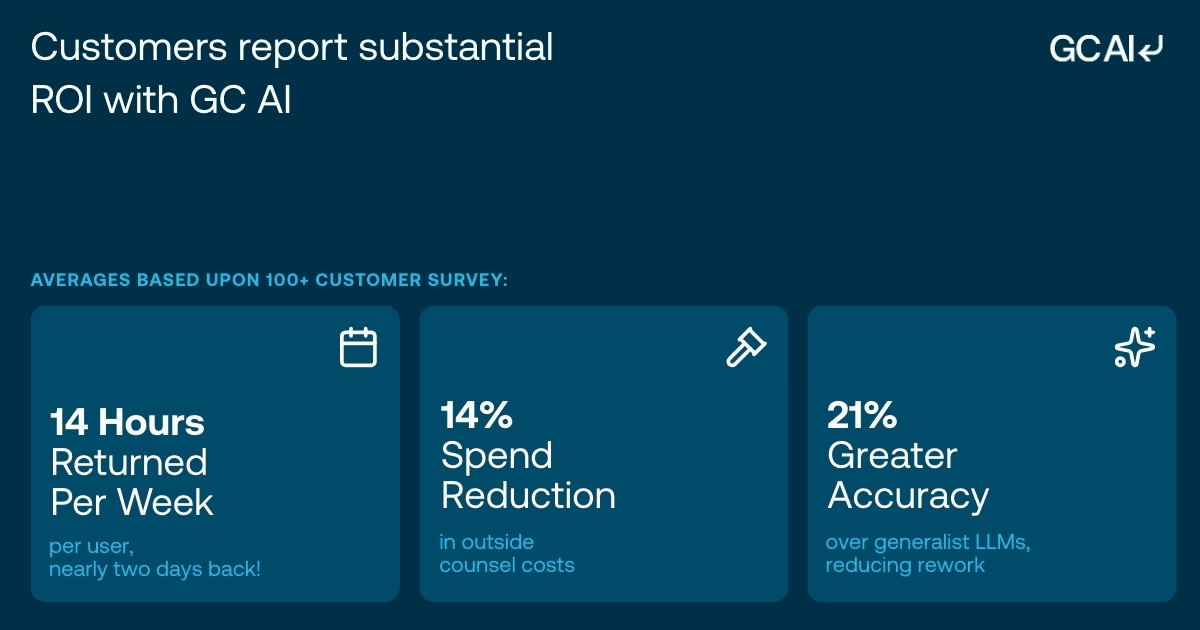
The teams using GC AI who hit 14 hours saved per lawyer per week followed a similar implementation pattern for brief writing specifically. They picked one brief type (usually motions to dismiss or employment dispute responses), built a citation-verification workflow before the first brief shipped, and scaled to other brief types over the next 60 days.
The 30-60-90 Day Rollout
Days 1 to 30: One brief type, one citation-verification protocol. Pick the brief type your team handles most often (motions to dismiss, employment responses, or regulatory responses for most in-house teams). Build the citation-verification protocol before the first AI-drafted brief ships: every citation gets clicked through and confirmed against the source.
Schedule the GC AI 101 class for the whole legal team in week 1. By day 30, every lawyer on the team has drafted at least one brief skeleton with verified citations inside GC AI for Word.
Days 31 to 60: Add the second brief type and the cite-check workflow. Layer in the second-most-common brief type. Add a cite-check protocol with paralegal or junior counsel as the verification owner. Run GC AI 105 (AI in Word) for the team.
Measure time-to-first-draft on briefs and compare to baseline. For the 15 prompt templates in-house teams use daily, see AI Prompts for Lawyers.
Days 61 to 90: Research-backed brief drafting and team-wide verification. Layer in Research for jurisdictional questions and authoritative-source review. Train senior counsel to spot-check AI cite output as part of the brief review workflow.
Run GC AI 106 (Building Playbooks) so the team can author its own brief skeletons without waiting on a vendor implementation engineer. By day 90, the target is a team drafting briefs in roughly half the time, with reduced reliance on outside counsel for litigation work.
Training is what turns a paid license into 14 hours back. Teams that skip it tend to stall after week one. Teams that run the classes build the prompt-and-verify habits that make the time savings real.
The classes are 1.25-hour California CLE-eligible sessions on prompting, AI in Word, using playbooks, and building playbooks. Former general counsels teach them. Reach the catalog at GC AI Classes.
Join the In-House Counsel Community Writing Inside GC AI
In-house counsel write inside GC AI across 53 countries today. There are three doors in:
-
Take the free GC AI 101 class, a 75-minute California CLE-eligible session taught by former general counsels.
-
Subscribe to the CZ and Friends podcast, where Cecilia talks with in-house counsel from across the country.
-
Start your 14-day free trial inside Microsoft Word and run your first brief skeleton with verified citations this week.
GC AI is SOC 2 Type II and SOC 3 certified, GDPR compliant, and AES-256 encryption. We maintain zero-data-retention agreements with our LLM providers wherever feasible.
FAQ
Can AI write a legal brief from scratch?
Yes, for the structural skeleton. AI drafts the facts section, the procedural posture, the legal standard, and an argument framework with case citations slotted in. The lawyer fills the strategic argument and verifies every citation before filing. The skeleton-to-final draft workflow is the highest-ROI use case for AI in legal brief writing.
How do I avoid Mata-style hallucinated citations with AI?
Use a legal AI platform that returns character-level citations grounded in source documents, and verify every citation before filing. Mata v. Avianca sanctioned counsel because they did not verify ChatGPT-generated case citations that turned out not to exist. ABA Formal Opinion 512 (2024) makes the verification duty explicit. Tools like GC AI's Exact Quote and Clearbrief's record cite-checking ground citations to source documents the lawyer can click through to verify. Consumer AI tools rely on the model's training data without a click-through verification path, which is where the Mata failure mode happens.
Is AI legal brief writing safe for confidential litigation?
Yes, on platforms with the right security posture. A safe platform has SOC 2 Type II certification at minimum, zero-data-retention agreements with the underlying LLM providers, and encryption that meets enterprise security review. GC AI is SOC 2 Type II and SOC 3 certified, GDPR compliant, and AES-256 encryption. We maintain zero-data-retention agreements with our LLM providers wherever feasible.
What is the best AI for in-house counsel writing briefs?
GC AI is the best fit for in-house counsel writing briefs. The platform delivers character-level citations through Exact Quote, drafts inside the document where the brief lives, and comes with Solutions Attorneys who train the team during onboarding. For litigation-specific cite-checking against record evidence, Clearbrief is the closest specialist fit.
How much does AI for legal brief writing cost?
As of May 2026, pricing ranges from roughly $20 to $500 per seat per month. GC AI is $500 per seat per month with a 14-day free trial. Clearbrief Solo is $300 per user per month. Spellbook moved to custom pricing in 2026 and requires a demo. Claude Pro is $20 per month and Team is $25 per seat per month. ChatGPT Plus is $20 per month and Business is $25 per seat per month month-to-month. Harvey does not publicly disclose its pricing.
Can AI cite-check briefs against the case record?
Yes, with the right platform. GC AI handles cite-checking against uploaded source files through Exact Quote, the same character-locked grounding that protects against the Mata failure mode.
Will AI replace litigators?
No. AI accelerates the first-draft and citation-verification stages of brief writing. Legal judgment, oral advocacy, deposition strategy, settlement negotiation, and the responsibility for filings stay with the lawyer. The teams who report the strongest gains describe AI as a force multiplier on their existing brief-writing work and on the legal expertise that produces the final filing.
How do I get started with AI for brief writing?
Start with one brief type your team handles most often, usually motions to dismiss or employment dispute responses. Pick one platform, run a 14-day pilot inside Microsoft Word, and measure time-to-first-draft against your current baseline. Build the citation-verification protocol before the first brief ships. GC AI's free 14-day trial covers the full platform including Exact Quote, Research, and the class library.