Midway through a session of GC AI’s 101 class, a live prompting session for in-house lawyers, someone asked if there’s a limit to how many questions you can ask an AI about one agreement. Cecilia Ziniti, GC AI’s CEO, answered with the tell she teaches lawyers to watch for: push an AI past what it can handle and “you will be able to tell if the AI is kind of going off the rails because it won’t have the correct citations.” That tell sorts legal AI features into two piles: the ones that let you catch the AI when it is wrong, and decoration.
Practicing lawyers land on the same short list on their own. In a Reddit thread asking for the most useful legal AI feature, four themes kept coming up: checking citations against the source, skepticism about hallucinations, redlining inside Microsoft Word, and drafts tuned to a specific reader.
Those themes map to four features you can test: citations, accuracy, ease of editing, and tone.
If it clears all four, it’s worth checking out the platform. If it fails citations, don’t even bother.
GC AI is the enterprise legal AI platform a three-time general counsel (Anki, Bloomtech, and Replit) built for in-house teams. as of September 2026, 2,200+ legal teams use it, including legal departments at Hitachi, Liquid Death, and Snyk, plus 200+ public companies.
Four GC AI features give you something concrete to run the checks against:
Exact Quote for character-level citations
Easy Edit for redlining Word documents inside the platform
GC AI for Word for the same review inside Word itself
Custom Company Profile for drafts that match how your team writes
Citations: How Do You Catch a Wrong Answer From Legal AI?
Being sure of the answer is part of your job. The company and executive team act on what you tell them, so you check the AI’s answer against the source before you pass it along.
A citation turns that check into one click. That makes it the first legal AI feature to test.
The check is precision: does the platform quote the exact language of the document or authority in front of you, or hand you a paraphrase you still have to hunt down?
Here’s how to test it:
Upload a contract you negotiated yourself: ask what the indemnity covers, then click the citation and see where it lands.
Compare the quote to the clause: exact language passes, and a citation that points to the wrong section fails the platform on the spot.
Repeat on primary law: a research answer should cite the statute or the regulator’s own page, and the link should resolve. For case law, check further: US Case Law adds a treatment flag confirming the case is still good law.
Exact Quote covers the first two checks: the passage comes back character for character, highlighted in the source document, so verification takes seconds.
Watch Exact Quote pull the verbatim passage from a source document:
https://www.youtube.com/watch?v=BjBnK4gVZ4Y
Ritesh Patel, Chief Legal Officer at Viant Technology, draws the line from citations to whether a team adopts the platform at all:
“Having sources and links right there builds trust. You can check the law yourself, and that trust drives adoption across the team.”
Accuracy: What’s the Legal AI’s Real Pass Rate?
How often is it wrong? That question sits under the other three checks, and it has a measurable answer a serious vendor can show you, methodology included.
Skepticism is warranted even for purpose-built products: Stanford’s RegLab and HAI institute tested leading AI legal research platforms in 2024 and found hallucination rates between 17% and more than 34%, on products marketed as hallucination-free.
GC AI’s R&D team built the In-House Legal Bench (May 2026) to put a readable number on the question. The benchmark runs 100 tasks drawn from an in-house legal team’s daily work, each scored against an answer key averaging 12 criteria, written by attorneys with more than 80 combined years of practice.
Pass rates across the 100 tasks:
GC AI: 86.8%
ChatGPT (GPT-5.5): 79.8%
Claude (Opus 4.7): 68.4%
Gemini (3.1 Pro): 57.5%
The margins ran widest where an answer has to locate and organize current requirements: regulatory tracking (+15.1 points) and legal research (+12.7). GC AI ran the benchmark, so apply the same discipline you would to any vendor study. Read the methodology. The task list and scoring criteria are public. The benchmark covers general-purpose AI, and if the platform you are replacing is a consumer chatbot, GC AI vs ChatGPT covers that decision in detail.
Then build your own five-task version:
Pull questions your team has answered and grade the platform against the memo you already sent.
Borrow a model from the bench’s risk-assessment tasks and ask it to spot the exposure in an arbitration clause with no IP carve-outs in a supply agreement.
Supply the test documents yourself, and use Easy Prompt to turn a rough version of the question into something the platform can run cleanly, so the accuracy grade reflects the platform’s work.
Ease of Editing: What Happens When You Ask a Legal AI for a Redline?
Contract review lives in Word: tracked changes, the counterparty’s file, their formatting. An answer in a chat window still has to make it into that document, and copying, pasting, and reformatting it eats the time the AI saved.
In GC AI’s 201 Advanced class, Cecilia moved the demo into Word to make the point.
She opened an old employer’s core MSA, asked how the contract terminates, and when GC AI flagged that the termination points were asymmetrical, her follow-up was a single line: “Can you redline to fix this, please?” The tracked changes landed in the document, and the review carried its context from the question straight into the markup.
Hayley McAllister, Senior Counsel and Head of Commercial Legal at Jasper, described the same shift in her own workflow:
“Once the Word plugin rolled out, I pretty much exclusively started using it for all of my redlining and contract review.”
She puts a number on it: “What used to take me an hour now takes me 10 minutes.”
Here’s how to test it:
Open the platform’s Word add-in on the other side’s draft: ask for redlines in tracked changes, in their file, with their formatting.
Check the round trip: accept two edits, reject one, and confirm numbering, cross-references, and defined terms survive.
Test the drop-in: when a clause is missing, ask for one you can place in the agreement without leaving the document.
If this is a contract type your team reviews often, Playbooks holds your standard positions so the redline runs the same way every time.
GC AI for Word runs the full review in the sidebar and stays synced with the web app. The chat where you asked about termination carries straight into the markup.
Watch GC AI for Word run a review and return tracked changes inside the document:
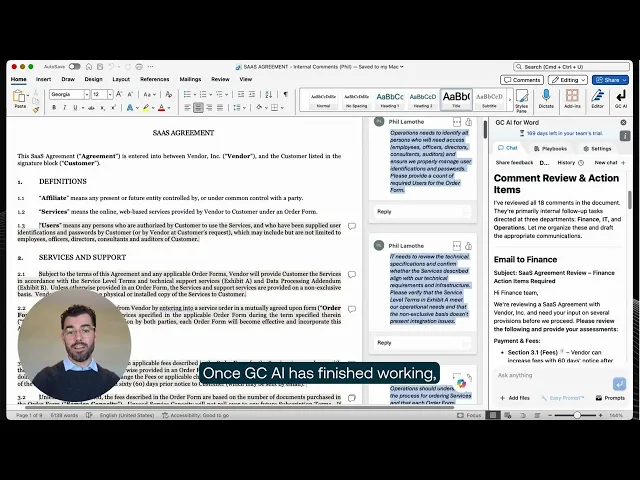
When the review starts in the platform, Easy Edit does the same job inside GC AI: upload the counterparty’s .docx, get tracked changes you can apply or reject one by one, and download a redline that opens cleanly in Word.
Score the section with one question: did the trial end with a document you sent, or with text you copied somewhere else?
Tone and Voice: Does the Draft Sound Like Your Team Wrote It?
Tone decides whether a draft goes out under your name or comes back for a rewrite. No benchmark measures it, so the trial is the only place to test it.
Cecilia’s line from that same 201 session: “AI will chameleon to you.” Tell it the draft is for the VP of finance and “it’s gonna be a little bit more numbery”; tell it you are meeting with HR and the same advice comes back “a little bit more affirming.”
Context is how you steer it.
A general counsel at a private-equity-backed software company told the GC AI team she wrote her risk posture into her team’s company profile. A junior lawyer on her team connected the dots on her own: “oh, that’s why it always tells me about the private equity ownership.”
In GC AI, that context lives in Custom Company Profile: your templates, standard positions, and house style, entered once for the whole team. Custom Instructions do the same at the individual level: how one person likes responses formatted.
In-house teams feel this check more than anyone. Business Insider reported in January 2026 that in-house legal teams are moving on AI faster than law firms, and their drafts go straight to sellers, engineers, and the board, in the voice of a colleague who knows the company.
You’ll see the in-house counsel vs law firm gap show up in all four checks. Tone is where you notice it first.
Alexandra Sepulveda, Assistant General Counsel at Trust & Will, picked tone when budget forced her to choose just one tool:
“If you only have a budget for one tool, choose the one fine-tuned for in-house legal. I spend less time monkeying with output to get the right voice and context, and more time advancing business priorities.”
Test it in the trial:
Load your paper first: give the platform your template, fallback positions, and risk posture before you judge a single draft.
Ask for the same advice twice: once as a note to sales, once as a summary for the audit committee, and check that the positions hold while the tone changes.
Read the draft aloud: if it needs a rewrite to sound like your team, price that rewrite into the vendor’s time-savings claim.
Try the Four Checks for Yourself
Upload an MSA you negotiated in the past and run the checks in order. Pick the test document yourself, without the vendor’s help.
If you’re new to legal AI, check out our legal AI classes or the best legal AI tools for in-house counsel guide.
Frequently Asked Questions
Do General-Purpose AI Chatbots Give Citations for Legal Work?
Yes. Consumer chatbots cite web sources for research questions, and the check for legal work is character-level citation: whether the platform quotes and highlights the exact passage in your own uploaded document. In the In-House Legal Bench (May 2026), GC AI passed 86.8% of 100 in-house legal tasks, ahead of ChatGPT (GPT-5.5) at 79.8%.
How Do You Compare Legal AI Platforms for Accuracy and Performance?
Build a test with your own real tasks and grade each platform against work you’ve already done, the same way GC AI’s In-House Legal Bench (May 2026) grades against 100 attorney-developed tasks. GC AI passed 86.8% on that benchmark, ahead of ChatGPT (79.8%), Claude (68.4%), and Gemini (57.5%). Read the methodology before trusting any platform’s number, including this one.
Is Legal AI Accurate Enough to Use Without Attorney Review?
Attorney review stays in the workflow whatever the benchmark says. ABA Formal Opinion 512 (July 2024) keeps the duties of competence and supervision with the lawyer using the AI. The right features make that review fast: verifiable citations turn a re-read into a spot check.
Is It Safe to Upload Real Contracts When Testing a Legal AI Platform?
Check the controls in writing before the trial starts: SOC 2 certification, zero data retention terms with the model providers, and encryption at rest and in transit. GC AI is SOC 2 Type II and SOC 3 certified, GDPR compliant, with zero data retention agreements with OpenAI, Anthropic, and Google, and AES-256 encryption, and publishes its full subprocessor list.
Should In-House Legal Teams Evaluate Legal AI Differently Than Law Firms?
Yes, on at least one check: tone. In-house counsel writes for one company’s own business partners, in that company’s voice, while firm lawyers serve many outside clients. The in-house counsel vs law firm difference shows up across all four checks, but tone is where a trial surfaces it first.