“If you ask Amazon AI about the Loper Bright decision,” Cecilia Ziniti, CEO and co-founder of GC AI, tells the lawyers in her legal AI classes, “it’ll come back and tell you about the case, and then be like, the case was about fisheries, and be like, hey, by the way, can I interest you in a 12-pack of StarKist tuna?” Ziniti was general counsel at Anki, BloomTech, and Replit before she built GC AI, and the line lands because the point holds for any general-purpose model: there it answers your legal question while remaining, underneath, a mass-market consumer product.
Gemini for lawyers is the clearest case of that, and it is the one you are most likely to reach for, because you did not choose it. It chose you. If your company runs on Google Workspace, Gemini now sits inside Gmail, Docs, Drive, and Meet by default, bundled into the paid Google Workspace plans. The AI is already where you work, and someone already paid for it. So the only real question for an in-house team is what to trust it with.
Part of an in-house lawyer’s week is the work around legal work: summarizing a board deck, turning rough notes into a first draft, getting oriented on an unfamiliar regulation. Gemini is useful there.
The other part is the legal work itself: reviewing a counterparty’s MSA, redlining on the company’s own paper, giving the business an answer it will rely on. That work carries higher stakes, because the documents you paste into a chat box are the company’s most sensitive paper, and a February 2026 privilege ruling, United States v. Heppner, now reaches the AI chats lawyers use.
The split holds up in practice: Gemini handles the work around legal work, and a purpose-built legal AI platform like GC AI, the one Ziniti built to solve the problems she hit as an in-house lawyer, handles the legal work itself. The two coexist cleanly inside one workflow.
Can In-House Counsel Use Gemini for Legal Work?
Yes, in-house counsel can use Gemini for legal work, on two conditions: the account is a paid Google Workspace edition, and the task matches what a generalist model does reliably. Gemini is a capable generalist that lives inside the apps a legal team already uses, which makes it a fast option for drafting, summarizing, and getting oriented.
The care comes in on confidentiality and on anything the business will rely on as legal advice. There, both the tier you are signed into and the kind of work decide whether Gemini is the right place for it.
What Gemini Does Well for In-House Legal Work
Gemini is strongest on the work that surrounds legal work, where a fast generalist inside your existing apps saves real time. Three use cases play to that Workspace-native advantage.
First Drafts and Summarization
Gemini will summarize a 40-page board deck in Drive, pull the action items out of a long Gmail thread, and turn a rough set of notes into a structured first draft inside Docs. Its long context window handles documents most lawyers would rather not read end to end on a Friday afternoon. A prompt like “Summarize this deck in ten bullets and flag anything that reads as a legal commitment” returns an editable starting point in seconds.
Quick Research Orientation
For “what does this term generally mean” or “give me the lay of the land on this regulation,” Gemini is a fast orientation layer, the same way an in-house lawyer once opened a fresh browser tab. It pulls real-time information from the web, which helps for a first read on an unfamiliar rule.
Gemini’s Deep Research mode takes this further: it runs multi-step research across dozens of sources and synthesizes a structured report, which is useful when a new regulatory area lands on your desk on a Tuesday and you need enough context to brief your CFO by Thursday. Pair that with Gemini 3.1 Pro’s large context window, built to hold an entire merger data room or a full set of regulatory filings in a single query, and you have a capable orientation engine for large-scale document triage.
The limit is the same one that applies to all generalist orientation: Gemini maps the territory; a purpose-built legal AI platform is where you work the territory. Treat the output as a starting map, and confirm anything load-bearing against the primary source before it shapes advice.
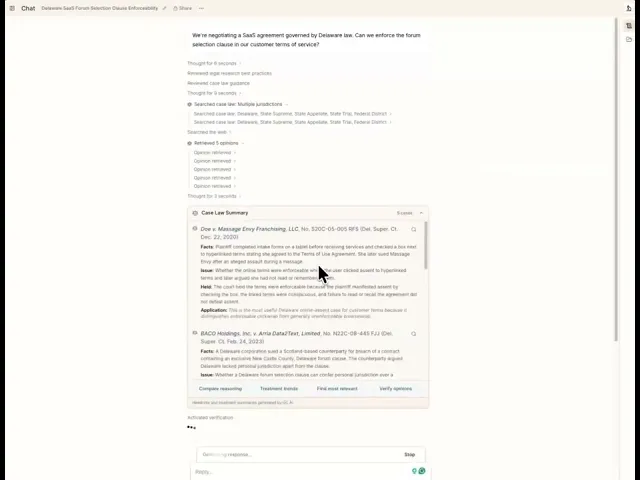
That gap is sharpest on case law, where Gemini summarizes from the open web and can return confident citations you cannot verify. GC AI’s US Case Law is fetched live from a dedicated database of 13M+ federal and state court opinions, links every citation to the full opinion you can open and read, and flags whether a case was overruled, reversed, questioned, or affirmed, so you know whether it is still good law before you rely on it.
Plain-English Drafting
Asking Gemini for a first cut of an internal memo, a policy outline, or a plain-English explanation of a regulation gives you something to edit instead of a blank page. The output reads cleanly, and the side panel in Docs means you never leave the document. For an in-house team, that is the difference between a memo that goes out before lunch and one that waits for a free afternoon.
When the task crosses into privileged analysis, contract redlining, or work the business will rely on, GC AI’s Easy Prompt handles the prompting: it translates plain-language descriptions into optimized legal-AI instructions, with matter context, fallback positions, and company templates already built in.
Is Gemini Private for Lawyers? Consumer vs Workspace
Whether Gemini is private for lawyers depends entirely on the account you are signed into, and the two answers point in opposite directions.
Consumer Gemini (free or personal Google account). Google’s own Gemini Apps Privacy Hub is direct: a subset of conversations are reviewed by people, and with activity history on, chats are used to improve Google’s generative AI models. Reviewed conversations are retained for up to three years, disconnected from your account, and deleting your activity does not remove them. Google states it plainly: “Please don’t enter confidential information that you wouldn’t want a reviewer to see or Google use to improve our services.” For an in-house lawyer, a counterparty’s draft MSA is exactly that kind of information.
Gemini in Google Workspace (Business or Enterprise). The posture flips. Per Google’s Workspace Gemini privacy documentation, your prompts and content stay inside your domain, submissions are not used to train generative AI models outside it, and data stays within your trust boundary. That is the posture in-house teams need.
The catch is that this protection follows the account. The person typing has to be in the right one. Whether a given lawyer sits inside the Workspace trust boundary or has drifted into a personal Gemini tab is a configuration and habit question, so a GC who wants confidence verifies the account, the edition, and the admin settings before anyone pastes a confidential agreement.
Four Rules for Using Gemini Safely in Legal Work
Four rules keep Gemini on the safe side of the line for in-house work.
Verify the Account and Edition Before Anything Confidential
Before pasting a contract or a privileged question, confirm three things: you are in a paid Google Workspace edition, Gemini is enabled under your domain’s admin controls, and no personal Google account is signed into the same browser. The data posture lives at the account level, so this thirty-second check protects everything downstream.
Keep Privileged Work Out of Consumer Gemini
Treat consumer Gemini as a public channel. Google advises against entering confidential information there, so a counterparty’s agreement, a litigation question, or anything carrying attorney-client privilege belongs in a platform with legal-scoped data protections. Consumer Gemini works for general, non-confidential drafting.
Verify Every Citation Against a Primary Source
Generalist models generate fluent text that can include confident, wrong assertions. The lawyers sanctioned in Mata v. Avianca submitted AI-generated citations that did not exist. With any generalist AI, read the source yourself before you rely on a cited authority.
Match the Model to the Task
Use Gemini for the work around legal work, and a purpose-built legal AI platform for the work the business will rely on. The closer a task gets to privileged analysis, contract redlining, or an answer you would put your name on, the more the scope argues for a tool built for it.
What United States v. Heppner Means for Gemini Users
In United States v. Heppner (SDNY, February 2026), Judge Jed Rakoff held that a represented party’s written exchanges with an AI chatbot carried neither attorney-client privilege nor work product protection. The ruling is the first of its kind nationwide, and it reaches every AI chat platform a lawyer might use, Gemini included.
On May 7, 2026, Heppner was convicted on all counts after a three-week trial. The AI chat logs the court refused to shield were introduced by prosecutors as active evidence. Sentencing is scheduled for October 2026.
A note on scope: courts in the Eastern District of Michigan and the District of Colorado have since declined to extend the Heppner reasoning as a blanket rule in civil matters, treating public AI tools more like software than adversaries. Federal AI privilege law is actively evolving. For in-house teams, the practical posture holds: consumer AI chats carry discovery risk in criminal proceedings and contested civil cases alike, and privileged work belongs on a platform with legal-scoped data protections and a clear retention posture.
Where Gemini Falls Short for Privileged and Contract Work
Gemini is built to serve every Google user, and in-house legal is a sliver of that audience, so the product is shaped around general productivity. Three gaps matter most for legal work.
No Persistent Legal Context Across Matters
Gemini does not carry your company’s templates, fallback positions, or how your team writes from one chat to the next. Every session starts cold. You re-explain that you are the licensor, that your indemnity cap is fixed, that “confidential information” carries your specific carve-outs, every time.
Redlining Lives Outside Gemini’s Lane
Gemini can refine and rewrite selected text in Docs, and those edits stay private to you until you accept them, a step short of the track-changes redlining a counterparty can see and respond to (Google Docs Editors Help). Most in-house contract work also happens in Microsoft Word, where the counterparty’s paper arrives, and a Docs-native assistant stays in Docs.
General-Grade Data Protections
A consumer-grade generalist has no zero-data-retention agreement scoped to legal use and no character-level verification standard. The Workspace tier protects your data inside the domain, and Google has extended Workspace Gemini to support HIPAA workloads as of 2026.
Those protections are designed for general business use and healthcare compliance: HIPAA compliance does not address attorney-client privilege posture, persistent matter context, or citation verification. Privileged work benefits from a platform whose confidentiality posture is built around legal work from the start.
These gaps are the predictable result of a horizontal model meeting vertical legal demands. The in-house answer is a platform that starts where Gemini stops: persistent matter context, citations you can verify to the character, redlining inside Word, and a confidentiality posture built for legal work.
How a Purpose-Built Legal AI Platform Closes the Gap
A purpose-built legal AI platform closes the gap by carrying the context, citations, and confidentiality standards legal work requires. GC AI is the enterprise legal AI platform for in-house teams, used by 2,200+ legal teams across 53 countries as of September 2026, including legal departments at Hitachi, Liquid Death, Snyk, and Columbia, plus 200+ public companies and 25 unicorns.
The gap also shows up in head-to-head testing. On GC AI’s In-House Legal Bench, which scored AI assistants on 100 in-house legal tasks against 1,200+ attorney-developed criteria (as of September 2026), the four tools landed here:
GC AI: 86.8%
ChatGPT (GPT-5.5): 79.8%
Claude (Opus 4.7): 68.4%
Gemini (3.1 Pro): 57.5%
The bench tested Gemini 3.1 Pro in May 2026. Google rolled Gemini 3.5 Flash as the default Workspace model on June 9, 2026; the model landscape is moving fast, and the bench will be updated as models change.
GC AI holds an NPS of 77, placing it among the top-scoring enterprise software platforms. The largest advantages were the research-intensive tasks: regulatory tracking, legal research, and checklists. The features map directly to the gaps above.
Persistent context. Files, GC AI’s permanent document collections, and Projects, its cross-chat matter memory, hold the context Gemini drops between sessions. Upload your templates, fallback positions, and prior agreements once, and GC AI reasons against them across every chat, so the licensor explanation you repeated in every Gemini session becomes a setting you configure once.
Verifiable citations. Exact Quote, GC AI’s character-level citation feature, pulls verbatim citations from your uploaded documents, so a quoted clause is the clause on the page. Ritesh Patel, Chief Legal Officer at Viant Technology, described the shift after moving to a legal-specific platform:
“It’s also replaced Googling. Now my first stop is GC AI. I describe the setup, get an answer with citations, and use that to brief my team or our business partners.”
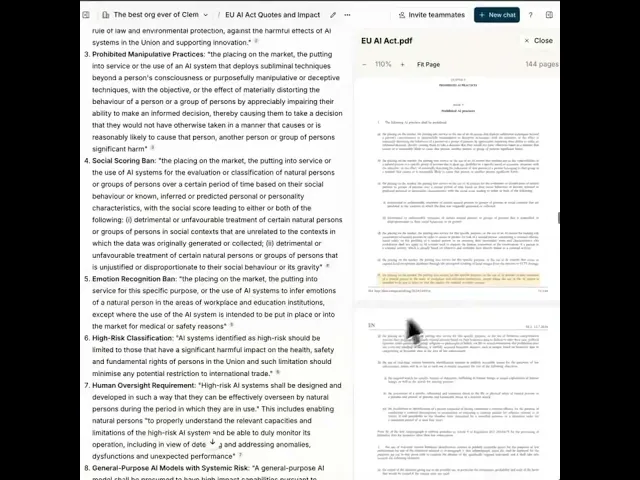
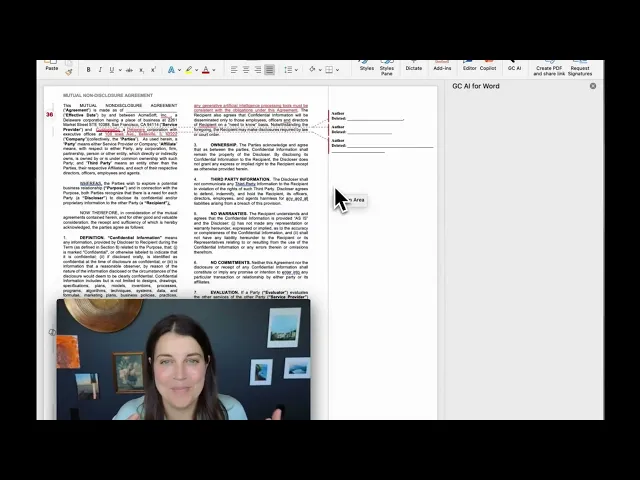
Redlining where the paper lives. GC AI for Word puts redlining, issue spotting, and drafting inside Microsoft Word, where the counterparty’s paper arrives. Web research pulls into Word with one click, so the document and the analysis sit in the same place.
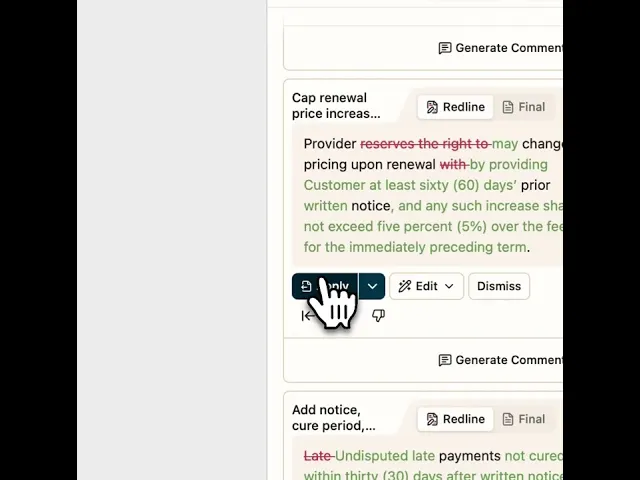
Confidentiality by default. GC AI is SOC 2 Type II and SOC 3 certified, GDPR compliant, with zero data retention agreements with OpenAI and Anthropic, and AES-256 encryption (security). The confidentiality posture is the default for legal work, so it holds without a lawyer remembering to confirm a setting.
Gemini vs GC AI for In-House Legal Work: Side by Side
Gemini and GC AI solve different halves of an in-house lawyer’s day. The table lines them up on the capabilities that matter for legal work as of June 2026.
Capability | Gemini (Workspace) | GC AI |
Built for | General productivity across Google Workspace | In-house legal teams |
Matter context | Each chat starts cold | Files and Projects carry templates and matter context across chats |
Citations | Generated text you verify source by source | Exact Quote, character-level citations from your own documents |
Redlining | Suggesting mode in Google Docs | Track-changes redlining inside Microsoft Word |
Confidentiality for legal | Protected inside the Workspace domain, general-grade | SOC 2 Type II, SOC 3, GDPR, zero data retention with OpenAI and Anthropic, AES-256 |
In-House Legal Bench (as of June 2026) | 57.5% (Gemini 3.1 Pro) | 86.8% |
Best for | Drafting, summarizing, and orientation around legal work | Privileged review, contract redlining, and research the business relies on |
The table reads one way for an in-house team: Gemini covers the productivity surface, and GC AI covers the legal surface, with the bench numbers showing the distance on legal-specific tasks.
Try GC AI for In-House Legal Work
The fastest way to see the difference is to run one document through both. Take a vendor MSA your team has already reviewed, ask Gemini and GC AI each to flag the risks against your position, and compare which output you would send to the business.
In GC AI’s December 2025 ROI study of more than 100 active customers, teams saved an average of 14 hours per week, and 97.5% saw value before month one.
KT Farley, Chief Privacy Officer and Associate General Counsel at Helix, framed the value in terms in-house leaders recognize:
“If you’re not using it, you should be. It’s cost-effective, fine-tuned for attorneys, and the cost of a license is a couple of hours of outside counsel time. It will completely transform your outside counsel budget.”
That budget math is why many legal departments run Gemini and GC AI side by side: the Workspace AI they already pay for handles the productivity work, and GC AI handles the legal work that used to route to outside counsel.
For the rest of the consumer-AI landscape from the in-house seat, see our guides to ChatGPT for lawyers, Claude legal AI and Claude Legal Plugin. To go deeper on prompting for in-house work, the free legal AI classes are taught by former general counsels.
The in-house lawyer who gets the most out of Gemini uses it for everything around legal work, and reaches for GC AI the moment the work becomes the company’s most sensitive paper.
Frequently Asked Questions
What Can In-House Lawyers Use Gemini For?
In-house lawyers can use Gemini productively for tasks that do not involve confidential or privileged information, summarizing public regulatory guidance, drafting first-pass internal policy templates, researching general legal concepts, and orienting quickly on unfamiliar areas of law. Its large context window is useful for ingesting batches of non-sensitive documents in a single prompt. For work that touches deal details, litigation strategy, or client-specific facts, a purpose-built legal AI with contractual data isolation is the safer choice.
Is Gemini Safe for Lawyers to Use on Confidential Documents?
Gemini is safe for confidential legal work only if your organization has deployed it through Google Workspace Enterprise with a Data Processing Agreement that explicitly prohibits training on your data. The consumer and free tiers store prompts for up to three years and allow Google to review inputs, which can trigger a confidentiality breach under ABA Model Rule 1.6 (Gemini Apps Privacy Hub). Even in the enterprise tier, Gemini provides no matter-level access controls or privilege-specific governance, gaps that purpose-built legal AI platforms are designed to address.
Does Gemini Protect Attorney-Client Privilege?
Gemini does not protect attorney-client privilege by design, and a 2026 federal ruling made that risk concrete. In United States v. Heppner (SDNY, February 2026), Judge Jed Rakoff held that AI chat exchanges were not privileged because the AI is not an attorney, the platform’s privacy policy permits third-party data disclosure, and the prompts were not prepared at counsel’s direction. Heppner was convicted on all counts in May 2026, and those AI-generated documents were admitted as prosecution evidence.
What Happened in United States v. Heppner and Why Does It Matter?
In United States v. Heppner (SDNY, February 2026), Judge Jed Rakoff ruled that a represented party’s written exchanges with an AI chatbot carried neither attorney-client privilege nor work product protection, the first ruling of its kind nationwide. Heppner was later convicted on all counts in May 2026, and his AI chat logs were introduced as prosecution evidence at trial. The ruling is a direct signal that privileged work belongs on a platform with legal-scoped data protections and a clear retention posture, not a consumer AI chat product.
Can Gemini Review and Redline a Contract?
Gemini can read a contract and flag issues in plain language, but it cannot natively produce tracked-changes redlines in Word or PDF format, and it has no playbook awareness of your organization’s standard positions or fallback language. For in-house teams managing high-volume commercial agreements, that gap slows every review cycle. GC AI for Word integrates directly into Microsoft Word, applies your organization’s playbook clause by clause, and generates redlines in the format counterparties expect.
How Does GC AI Compare to Gemini for In-House Legal Tasks?
On GC AI’s In-House Legal Bench, which scored AI assistants on 100 in-house legal tasks against 1,200+ attorney-developed criteria, GC AI scored 86.8% and Gemini 3.1 Pro scored 57.5% (as of September 2026), a 29-point gap. The largest performance differences were on research-intensive tasks: regulatory tracking, legal research, and checklists. GC AI also adds persistent matter context through Files and Projects, character-level citations through Exact Quote, and Word redlining, none of which Gemini offers.
How Much Does Gemini Cost for Legal Teams Compared to GC AI?
Gemini is bundled into paid Google Workspace plans; Business Standard runs $14 per user per month with Gemini included (as of September 2026). GC AI’s Individual plan starts at $500 per month. In GC AI’s December 2025 ROI study, teams saved an average of 14 hours per week, and 97.5% of customers reported value before month one, making the license cost straightforward to justify.
What Is Exact Quote and Why Does It Matter for Legal Work?
Exact Quote is GC AI’s character-level citation feature that pulls verbatim text from your uploaded documents, so a quoted clause is the clause on the page, not a plausible-sounding paraphrase. This directly addresses the risk that generalist models produce fluent but incorrect citations, a problem illustrated by the sanctions issued in Mata v. Avianca. For in-house teams, Exact Quote means every cited provision can be traced back to the source document before it shapes advice or goes to the business.
Can Gemini and a Purpose-Built Legal AI Platform Work Together?
Yes. Many in-house legal departments run both. Gemini handles productivity tasks already covered by the Workspace plan the company pays for: summarizing emails, drafting memos, orienting quickly on new regulations. A purpose-built platform like GC AI handles privileged review, contract redlining, and research the business relies on. The two cover different halves of an in-house lawyer’s day without overlap.