If you are looking for Wordsmith alternatives, start with the Wordsmith functions you need to replace and the additional legal work you want the new platform to handle.
Wordsmith combines company-wide legal intake, playbook-based review and drafting, legal research, business self-service, repositories, and workflow automation in one in-house platform. Replacing it is a larger buying decision than choosing a single contract-review add-in.
For in-house teams prioritizing lawyer-led contract review, drafting, legal research, and advice, GC AI belongs on the shortlist. It combines contract review, redlining, drafting, legal research, and business-facing advice, with Playbooks for the team's standard positions and Exact Quote citations that tie answers to source text. GC AI supports 2,200+ legal teams, including teams at Hitachi, Logitech, News Corp, and Skims.
If the main need is end-to-end contract lifecycle management, Juro or Ironclad may be a better comparison. If access to licensed legal research content is the priority, compare CoCounsel Legal and Lexis+ with Protégé.
Wordsmith Alternatives at a Glance
Use the table to compare the work each platform handles, where lawyers use it, and what public pricing information is available.
Platform | Primary Use | Where the Work Happens | Review and Drafting | Research, Intake, or Contract Management | Pricing |
GC AI | In-house legal work across contract review and drafting, legal research, business advice, recurring workflows, and contract portfolio intelligence | Microsoft Word, browser, and connected business systems | Playbooks, Exact Quote, redlining, drafting, and Easy Edit | Cited legal research and Agent Connectors; Contract Intelligence sold separately | Individual: $500/month or $5,000/year per seat; Team pricing on request; 14-day trial |
Harvey | Enterprise legal work, with especially deep adoption among large law firms and expanding in-house use | Collaborative legal workspace, agents, and contract workflows | Document analysis, drafting, contract review, and playbooks | Research, intake, triage, agents, and portfolio insights | No public dollar rates; fees are set in customer order forms |
Legora | Collaborative legal work and high-volume review | Workspace, Microsoft Word, Outlook, and tabular review | Playbooks, document creation, and review | Research, agents, and portfolio analysis | No public dollar rates; Agent Pro uses consumption-based pricing |
Spellbook | Contract drafting and review | Microsoft Word and web app | Contract review, playbooks, redlines, and drafting | Multi-document analysis and contract-focused legal sources | Custom pricing based on licensed team members; 7-day trial |
Ivo | Contract review and portfolio intelligence | Microsoft Word, Google Docs, and repository | Playbooks, historical contract context, and redlines | Portfolio queries, amendments, contract relationships, and cited results | Custom enterprise pricing based on team size, contract volume, setup, and integrations |
Juro | Contract lifecycle management | Browser platform and Microsoft Word | AI review, drafting, templates, and approvals | Repository, eSignature, tracking, and reminders | Custom pricing based on contract volume and integration needs |
Ironclad | Contract lifecycle management, intake, approvals, and renewals | CLM workflow and Microsoft Word | AI playbooks, document drafting, and review | Intake, repository, eSignature, and lifecycle reporting | No public dollar rates; request a quote |
LegalOn | Playbook-driven contract review and legal operations | Microsoft Word and browser | Attorney-built and custom playbooks, risk flags, and redlines | Vault in Contracting Suite; Matter Management and intake in Productivity Suite | Custom quote based on team size and capabilities; trial available |
CoCounsel Legal | Legal research, analysis, drafting, and contract work | Web and Microsoft Word | Contract Playbooks, drafting, review, and contract data extraction | Westlaw- and Practical Law-grounded research | CoCounsel Legal starts at $1,694.90/month for in-house teams; larger teams contact sales |
Lexis+ with Protégé | Legal research, drafting, and analysis | LexisNexis workspace and Microsoft 365 drafting workflows | Transactional drafting and document analysis | LexisNexis content, web sources, and Shepard's tools | Customized by organization size, capabilities, and content access |
Product capabilities and pricing information were checked against current public vendor materials in September 2026. Confirm the exact package, implementation costs, integrations, and usage limits before buying.
What Wordsmith Covers
Before comparing alternatives, identify the Wordsmith functions your team uses today.
Intake and Routing: Wordsmith can receive legal requests from tools such as Slack, Microsoft Teams, Outlook, and Gmail, then route them by type, risk, or owner.
Playbook Review and Redlining: Wordsmith can apply company playbooks to agreements, flag departures from approved positions, suggest fallback language, and produce tracked changes in Microsoft Word.
Blueprints and Self-Service Drafting: Blueprints can turn business inputs such as emails, questionnaires, and call transcripts into legal documents using standards set by the legal team.
Research, Agents, Reports, and Repositories: Wordsmith also offers legal research with cited answers, multi-step agents, contract reporting, repository search, alerts, and source-linked analysis across agreements.
Wordsmith pricing: Wordsmith does not publish prices. Its site offers a trial entry and a demo path, so buyers should ask what the quote includes, how usage is measured, whether there are seat or module minimums, and what implementation or integration costs apply.
How to Evaluate a Wordsmith Alternative
This guide compares current public product information rather than reporting hands-on benchmark results. Use the questions below to evaluate shortlisted platforms against the same representative legal work.
What work and users must the platform support? Identify whether you need contract review, drafting, legal research, business intake, portfolio analysis, approvals, signatures, renewals, or some combination. Also identify whether the primary users are lawyers, business teams, legal operations, or contract administrators.
Does the document and contract workflow fit? If lawyers work in Microsoft Word, compare tracked changes, comments, playbooks, formatting, and how the next version of the agreement moves through review. For signed contracts, compare repository search, amendment relationships, obligations, renewals, permissions, and links back to source agreements.
Can counsel verify the output? Contract analysis should lead back to the controlling language. Legal research should provide sources counsel can open and check. Proposed redlines should remain reviewable, and unresolved questions should be visible before counsel acts.
How does work enter and leave the system? Compare business intake, self-service, escalation to counsel, storage, playbook ownership, and approval steps rather than relying on an integration logo.
What will it cost to deploy and operate? Compare licenses, add-ons, usage limits, implementation, integrations, storage, support, and renewal terms. For vendors without public prices, get the full quote in writing before comparing total cost.
The GC AI vs Wordsmith comparison covers the direct two-product comparison.
10 Best Wordsmith Alternatives for In-House Counsel
The options below cover different needs. GC AI is listed first for teams prioritizing lawyer-led review, drafting, research, and advice, while other platforms may be a better fit for contract lifecycle management, licensed research content, or broader enterprise workflows.
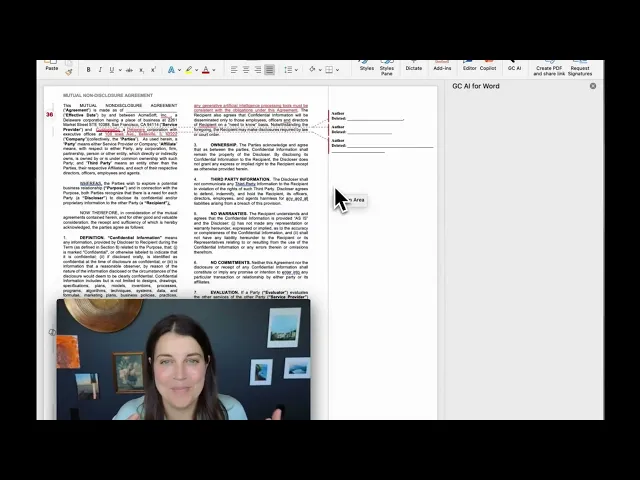
GC AI product demo
GC AI: In-House Review, Research, and Advice
GC AI was co-founded by Cecilia Ziniti, who served as general counsel at Anki, Bloomtech, and Replit and previously worked in-house at Amazon and Cruise. That background is relevant because GC AI is designed around work in-house lawyers do themselves: contract review, redlining, drafting, research, and advice to the business.
Consider a supplier asking to end an agreement early. Counsel can use Exact Quote to find the termination language, use GC AI Research for the relevant legal question, and bring in business context through Agent Connectors.
GC AI can then help draft advice or a response. The lawyer still checks the contract language and cited authorities, decides what to recommend, and approves any action before it is taken.
At Jasper, Hayley McAllister, Senior Counsel and Head of Commercial Legal, describes how the Word workflow became part of her regular contract-review work:
“Once the Word plugin rolled out, I pretty much exclusively started using it for all of my redlining and contract review.”
GC AI fits teams that want to improve the legal work counsel performs directly. Teams that also need native signature, approval routing, renewals, or a primary contract-management system can use GC AI alongside a CLM.
GC AI’s Contract Intelligence connects to repositories such as Google Drive, SharePoint, OneDrive, Dropbox, and Ironclad, extracts the terms you specify into cited, sortable views, links amendments and related documents into contract families, and shows the current terms that govern across executed agreements. It is available as a separate paid add-on.
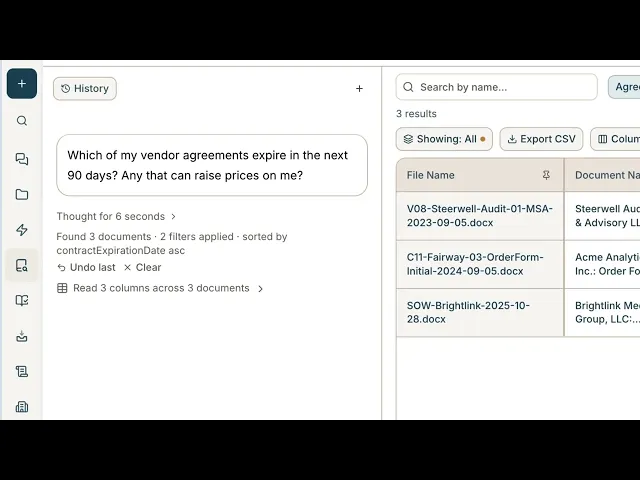
GC AI Contract Intelligence demo
Harvey: Enterprise Legal Work and Contract Intelligence
Harvey combines legal research, drafting, document analysis, agents, and contract workflows. Its Contract Intelligence product also covers intake, triage, playbook review, and portfolio analysis. Teams comparing it with Wordsmith should confirm how business requests enter the system, how contract review works in their documents, and what information remains available after the matter is complete. See GC AI vs Harvey for the direct comparison.
Legora: Collaborative Legal Work
Legora combines a shared legal workspace with research, agent workflows, Tabular Review, and Playbooks in Microsoft Word. In a Wordsmith comparison, the key questions are how it handles business intake, contract review, source verification, permissions, and the final document handed back to the business. See GC AI vs Legora for the direct comparison.
Spellbook: Contract Review and Drafting
Spellbook focuses on contract review, drafting, playbooks, redlines, and related work in Microsoft Word, with additional multi-document analysis in its web app. It is most relevant when contract work is the main need; business intake, approvals, repository requirements, and broader contract management should be checked separately. See GC AI vs Spellbook for the direct comparison.
Ivo: Contract Review and Portfolio Intelligence
Ivo combines playbook-based contract review with analysis across executed agreements. It supports review and redlining in Microsoft Word and Google Docs and can use historical contracts, amendments, and repository context in its answers. Teams replacing Wordsmith should separately confirm business intake, permissions, and any contract-management functions they need. See GC AI vs Ivo for the direct comparison.
Juro: Contract Lifecycle Management
Juro covers contract requests, drafting, approvals, signature, repository storage, reminders, and tracking. Its Microsoft Word integration supports AI review and redlining while keeping the document connected to Juro. It is most relevant when the replacement also needs to manage the contract lifecycle; deeper legal research and non-contract work should be evaluated separately.
Ironclad: Contract Lifecycle Management
Ironclad combines intake, approvals, repository management, eSignature, renewals, and contract reporting. Its AI also supports contract creation, review, extraction, and playbook-driven work, including Microsoft Word workflows. Teams comparing it with Wordsmith should decide how much of the purchase is about contract operations versus legal research or other lawyer work. See GC AI vs Ironclad for the direct comparison.
LegalOn: Contract Review and Legal Operations
LegalOn's Core Review plan covers playbook-driven contract review and redlining in Microsoft Word and the browser. Its Contracting Suite adds custom playbooks and Vault, while the Productivity Suite adds Matter Management, intake, and triage. That package structure matters when comparing it with Wordsmith because the needed functions may sit in different suites. See GC AI vs LegalOn for the direct comparison.
CoCounsel Legal: Legal Research and Drafting
CoCounsel Legal combines research, drafting, document analysis, contract data extraction, and Contract Playbooks with Thomson Reuters content. Its Microsoft Word workflow supports review and suggested redlines. It is especially relevant when Westlaw or Practical Law content is part of the requirement; business intake and contract-management needs should be assessed separately. See GC AI vs CoCounsel for the direct comparison.
Lexis+ with Protégé: Legal Research and Drafting
Lexis+ with Protégé combines legal research, drafting, and analysis using LexisNexis content, web sources, organizational knowledge, and Shepard's tools. It is most relevant when licensed research content is a major part of the decision. Business intake, contract playbooks, repository needs, and contract-management functions should be evaluated separately.
Should You Replace Wordsmith or Add Another Tool?
Replacing Wordsmith is not the only option. If it still handles part of your legal work well, adding another tool may be more practical than replacing it outright.
Replace Wordsmith When Representative Matters Expose a Material Gap
Replacement becomes reasonable when representative matters expose a material requirement your current setup does not meet and another platform demonstrably addresses it after migration, integration, security, and total-cost checks. Keep examples conditional: if your team needs a different research workflow, document workflow, or set of lifecycle controls, test that requirement directly rather than assuming either Wordsmith or an alternative lacks it.
Keep Wordsmith When It Still Handles Core Work Well
If Wordsmith performs well for the workflows your team relies on, you may not need to replace it. A complementary tool can address a narrower unmet need instead. If you use GC AI alongside Wordsmith, decide where requests start, where contracts are stored, where playbooks are maintained, and who reviews and approves the final legal work.
How to Test a Wordsmith Replacement
Use the same sanitized matter and instructions for every candidate instead of relying only on vendor-selected demos. Start with a supplier agreement and amendment, approved correspondence, governing-law information, and a specific business question about ending the agreement early.
Give each platform the same agreement, amendment, supporting correspondence, governing-law information, and instructions.
Ask it to identify the controlling contract language, explain how the amendment affects that language, surface unresolved questions, and cite the relevant source locations.
Where the platform supports legal research, run the same legal question. In GC AI, parallel research agents can investigate the question and reconcile cited findings; permissioned business context can be brought in separately through Agent Connectors.
Ask for a draft issue summary or response based on the contract documents, research, and approved business context.
Have counsel verify the documents, cited authorities, jurisdiction, currency, conflicts, and business context before approving any external action.
Compare the products on controlling-language identification, amendment effects, source locations, unresolved questions, the draft response, missed issues, unsupported statements, formatting problems, and the corrections counsel must make. Then compare migration, integrations, security, setup effort, and total cost.
Test GC AI on the Work Your Team Handles Every Day
If your team needs contract review and redlining in Word, cited legal research, business advice, recurring workflows, and portfolio analysis across signed agreements, put GC AI through the same representative matter you use to test the other candidates. Compare the cited findings, redline or draft quality, missed issues, formatting, and the corrections counsel must make.
If Wordsmith still handles intake or self-service well, GC AI can complement it rather than replace it. If the goal is to broaden what counsel can do directly, testing GC AI on real work gives the team a concrete basis for deciding whether it fits.
Frequently Asked Questions
Does Wordsmith Have a Microsoft Word Integration?
Yes. Wordsmith supports playbook-based review, redlining, clause insertion, drafting, research, translation, and native tracked changes in Microsoft Word. GC AI for Word also supports contract review, redlining, and drafting in Microsoft Word. Compare both products on the same DOCX and check formatting, comments, tracked changes, and how the reviewed document moves to approval.
Is Wordsmith a Contract Lifecycle Management Platform?
Wordsmith covers intake, contract review, drafting, agents, reports, repositories, research, and integrations. If your team also needs native signature, approval routing, obligation tracking, and renewal management, confirm those requirements directly and compare dedicated contract lifecycle platforms where needed.
Does Wordsmith Publish Pricing?
Wordsmith does not publish dollar prices on its current pricing page. It offers trial entry and a demo path. By comparison, GC AI publishes Individual pricing at $500 per month or $5,000 per year per seat, with Team pricing on request and a 14-day trial. Ask how Wordsmith pricing is calculated, what modules and usage are included, whether minimums apply, and what implementation or integration costs are added.
Can You Use GC AI and Wordsmith Together?
Yes. Wordsmith can continue handling business intake and self-service while GC AI handles contract review, drafting, research, and advice for counsel. Decide where requests start, where contracts are stored, where playbooks are maintained, and who reviews and approves the final legal work before using both systems together.