When ChatGPT and Claude launched, in-house lawyers tested them on real work: vendor MSAs, redlines, regulatory questions, and board memos. The experiments produced a consistent finding: consumer AI runs fast on horizontal tasks but lacks citation discipline, confidentiality posture, and the legal-specific guardrails that privileged client work demands. That gap is why legal AI tools exist, and the 2026 market reflects what lawyers learned through firsthand testing.
One of the lawyers who lived that gap built her own answer to it. Cecilia Ziniti, GC AI’s CEO and a 3x former general counsel, founded GC AI for the in-house category. CZ and Friends:Danielle Sheer, Chief Legal and Trust Officer at Commvault, described the same bet from the buyer side on Cecilia’s podcast,
“What would be really helpful is if there was an entire universe that was like ChatGPT, but built for and made for the legal world and the compliance world. GC AI. And it’s great because it gives me the tone, the tenor, the reliability, the credibility of an LLM that was created by and for lawyers.”
You don’t need to evaluate all fifteen. The category your team’s work lives in narrows the field to two or three. Below is a five-point checklist for what to ask, a side-by-side matrix, and fifteen platforms with a “pick this if” rule on each.
Find Your Platform in 60 Seconds
Answer four yes-or-no questions and the field narrows to two or three platforms before you read a single review.
1. Is in-house counsel your full job, spanning contracts, regulatory, employment, and corporate work? If yes, start with a purpose-built in-house platform (GC AI). If no, keep going.
2. Do you bill by the hour at an AmLaw-scale firm running diligence, litigation, and M&A at volume? If yes, look at the enterprise law-firm platforms (Harvey, Legora). If no, keep going.
3. Does your week live almost entirely inside Microsoft Word, drafting and redlining commercial contracts? If yes, weigh the Word-native and contract-review platforms (Spellbook, LegalOn, LegalFly). If no, keep going.
4. Is deep case law and statutory research the dominant task? If yes, the research engines fit (Thomson Reuters CoCounsel, Lexis+ with Protégé). If your main need is a contract repository and signature workflow, that is a CLM question (Ironclad), and most teams pair a CLM with a separate legal AI platform.
If two answers pointed the same direction, you already have your shortlist. If the answers scattered across categories, that scatter is the in-house signal, and a purpose-built in-house platform is built for exactly that mix.
What Changed in Legal AI Since January 2026
The category consolidated and rebranded fast in the first half of 2026. Five moves change how the names below line up, current as of July 2026.
Casetext is fully absorbed into Thomson Reuters CoCounsel. Thomson Reuters acquired Casetext in 2023, and the Casetext-built CoCounsel assistant now ships under the Thomson Reuters CoCounsel name, bundled with the Westlaw research stack. If you remember CoCounsel as a standalone Casetext product, it is now part of the Thomson Reuters ecosystem.
Leya is now Legora. The European enterprise platform formerly known as Leya rebranded to Legora and expanded its US presence. It is distinct from Luminance, a separate vendor.
Lexis+ AI became Lexis+ with Protégé. On February 24, 2026, LexisNexis renamed Lexis+ AI to Lexis+ with Protégé, where Protégé is the embedded AI assistant and Lexis+ with Protégé is the full research-and-drafting workflow solution. Existing Lexis+ AI users carry over automatically.
Spellbook signed an exclusive deal with the Canadian Bar Association. On March 3, 2026, Spellbook was named the exclusive AI contract drafting and review partner of the Canadian Bar Association in a two-year deal covering roughly 40,000 members, with a 20% member discount and member data stored in Canada and not used to train models.
LegalOn and LegalFly kept building. LegalOn shipped Vault, which turns stored contracts into business intelligence, on top of its contract-review suite and 50-plus AI playbooks. LegalFly, the Belgium-based enterprise platform, grew ARR more than 800% in 2025 and is preparing a Series B in 2026 to fund US expansion after raising roughly €17 million to date. LegalFly does not publish pricing as of July 2026; LegalOn publishes an Individual plan at $550/month billed annually, with Teams pricing custom.
Comparison Matrix at a Glance as of July 2026
Platform | Category | Pricing | Free Trial | Security | Word Integration | Compare |
|---|---|---|---|---|---|---|
GC AI | Purpose-built in-house | $500/seat/month | 14 days, no credit card | SOC 2 Type II, SOC 3 | GC AI for Word | N/A |
Harvey | Enterprise law-firm | Demo only, not published | No public trial | SOC 2 Type II, ISO 27001 | Word add-in | |
Spellbook | Word-native drafting | Demo only, not published | 7-day free trial | SOC 2 Type II, HIPAA | Word add-in | |
Thomson Reuters CoCounsel | Legal research | Demo only, bundled with Westlaw | Demo only | SOC 2 Type II, ISO 27001 | Limited | N/A |
Lexis+ with Protégé | Legal research | Demo only, bundled with Lexis | Demo only | SOC 2 Type II, SOC 3, ISO 27001 | Limited | N/A |
Legora | Enterprise law-firm | Demo only, not published | Demo only | SOC 2 Type II | Word add-in | |
LegalOn | Enterprise contract review | $550/mo Individual (billed annually); Teams custom | Demo only | SOC 2 Type II, ISO 27001 | Word add-in | |
LegalFly | Enterprise in-house / contract review | Demo only, not published | Demo only | SOC 2 Type II | Review module | N/A |
Ironclad AI | CLM | Demo only, not published | Demo only | SOC 2 Type II | Limited | N/A |
Clio Duo | Practice management with AI | Add-on to Clio Manage | 7 days (Clio) | SOC 2 Type II, HIPAA | Limited | N/A |
Brightflag | Legal ops with AI | Demo only, not published | Demo only | SOC 2 Type II, ISO 27001 | None | N/A |
Streamline AI | Legal ops with AI | Demo only, not published | Demo only | SOC 2 Type II | None | N/A |
Claude (Anthropic) | General-purpose | Free / $17-20 Pro / $100+ Max / $20-25 Team | Free tier available | SOC 2 Type II | None | |
ChatGPT (OpenAI) | General-purpose | Free / $8 Go / $20 Plus / $100 or $200 Pro / $20-25 Business | Free tier available | SOC 2 Type II | Limited | |
Microsoft 365 Copilot | General-purpose | $18-25/user/month | 30-day trial | SOC 2 Type II, ISO 27001 | Native | N/A |
Pricing for Claude, ChatGPT, and Microsoft Copilot is the public consumer or business price as of July 2026. Re-verify before any board memo because consumer AI tiers shift quarterly. Enterprise legal AI pricing is not public, and demo-quoted pricing is the industry norm for every platform on this page except GC AI.
Pricing Transparency at a Glance
Pricing transparency is itself an evaluation signal. A vendor that publishes a number lets an in-house team build a CFO-ready business case without a procurement cycle. As of July 2026, GC AI is the only purpose-built legal AI platform on this list that publishes per-seat pricing.
Platform | Category | Pricing (as of July 2026) | Pricing Published? |
|---|---|---|---|
GC AI | Purpose-built in-house | $500/seat/month, no seat minimum | Yes |
Harvey | Enterprise law-firm | Demo only, not published | No |
Spellbook | Word-native drafting | Demo only, not published | No |
Thomson Reuters CoCounsel | Legal research | Bundled with Westlaw, demo only | No |
Lexis+ with Protégé | Legal research | Bundled with Lexis, demo only | No |
Legora | Enterprise law-firm | Demo only, not published | No |
LegalOn | Enterprise contract review | Individual $550/mo billed annually; Teams custom | Partial |
LegalFly | Enterprise in-house / contract review | Demo only, not published | No |
Ironclad AI | CLM | Demo only, not published | No |
Clio Duo | Practice management with AI | Add-on to Clio Manage; base plans published | Partial |
Brightflag | Legal ops with AI | Demo only, not published | No |
Streamline AI | Legal ops with AI | Demo only, not published | No |
Claude (Anthropic) | General-purpose | Free / $17-20 Pro / $100+ Max / $20-25 Team | Yes |
ChatGPT (OpenAI) | General-purpose | Free / $20 Plus / $20-25 Business | Yes |
Microsoft 365 Copilot | General-purpose | $18-25/user/month | Yes |
What’s New in Legal AI: 2026 Updates
The 2026 legal AI market has moved faster than most comparison guides can track. Six developments change how lawyers should evaluate platforms right now.
In-house AI adoption crossed 87%. The 2026 General Counsel Report from FTI Consulting and Relativity puts in-house generative AI usage at 87%, nearly double the 44% from a year prior.
General-purpose AI providers are entering legal. Anthropic launched Claude for Legal and OpenAI announced Codex for Legal, both positioning as general-purpose AI with a legal mode. The architecture differs from purpose-built platforms that ship a legal-trained system prompt, verbatim citation retrieval, and in-house workflow defaults built from the ground up.
Harvey addressed small-team fit publicly. In a December 2025 AMA on r/legaltech, Harvey noted the platform is “starting to support smaller firms” and that its model costs “require too many seats to be cost effective” for smaller practices.
MCP is becoming the integration standard. The Model Context Protocol defines how legal AI platforms plug into the rest of the legal stack. Platforms with published MCP support integrate more cleanly with a firm’s or department’s existing CLM, DMS, and e-billing tools. Artificial Lawyer called it the standard that decides legal AI’s future. For a deeper look at legal MCP servers, see MCP for Legal Teams: Best MCP Servers for In-House Counsel.
GC AI published the In-House Legal Bench. GC AI’s May 2026 benchmark scored 100 in-house legal tasks judged by attorneys with 80+ combined years of practice: GC AI 86.8%, ChatGPT (GPT-5.5) 79.8%, Claude (Opus 4.7) 68.4%, Gemini (3.1 Pro) 57.5%. Full methodology at In-House Legal Bench.
GC AI added Midpage as a legal research subprocessor.** Midpage provides the legal-research database powering case law search, citation verification, and judicial opinion retrieval within GC AI. Midpage is SOC 2 Type II compliant.
The Seven Categories of Legal AI
A legal AI tool is software that uses large language models and legal-specific tuning to do work an in-house lawyer or transactional attorney would otherwise do manually: contract review, legal research, drafting, redlining, summarization, structured data extraction, and workflow automation. The 2026 market sorts into seven categories.
Purpose-built in-house platformsA lean team needs GC AI because it is purpose-built to cover that workload end to end. A larger in-house department needs GC AI because the bulk of its work is still in-house-shaped, regardless of headcount.
Enterprise law-firm platforms are designed first for AmLaw 100 firms and large litigation, M&A, and advisory teams, with pricing and workflow built around billable-hour models and partner-associate review. Top picks: Harvey, Legora, LegalOn.
Word-native drafting and review platforms run AI inside Microsoft Word, oriented toward contract drafting and inline redlining. Top pick: Spellbook.
Legal research engines layer AI on top of large legal databases (case law, statutes, regulatory filings) for first-pass research, brief drafting, and citation summarization. Top picks: Thomson Reuters CoCounsel, Lexis+ with Protégé. GC AI also runs multi-agent legal research across authoritative sources, government sites, and primary law for first-pass research with citations, covered in The 10 Best AI Tools for Legal Research.
Contract lifecycle management with AI platforms store, route, and track contracts, with AI on top for clause extraction and risk flagging. Teams typically pair a CLM with a separate legal AI platform. Top pick: Ironclad AI.
Legal ops platforms with AI are operational software for legal departments, covering matter intake, outside counsel management, e-billing, and spend analytics, with AI features layered on. Top picks: Brightflag, Streamline AI. GC AI covers a meaningful slice of in-house legal ops (intake, triage, contract routing) inside its core workflow.
General-purpose AI is the horizontal LLM bucket: Claude, ChatGPT, Microsoft Copilot. Powerful underlying models with no legal-specific tuning, no character-level verbatim source citations, no in-house context. A bridge to legal AI for any work that touches privileged matter.
The biggest mistake legal AI buyers make is shopping all seven categories as one. CLM and legal AI solve different layers and typically coexist. Legal research engines and contract review platforms answer different questions. The buyer’s question is which category the team needs and which platform leads that category for the team’s shape and budget.
How to Choose Legal AI: A 5-Point Buyer’s Checklist
Adoption is no longer the question; nearly nine in ten in-house legal teams now run generative AI on real work. The buyer’s question is which platform survives a real contract. Every vendor claims ‘purpose-built.’ That’s the legal AI equivalent of ‘time is of the essence.’ Five criteria separate the ones that hold up in production from the ones that demo well:
Citation discipline
Legal-specific system prompt
Word integration that holds up in production
Security posture with a published DPA
Transparent pricing and a real free trial
Citation Discipline
When the platform answers a legal question or summarizes a clause, can it produce a character-level verbatim citation back to the source document? Plenty of platforms produce confident-sounding output with no traceable source. For privileged legal work, citation discipline is the floor of the evaluation.
The trust gap is real: a March 2026 Legaltech News piece reported that only 22.1% of legal users have high trust in generative AI output, and that 89.5% of teams with high trust see positive ROI versus 27.8% of teams without.
Verifiable citations close that gap. GC AI’s Exact Quote is the canonical example: click the citation in chat, the source passage highlights in Doc View.
Legal-Specific System Prompt
A legal AI platform ships a system prompt that defines what an in-house lawyer is, how a contract reads, what a CLM does, and how a redline flows. GC AI’s system prompt runs over 20,000 lines. Ask the vendor what is in theirs. If the answer is vague, the answer is your answer.
Word Integration That Holds Up in Production
In-house contract work runs through Microsoft Word. The AI needs to show up in Word with the team’s templates, playbooks, and prior context already loaded. GC AI for Word ships Chat2, Easy Prompt, the Skill Library, and Projects in the same surface. Test the Word add-in with a real document during the trial, and do not accept a demo-only evaluation.
Security Posture With a Published DPA
SOC 2 Type II is now the minimum. The differentiation is what stacks on top: SOC 3, GDPR alignment, AES-256 encryption, and a published zero data retention agreement with the underlying LLM providers, named explicitly. GC AI is SOC 2 Type II and SOC 3 certified, GDPR compliant, with zero data retention agreements with OpenAI and Anthropic, and AES-256 encryption. The full posture lives at GC AI Security.
Transparent Pricing and a Real Free Trial
Enterprise legal AI platforms in this category publish no pricing and offer no public trial. GC AI publishes per-seat pricing and offers a 14-day trial with no credit card. A platform that requires a procurement cycle before the team runs a single document through it gets adopted slowly, if at all.
In-Chat Case Law Search
A newer capability worth checking is whether the platform can research case law in plain language without leaving the chat. A tool that searches real court opinions, links every citation to the full opinion, and flags whether a case is still good law beats a general-purpose chatbot that can only summarize the open web. GC AI now does this with US Case Law: ask a question in plain English and it searches a database of 13M+ federal and state court opinions, checks treatment data to flag overruled or reversed holdings, and writes a cited analysis in the same workspace as your contracts and drafting.
A soft sixth criterion that matters more than buyers expect is education. Ask what training ships with the license. GC AI runs free classes taught by former general counsels, listed in the review below.
Five Patterns From In-House Procurement
Five themes pull through customer interviews, class Q&As, podcast conversations, and procurement-call notes:
Price-vs-value math is a CFO conversation
Utilization is the silent metric. Teams are renegotiating in 2026 based on usage instead of aspirational deployment.
Shadow IT is the biggest risk facing legal departments.
Word adoption is the leading indicator. The fastest path to real adoption is a legal AI platform attorneys want to use.
Education is the overlooked moat
The first is that price-vs-value math is a CFO conversation. KT Farley, Chief Privacy Officer and Associate General Counsel at Helix, frames the ROI calculation:
“The cost of a license is a couple of hours of outside counsel time, and it will completely transform your outside counsel budget.”
The math an in-house lawyer pitches lives at the budget line, where the license costs less than two hours of the team’s typical outside counsel rate, and the time it saves flows back into the budget the same week.
The second is that utilization is the silent metric. A platform that sits unused costs budget without producing return. David Morris, former Chief Legal Officer at Snyk, names the adoption signal:
“This was the first time that after a trial, the team came to me and said, so we can’t live without this.”
The team asking the GC to sign the contract inverts the typical legal AI rollout, where the GC pushes adoption top-down. the GC AI Word Add-in meets lawyers where the redlines already happen.
The third is that shadow IT is real. When a platform is hard to procure, slow to deploy, and unfriendly to first-touch use, lawyers paste contracts into ChatGPT instead. The buyer’s evaluation has to take shadow IT seriously. The platform that gets used in the wild at 9pm, after the kids are in bed and a vendor MSA is sitting in the inbox, is the platform the team will pay for next year.
The fourth is that Word adoption is the leading indicator. In-house lawyers live in Microsoft Word for the contract review half of their week, and a platform that does not show up in Word loses that half of the work. Hayley McAllister, Senior Counsel and Head of Commercial Legal at Jasper, names the moment the platform stuck:
“Once the Word plugin rolled out, I pretty much exclusively started using it for all of my redlining and contract review.”
The fifth is that education is the overlooked moat. The platform is the model layer; the team’s prompting fluency is the work layer.
The 101 class GC AI runs (free, California CLE-eligible) teaches lawyers to brief AI the way a senior partner briefs a smart, eager intern: clear context, specific output, defined constraints. Teams that get the most from legal AI invested in fluency early.
GC AI
GC AI is the legal AI platform for in-house counsel, used by 2,100+ legal teams across 53 countries, including 200+ public companies and 25 unicorns, with an NPS of 77.
Fast Company named GC AI to its most innovative AI companies of 2026 list, and Inc. named founder Cecilia Ziniti to its 2026 Female Founders 500.
The customer base runs from solo GCs and small legal teams through mid-market departments to enterprise legal organizations; the Enterprise tier adds SSO, custom integrations, and managed onboarding.
Team Size | Buy First | Add Next |
|---|---|---|
Solo GC or first legal hire | GC AI ($500 per seat, no minimum, 14-day trial) | Enterprise controls on any generic AI the company already runs |
Lean team, 2–10 lawyers | GC AI across the team | Ironclad or another CLM when intake and approvals bottleneck |
Department, 10+ lawyers | GC AI for the legal workload | CLM plus legal ops for intake and e-billing |
GC AI for Solo GCs and Small Legal Teams (1–5 Lawyers)
Small teams are hardest hit by tool sprawl. They cannot evaluate twelve platforms and integrate five; they need one platform that covers the work that hits the desk every day: contract review, redlining against a playbook, research, intake, matter memory, Word drafting, and the occasional “what is market for this clause” question at 9 p.m. That is the workload GC AI covers, and with no seat minimum the first seat can start this week.
Fractional GC Alix Rosenthal, a former Lyft VP, reviewed a client’s terms and conditions in under an hour on GC AI, and Jennee DeVore, General Counsel at Inflammatix, drafts contract amendments in minutes that once took an hour by hand.
GC AI for Mid-Size Legal Departments (5–25 Lawyers)
Mid-size departments buy GC AI for consistency: Playbooks give every contract the same review regardless of which lawyer runs it, Projects keep matter context shared across the team, and the Word add-in meets everyone where the redlines happen.
Tiffany Lee, General Counsel at Liquid Death, calls it life-changing and an indispensable tool for in-house practice. Julia Cowles, VP and General Counsel at Khan Academy, relies on it for contract reviews, case summaries, and memo drafting. Ashley Good, Associate General Counsel at Vuori, recalls a $9B acquisition catalog that took six associates three exhausting weeks; the same job now takes hours with this technology.
GC AI for Enterprise Legal Departments (25+ Lawyers)
The Enterprise tier adds SSO, custom integrations, managed procurement and onboarding, change-management support, and dedicated solutions-attorney support. 200+ public companies run GC AI today, including the legal teams at Columbia Sportswear, Eventbrite, Viant Technology, and Hitachi, and large departments typically pair it with their CLM and research subscriptions.
Wendra Liang, VP of Legal at Vercel, names the shift in-house lawyers feel after switching to a purpose-built platform:
“It’s the first product I’ve felt is built for the kind of lawyer I aspire to be.”
The day-to-day product surface is a chat interface next to a document workspace, a Microsoft Word add-in, and a 20,000-line legal system prompt that does most of the quality work before the LLM ever runs.
The platform reflects how in-house lawyers work: contracts open all day, regulatory questions stacking up in your inbox, business partners pinging Slack, outside counsel costs to manage. The system prompt, tone, and default workflows are built around that mix.
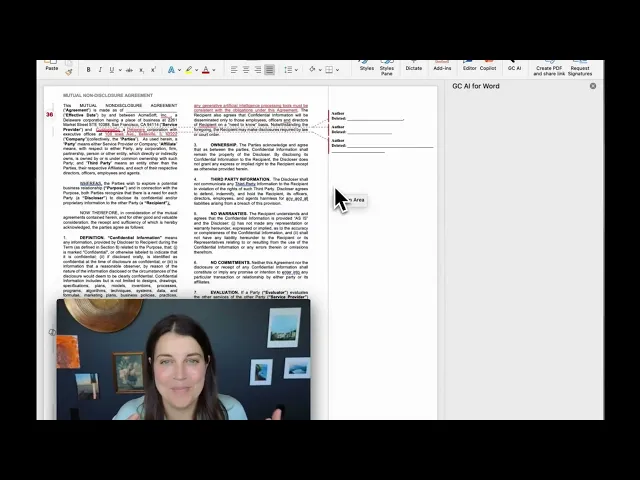
What makes the day-to-day mix different from horizontal AI:
Easy Prompt turns a thought-starter into an optimized legal prompt.
Exact Quote pulls character-level verbatim citations from uploaded documents.
Playbooks run repeatable contract reviews against pre-built libraries for NDAs, DPAs, SaaS agreements, and commercial MSAs, flagging where a term such as a confidentiality clause drifts from the team’s market position.
Projects keeps memory across chats inside a single matter.
Custom Company Profile encodes the team’s voice and templates so output arrives calibrated.
Files holds permanent collections of up to 1,500 pages, available across every chat.
GC AI for Word is the Microsoft Word add-in. Web chats pull into Word with one click.
Laura Knight, VP Legal at Secure Code Warrior, ran a head-to-head:
“GC AI’s Word Add-in is in a class of its own compared to other legal AI tools I have evaluated.”
Research deploys multiple AI agents in parallel across court opinions, statutes, and regulations, and returns a cited first-pass analysis. Case law search, citation verification, and judicial opinion retrieval are powered by Midpage, a SOC 2 Type II compliant legal research database.
US Case Law, added in June 2026, searches real US court opinions from a plain-English question: it draws on a dedicated database of 13M+ federal and state opinions, reads the full opinions, checks treatment data to flag whether a case is still good law, and writes a cited analysis, with every citation opening the full opinion in a built-in reader.
A December 2025 study of 100+ active customers measured the ROI:
14 hours per lawyer saved each week
14% reduction in outside counsel spend
21% greater perceived accuracy compared to generic AI like ChatGPT
97.5% of teams see value before month one
Approximately $252,000 per year in median company savings (14% × $1.8M median outside counsel spend per the ACC Law Department Management Benchmarking Report)
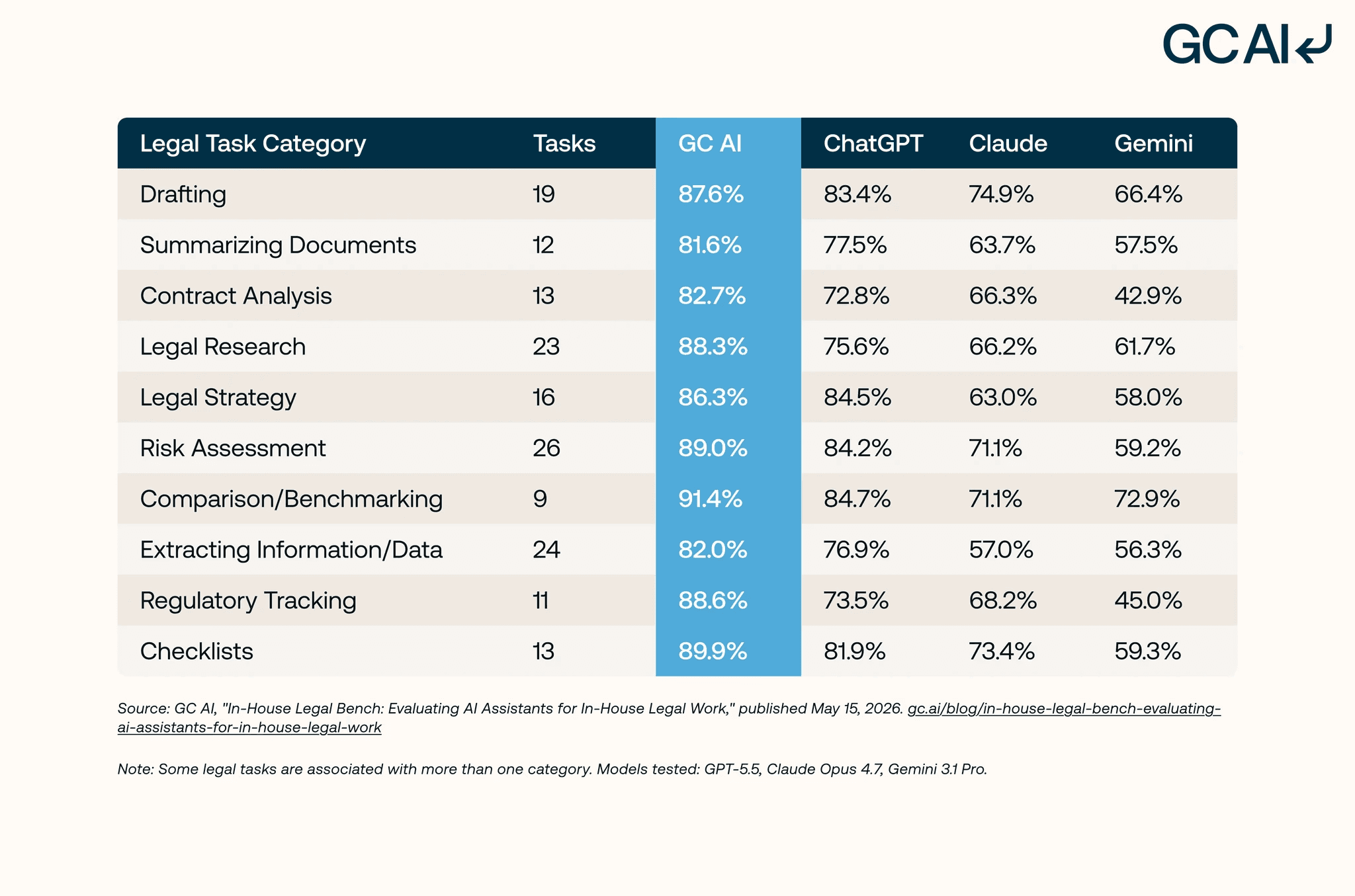
In GC AI’s In-House Legal Bench (May 2026), a 100-task benchmark scored by attorneys with more than 80 combined years of practice, GC AI passed 86.8% of in-house legal tasks, ahead of ChatGPT (GPT-5.5) at 79.8%, Claude (Opus 4.7) at 68.4%, and Gemini (3.1 Pro) at 57.5%. The benchmark measures GC AI against general-purpose models.
Andrea Peters, Senior Counsel and Global Head of Compliance at Interface, describes the practical compounding:
“Becoming a more strategic thinker requires headspace that’s hard to find when you’re buried in tasks. GC AI helps me get there in two ways: it saves time on the routine stuff, and it also helps me think strategically, compounding the value.”
GC AI’s pricing is published at $500/seat/month on the individual plan, with no seat minimum. Team and enterprise plans are custom for larger deployments. The 14-day free trial requires no credit card.
More than 6,000 lawyers have completed our free, California CLE-eligible classes, taught by former general counsels. You can take a free course here.
For an in-house-specific comparison across eight platforms with deeper ICP fit analysis, see Best Legal AI Tools for In-House Counsel.
Spellbook
Spellbook is designed for both law firms and in-house teams. The product started as a Microsoft Word add-in for transactional drafting, and that’s still where it’s strongest. Clause suggestions, automated redlines, and third-party paper review run fast on the Word surface, with a Benchmarks feature anchored to a proprietary contract dataset that supports market-standard checks. The Benchmarks feature is meaningful product differentiation if the team’s primary question is whether a clause is market-standard, for example whether a termination clause carries the cure period and notice window a counterparty expects.
Buyers covering vendor DPAs, employment matters, regulatory questions, and internal stakeholder communications alongside contract drafting should test how the platform handles those workflow types during the trial. Pricing is demo-only.
Choose Spellbook if you are a transactional lawyer who lives almost entirely in Microsoft Word, drafting and redlining commercial contracts, and the Benchmarks feature is load-bearing for the work.
Harvey
Harvey initially launched with AmLaw 100 firms and large litigation, M&A, and advisory teams. The product line maps to how those teams already work: Vault handles large-scale diligence the way an AmLaw associate runs it, Assistant supports the partner-and-associate drafting flow, Knowledge powers cross-domain research, and Workflow Agents build firm-specific custom automations. Sequoia and OpenAI back the company.
Pricing is demo-only. The adoption layer (Harvey Academy, partner-led training programs) is firm-oriented, and the integration assumption is a billable-hour operating model. Buyers without that shape (solo, in-house, or small-firm transactional) should evaluate fit during a demo before committing.
Choose Harvey if you are an AmLaw 100 firm or a large litigation, M&A, or advisory practice running diligence and drafting at firm scale, with a multi-seat budget and an internal training function that can run a Harvey Academy rollout.
Thomson Reuters CoCounsel
Thomson Reuters CoCounsel is the AI layer on top of the Thomson Reuters legal research stack (Westlaw and the broader TR ecosystem). Headline use cases include first-pass legal research, brief and memo drafting, document review, and deposition prep. The strongest fit is litigation-heavy work where a long Westlaw history is already part of the team’s research workflow.
For an in-house team, legal research is a real workflow but rarely the dominant one. CoCounsel optimizes the deeper-research lane, and the research engine is the headline capability.
Choose CoCounsel if your team handles heavy litigation or regulatory research, uses Westlaw daily, and wants the AI surface on top of the database the team already pays for.
If CoCounsel is on your shortlist, our GC AI vs CoCounsel comparison takes a closer look at how the two platforms differ across legal research, contract review, Microsoft Word workflows, pricing, and overall fit for in-house legal teams.
Lexis+ with Protégé (formerly Lexis+ AI)
Choose Lexis+ AI If Lexis Is Already Your Library
Departments that live in the Lexis corpus should evaluate Lexis+ AI first for research; the citation grounding is the draw. Pair it with a platform built for the rest of the workday: GC AI handles contract review, playbook-driven redlining, Word-native drafting, and matter memory alongside a research subscription.
Choose Lexis+ with Protégé if your team is on LexisNexis already and wants the generative AI layer over an existing research investment.
Legora
Legora is a Sweden-based legal AI platform positioned as collaborative AI for law firms and in-house teams as of September 2026. It is strong across the UK and EU, with the GDPR-first posture and data residency options that matter in European procurement, and it has been expanding from its European law-firm base toward in-house buyers. US in-house buyers should ask for named US references during evaluation.
Legora’s center of gravity is firm-side multi-jurisdictional research and document review. Buyers running a one-lawyer in-house workflow with fast turnaround on commercial contracts should test how the platform handles that pace during the trial. Pricing is demo-only.
Choose Legora if you are a multi-jurisdictional firm or large in-house team running document review and research across European jurisdictions, with a multi-seat enterprise budget.
LegalOn
LegalOn is a contract-review platform serving customers across law firms and in-house legal teams. The product line ships a seven-piece suite (Review, Assistant, Matter Management, Knowledge Core, Agents, Translate, and a Word add-in) and a library of 50+ AI playbooks for NDAs, MSAs, and other standard agreements.
LegalOn’s core focus is contract review at scale. The product direction has trended agentic over the past year, with five new AI agents shipping in February 2026 and Inline Citations launching in spring 2026 (hover-preview source links inside AI responses). As of July 2026, LegalOn publishes an Individual plan at $550 per month billed annually, with Teams pricing custom.
Choose LegalOn if your team is primarily focused on contract review at enterprise scale and runs across both firm and in-house workflows.
LegalFly
LegalFly is a Belgium-based enterprise legal AI platform built for in-house teams, positioned as “built in Europe, trusted globally.” The product ships six modules: Discovery for research and document analysis across 130-plus jurisdictions, Review for playbook-driven contract review, Draft for templated document generation, Legal Radar for regulatory monitoring, Multi Review for large-document due diligence, and Agent Studio for custom AI agents. Its security story leans on on-premise deployment options and data anonymization for regulated environments like banking and insurance.
LegalFly concentrates on multi-department enterprise workflow across legal, procurement, and compliance, with a European data-residency posture. Pricing is demo-only as of July 2026. The company grew ARR more than 800% in 2025 and is preparing a Series B for US expansion, so US-based buyers should confirm current support and data-residency terms during the trial.
Choose LegalFly if you are a European or multinational enterprise in-house team that needs on-premise or data-anonymized deployment and multi-department workflow across legal, procurement, and compliance.
Ironclad AI
Ironclad is a contract lifecycle management (CLM) platform with AI features layered on top. The CLM core handles contract intake, routing, redlining workflows, e-signature, repository, and reporting. The AI layer adds clause extraction, risk flagging, and AI-assisted review on top of that operational backbone.
CLM and legal AI solve different layers. If your CLM and your legal AI are fighting over who’s redlining, your CLM is winning. CLM is operational, where contracts live, who signed them, what the repository looks like. Legal AI is analytical, what does this clause mean, is it market, what should be redlined. In-house teams that run a CLM typically also run a legal AI platform alongside it.
Choose Ironclad if your team needs a CLM (contract repository, workflow automation, e-signature, reporting) and wants the AI layer on top of that backbone.
For a closer look at how GC AI compares with Ironclad, see our GC AI vs Ironclad guide.
If you’re evaluating other contract lifecycle management platforms before committing, our Ironclad Alternatives compares the leading CLM options and explains which teams each platform is best suited for.
Clio Duo
Clio Duo is the AI layer on top of Clio’s practice management platform. Clio is the dominant practice management software for solo and small firms in the US, with a UK and Canada footprint. Duo extends that surface with AI for case summarization, document drafting, time-entry assistance, and search across the Clio matter database.
The strongest fit is solos and 2-to-10-lawyer firms already on Clio Manage or Clio Grow who want practice management plus AI in one surface. Clio’s product targets the law-firm operating model (matters, billable hours, client relationships, intake). In-house teams operate on a different shape, where the backbone is Slack, email, a CLM, and a document workspace.
Choose Clio Duo if you are a solo or small-firm lawyer already running on Clio Manage and want the AI layer inside that practice management workflow.
Brightflag
Brightflag is a legal operations platform focused on outside counsel management, e-billing, and matter management. The AI layer adds invoice review, spend analytics, and matter intelligence. Mid-to-large in-house teams use Brightflag where outside counsel spend is a real budget line and legal ops has its own headcount. Brightflag’s AI capability handles invoice and spend analytics, while contract review, drafting, and research live in a different product layer.
Choose Brightflag if your team has a legal ops function with budget for outside counsel management software and wants AI on top of the e-billing and matter management workflow.
Streamline AI
Streamline AI is a legal operations platform focused on intake, triage, and workflow routing. The AI layer adds matter classification, intake routing, and workflow automation. In-house teams use Streamline where intake volume is high enough that routing and triage is a meaningful workflow problem. The shape mirrors Brightflag in evaluation logic, as a legal ops platform with AI features that solves a different layer than contract review, drafting, and research.
Choose Streamline AI if your primary operational pain is matter intake and triage at scale, and you want AI built into that workflow.
Claude, ChatGPT, and Microsoft Copilot
The gap is measurable. On GC AI’s In-House Legal Bench, 100 real in-house tasks scored against 1,200+ attorney-developed criteria, GC AI led all 10 task categories against the three general-purpose models it tested:
GC AI: 86.8%
ChatGPT (GPT-5.5): 79.8%
Claude (Opus 4.7): 68.4%
Google Gemini (3.1 Pro): 57.5%
The largest margins came in regulatory tracking, legal research, and checklists.
The general-purpose AI category covers Claude (Anthropic), ChatGPT (OpenAI), and Microsoft 365 Copilot. These are horizontal AI products with powerful underlying models, no legal-specific tuning, no character-level verbatim source citations, no in-house legal context, and no Playbooks for repeatable contract review. For the practical playbook on using these tools at the edges of legal-adjacent work, see How to Make ChatGPT Useful for Legal Work.
Microsoft Copilot for M365 is priced at Tricia Kinney of BlueLinx names the choice in plain terms:$21 per user per month for Business plans, with the Enterprise plan at $30 per user per month, as of July 2026.
“I am a huge fan of using legal-specific AI tools as opposed to consumer-specific AI tools. You want them training in the same context that we’re operating in.”
As of July 2026: ChatGPT consumer tiers train on conversations by default (toggle off available); Business and Enterprise do not. Claude Pro does not train on conversations. Microsoft 365 Copilot for Business does not train. A published zero-data-retention agreement with the underlying LLM provider is the bar GC AI ships standard.
2026 update: general-purpose AI providers are entering legal. Anthropic formally launched Claude for Legal on May 12, 2026 with 12 plugins and 20 connectors to legal tech tools. OpenAI confirmed plans for a Codex for Legal offering. Both position as general-purpose AI with a legal-specific mode.
Choose general-purpose AI if your AI work is mostly horizontal: research summarization, internal communication drafting, brainstorming, non-legal-specific document work. Treat general-purpose AI as a bridge to legal AI.
What to Test in Your First Week of a Trial
A demo shows the platform at its best. A trial shows it on your work. Run each platform against documents your team already knows the answer to, and test what the category is supposed to be good at. Here is the first-week checklist by category.
Purpose-built in-house platforms (GC AI). Upload a vendor MSA your team has already redlined and check whether the first-pass review flags the same risks a lawyer did, with a character-level citation back to each clause. Run a regulatory question, an employment question, and a board-memo draft in the same week to confirm the platform holds up across the full in-house mix.
Enterprise law-firm platforms (Harvey, Legora). Test large-scale diligence on a real document set and confirm the partner-and-associate review flow and firm training rollout fit your team’s billable model and seat count.
Word-native drafting and contract review (Spellbook, LegalOn, LegalFly). Open a live contract in Microsoft Word and run inline redlining, clause suggestions, and a market-standard check end to end. Confirm the add-in loads your templates and playbooks, and that first-pass clause review catches a missing or one-sided term, for example an indemnification or limitation of liability clause that falls outside market.
Legal research engines (Thomson Reuters CoCounsel, Lexis+ with Protégé). Run a research question you have already answered the hard way and check the citations against the underlying database for accuracy and currency.
Contract lifecycle management (Ironclad). Test intake, routing, e-signature, and repository search, then confirm how the AI layer hands off to the separate legal AI platform your team uses for analysis and redlining.
Legal ops platforms (Brightflag, Streamline AI). Run real intake volume or a sample of outside counsel invoices through triage and spend analytics, and confirm the operational layer connects to your contract and research workflow.
Day 5: Talk to one in-house customer whose job looks like yours. Confirm the data retention terms on your specific tier before any privileged work, and treat output as a draft that still needs legal-specific citation and review.
Run the One-Week Test on Your Own Paper
One live contract and five working days tell you more than any vendor page, this one included.
No credit card required. Drop in a contract the team has already reviewed (an MSA, an NDA, a vendor DPA) and see what GC AI returns. The fastest way to know if a legal AI platform fits is to run it against work the team already knows.
Frequently Asked Questions
What Is the Difference Between Legal AI and Contract Lifecycle Management (CLM) Software?
Legal AI platforms like GC AI review, redline, draft, and research legal work. CLM platforms like Ironclad manage where a contract goes: intake, approvals, execution, storage, and obligation tracking. In-house teams typically run both, with the CLM handling contract logistics and a legal AI platform handling the legal judgment.
What Does Citation Discipline Mean in Legal AI?
Citation discipline is the ability of an AI tool to produce a character-level, verbatim citation from the source document for every claim or summary it generates. GC AI’s Exact Quote feature lets lawyers click a citation in chat and see the source passage highlight directly in the document, so output can be verified without re-reading the entire file.
Is It Safe to Use ChatGPT or Claude for Confidential Legal Work?
Personal-tier ChatGPT and Claude accounts are not safe for client-confidential legal work, because the data protections depend on enterprise agreements that personal tiers do not carry. Shadow IT, attorneys using personal accounts because the sanctioned platform is slow or does not cover the task, is the biggest risk facing legal departments. The fix is enterprise controls on any generic AI the company keeps, plus a legal AI platform attorneys want to use.
What Security Standards Should a Legal AI Platform Meet?
SOC 2 Type II is the baseline, but stronger platforms stack additional certifications and publish a data processing agreement that names the underlying LLM providers explicitly with zero data retention terms. GC AI holds SOC 2 Type II and SOC 3 certifications, is GDPR compliant, uses AES-256 encryption, and publishes zero data retention agreements naming OpenAI and Anthropic.
Do Legal AI Tools Work Inside Microsoft Word?
The strongest platforms ship a native Word add-in, which matters because in-house contract work runs through Word. GC AI for Word includes Chat2 for web research from inside Word, Easy Prompt, the Skill Library, and Projects. Spellbook is also Word-native, while platforms like CoCounsel and Ironclad have more limited Word integration.
What ROI Can In-House Teams Expect from Legal AI?
A December 2025 study of 100-plus active GC AI customers found that lawyers saved 14 hours per week, reduced outside counsel spend by 14%, and rated output accuracy 21% higher than generic AI. The median company saved approximately $252,000 per year, with 97.5% of teams seeing value before the end of month one.
What Is the Microsoft Word Legal Agent?
The Microsoft Word Legal Agent is Microsoft’s AI agent built into Word as part of the broader Microsoft 365 Copilot platform. As of July 2026, it is available worldwide through the Frontier program on Word for Windows desktop, and requires a Microsoft 365 Copilot subscription. For in-house legal teams, the gap between a generic Word agent and a purpose-built legal AI platform is citation discipline, legal-specific tuning, and a published DPA; GC AI covers all three.
What Is the Best Legal AI for In-House Counsel?
GC AI is the purpose-built pick for in-house counsel, used by 2,100+ legal teams across 53 countries. It covers the full in-house workload (contract review, playbook redlining, research with US Case Law, Word drafting, and matter memory) at a published $500 per seat with no minimum. For the full team-size and buyer-need comparison, see Best Legal AI Tools for In-House Counsel.
What Is the Best Legal AI for a Solo GC or Small In-House Team?
GC AI is the strongest fit for a solo GC or a small in-house team. Pricing is published at $500 per seat per month with no seat minimum, so one lawyer can start on a 14-day trial without a procurement cycle, and the platform covers the mixed workload of contracts, research, employment, and privacy that hits a solo desk.
What Is the Best Legal AI for Enterprise Legal Departments?
GC AI’s Enterprise tier serves large legal departments with enterprise SSO, custom integrations, managed procurement and onboarding, change-management support, and dedicated solutions-attorney support. 200+ public companies and 25 unicorns run GC AI today, and larger departments typically pair it with a CLM for contract operations.
How Much Does LegalOn Cost?
LegalOn’s individual plan was published at $550 per month, billed annually, as of June 2026; the company has since removed its public pricing page, and all plans are quote-led via a sales demo as of July 2026.
What Is the Difference Between LegalOn and Legalfly?
LegalOn and Legalfly both serve in-house contract review but are built for different risk profiles. LegalOn offers 50+ attorney-authored playbooks, a Microsoft Word add-in, and individual pricing last published at $550 per month billed annually (June 2026, since removed from its site), making it strong for high-volume standardized contract workflows. Legalfly, based in Belgium, prioritizes data privacy through automatic document anonymization before any AI processing and supports on-premise deployment alongside Word and Outlook add-ins; its pricing is not published. Both center on contract review, so buyers whose week includes legal research, drafting, and broader matter work should confirm coverage beyond contracts; that broader workload is what a platform like GC AI is designed around.
What Makes GC AI Different from Other Legal AI Platforms?
GC AI is purpose-built for in-house legal teams, not adapted from a general-purpose model. The platform ships Exact Quote for character-level verbatim citations, Easy Prompt for one-click prompt building, Playbooks for repeatable contract review, and the Word Add-in for drafting and review inside Word. The system prompt runs over 20,000 lines and is built around how in-house lawyers work across contracts, regulatory matters, and employment.
How Do I Choose the Right Legal AI Tool for My Team?
Start with the category your team’s work lives in, because that narrows fifteen platforms to two or three. If in-house counsel is your full job across contracts, regulatory, employment, and corporate work, a purpose-built in-house platform like GC AI fits. If you bill by the hour at a large firm, the enterprise law-firm platforms such as Harvey and Legora fit. If your week lives inside Microsoft Word, the Word-native and contract-review platforms such as Spellbook, LegalOn, and LegalFly fit. If deep case law research dominates, the research engines such as Thomson Reuters CoCounsel and Lexis+ with Protégé fit. Then test the shortlist on a real contract during a free trial before committing.
Does Legalfly Support On-Premise Deployment?
Legalfly, based in Belgium, supports on-premise deployment alongside its cloud option and its Word and Outlook add-ins. On-premise is designed for organizations where data sovereignty or regulatory requirements prohibit cloud processing. Document anonymization runs automatically before any AI processing, which means no raw contract text leaves the customer’s environment. Pricing is not published; procurement goes through a sales demo. Teams that can use cloud AI but still want strong data-handling guarantees should also evaluate zero data retention terms; GC AI publishes its own.