Legal workflow software automates how legal work moves through an in-house department: intake, approvals, contract routing, matter tracking. The newest platforms also automate the legal work itself: drafting, contract review, and research.
Those are two different purchases, and the best legal workflow software for your team depends on which job needs doing.
David Morris has bought both kinds, most recently as Chief Legal Officer at Darktrace. On CZ and Friends, GC AI’s podcast, he ranked the categories the way most GCs would: electronic billing is “everyone hates it” territory, and contract management is “a necessary evil.”
Then his team at Snyk, where he was General Counsel, ran a GC AI trial. Two weeks in, it expired with no budget approved.
The team’s answer: “We’ll give up other stuff. What tools can we get rid of?”
This is our ranked list of the best legal workflow software for in-house teams in 2026. We built GC AI. That’s why it’s #1, and it’s also why we set three rules before writing this:
Name the layer: every platform is labeled orchestration (routing, approvals, storage) or AI execution (the drafting, review, and research itself). They are different purchases, and most bad legal software decisions come from confusing the two.
Verify as of August 2026: every platform description below was checked against the vendor’s current public materials this month.
Print pricing or say so: where pricing is public we state it; where it is demo-gated we say that instead of estimating.
The bar for every platform on this list comes from how Morris described GC AI to CEO Cecilia Ziniti on the episode:
“No one ever was this excited about any legal technology [GC AI] ever. It was always I was dragging people along for the ride.”
What Legal Workflow Software Means for In-House Teams
The market splits into two layers.
The orchestration layer moves work through the department: intake, approval chains, matter lifecycles, spend reporting. Ironclad, Streamline AI, LawVu, Onit, and Brightflag live here.
The AI execution layer does the legal work: drafting, contract review against your positions, legal research, and redlining in Microsoft Word. GC AI lives here.
Legal workflow automation splits the same way: automating how work moves is orchestration, and automating the work itself is execution.
An orchestration platform can tell you a vendor agreement is stuck at two pending approvals. It has no opinion on whether the termination clause protects you; that part is still your job.
The line moved in 2026: orchestration vendors are adding AI agents for intake and routing, and GC AI’s July releases put execution inside Gmail, Slack, and the contract repository itself. The split still holds: one layer moves the work, the other does it.
This guide stays on the workflow layer. For the broader category, start with the best legal AI tools for in-house counsel pillar.
Legal Workflow Software at a Glance
Platform | Layer | Best For | Setup Time | Pricing |
|---|---|---|---|---|
GC AI | AI Execution | Contract review, drafting, research, and redlining for in-house teams | Same week | $500/seat/mo, 14-day free trial |
Ironclad | Orchestration | Enterprise contracting ops | Multi-month | Quote after demo |
Streamline AI | Orchestration | Intake and request triage | Weeks | Quote after demo |
LawVu | Orchestration | Matters, contracts, and spend in one workspace | Weeks | Quote after demo |
Checkbox | Orchestration | Custom intake and workflow builds | Build-first | Quote after demo |
Harvey | AI Execution | Enterprise departments with firm-overlap work | Structured rollout | Quote after demo |
Onit | Orchestration | Enterprise matters, spend, and outside counsel | Multi-month | Quote after demo |
Tonkean | Orchestration | Cross-system automation | Configuration-first | Quote after demo |
All platform details verified against vendor public materials as of August 2026.
You will see Clio, Filevine, Monday, and Power Automate on other lists: Clio and Filevine are practice and case management built first for law firms, and the others are general-purpose work platforms that treat a contract like any other task.
The 8 Best Legal Workflow Software Platforms for In-House Teams
The order is our editorial read on fit for in-house teams:
GC AI
Ironclad
Streamline AI
LawVu
Checkbox
Harvey
Onit
Tonkean
GC AI
GC AI is legal AI software and an enterprise legal AI platform built for in-house teams by a three-time general counsel. It covers the execution layer end to end: drafting, review, research, redlining, and, since July 2026, the contract repository.
2,100+ legal teams across 53 countries use it as of September 2026, including Hitachi, Liquid Death, Snyk, and Columbia Sportswear, plus 200+ public companies and 25 unicorns.
Founder Cecilia Ziniti has turned down selling to large law firms: she wants the product designed for lawyers who help their company achieve its goals, and the defaults show it.
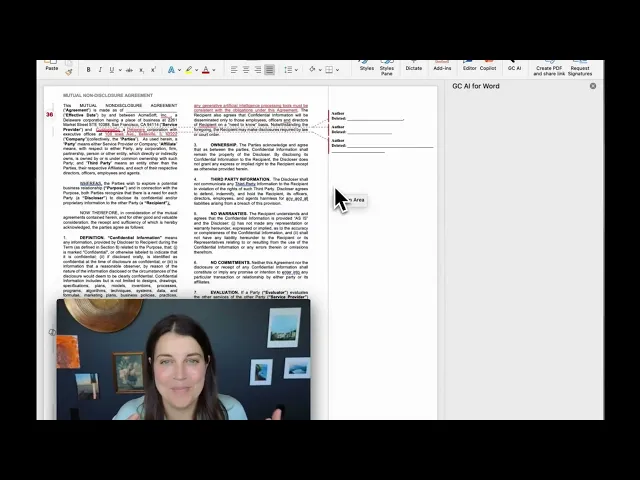
Six legal AI features carry the daily work:
Playbooks: multi-step agentic contract review against your standard positions, pre-built for NDAs, DPAs, and MSAs.
Exact Quote: character-level citations pinned to the source document, verified in one click.
GC AI for Word: the full platform inside Microsoft Word, redlining included.
Research: agents deployed against primary law and government sources, plus US Case Law’s database of 13M+ US federal and state opinions with good-law flags.
Files: permanent document collections up to 1,500 pages, available in every chat.
Easy Prompt: plain language in, structured legal output out.
The July 2026 launch week added five more:
Easy Edit: Word-grade tracked changes in the browser; downloads keep real redlines and comments.
Agent Connectors: GC AI reads and acts in Gmail, Outlook, Slack, Teams, and your document drives, with every action set to Needs Approval by default.
Contract Intelligence: executed agreements from Google Drive, SharePoint, OneDrive, Dropbox, Ironclad, or direct upload land in a Vault, with every extracted term cited and the whole portfolio answerable in plain language.
Automations: recurring skills on a schedule, a morning briefing or a weekly regulatory sweep.
GC AI’s API: the same legal brain inside Salesforce, Jira, Zapier, or your CLM, with no extra seat.
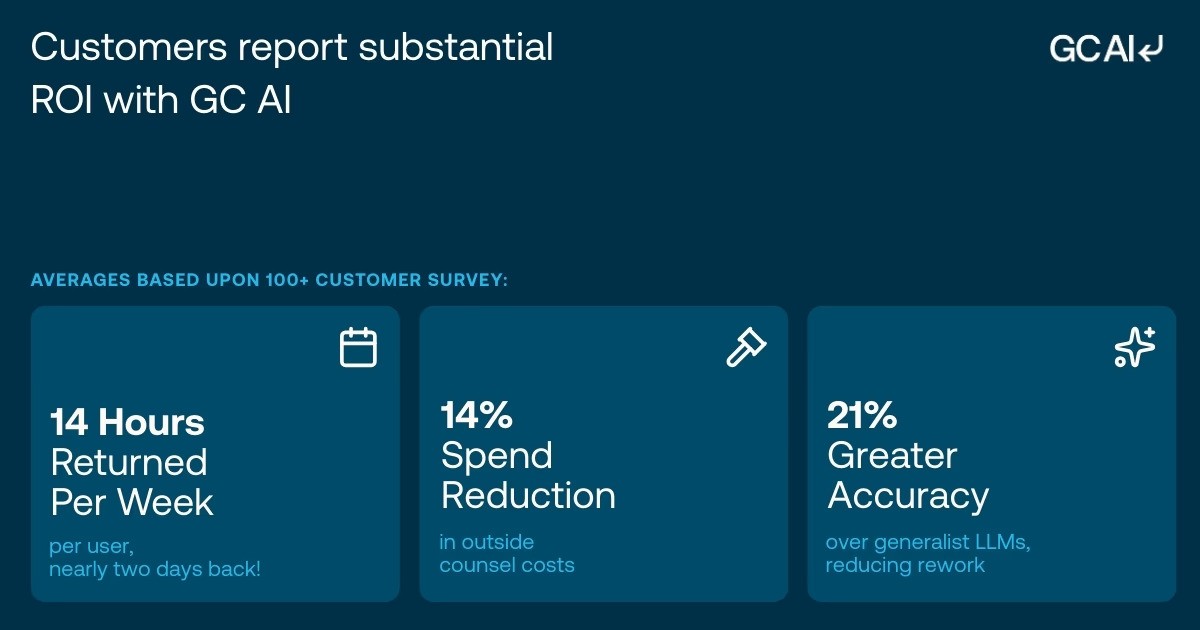
GC AI’s December 2025 ROI study of 100+ active customers found 14 hours saved per lawyer per week and 14% lower outside counsel spend. Against the $1.8 million median outside counsel budget in the ACC benchmarking report, that 14% is roughly $252,000 a year.
GC AI is SOC 2 Type II and SOC 3 certified, GDPR compliant, and AES-256 encrypted, with zero data retention agreements with OpenAI, Anthropic, and Google; the provider list is public on its subprocessor list.
Pricing is $500 per seat per month with a 14-day free trial, no credit card, and no seat minimum. Before any vendor demo, run your own numbers with the ROI Calculator.
Choose GC AI if your team spends real time on the legal work itself: contract review, drafting, research, or redlining in Word.
Ironclad
Ironclad is an enterprise CLM. Its visual Workflow Designer handles multi-step approval chains with conditional branching, and the platform tracks status, stores executed agreements, and reports on cycle times.
It is adding AI agents too: Ironclad Assistant arrived in March 2026, and procurement-focused agents followed in August 2026, aimed at the contracting process.
Whether the indemnification clause carves out the right exceptions is execution work. Teams that run both platforms use Ironclad for contract operations and GC AI for the review itself; Contract Intelligence imports directly from Ironclad.
Choose Ironclad if the gap is operational: multi-party approvals, status tracking, and lifecycle visibility. See the Ironclad alternatives guide and the GC AI vs Ironclad comparison.
Streamline AI
Streamline AI is the legal front door: AI-powered intake and triage that routes incoming requests by type and priority, with analytics on volume and turnaround. In April 2026 it extended into an agent platform that triages demand straight from email and Slack.
Streamline AI was built for in-house teams, and it solves the request-chaos problem specifically. What happens to the contract after routing is a different purchase.
Choose Streamline AI if your pain is unstructured incoming requests: no queue visibility and no turnaround data.
LawVu
LawVu is a legal workspace that combines matter management, contracts, and spend tracking in one system. In June 2026 it launched LegalOS, an AI layer with an assistant, agentic workflows, and AI triage.
The draw is consolidation: matters, contracts, and outside counsel costs in one place. When you evaluate its built-in AI, ask how deep the drafting, review, and research go, and compare the answers against a dedicated execution platform.
Choose LawVu if you want integrated operational visibility on a single platform.
Checkbox
Checkbox is a no-code workflow builder with strong intake forms, now positioned as an AI front door for legal. Teams design custom intake flows with conditional branching: a vendor onboarding flow that routes by contract value, jurisdiction, and data sensitivity, for example.
The flexibility is real, and so is the build time. Teams with legal ops bandwidth get the most out of it.
Choose Checkbox if your ops team has the appetite to build and maintain custom flows.
Harvey
Harvey is a legal AI platform that launched with large law firms, built around firm-scale work: litigation support, M&A diligence, and cross-jurisdictional research. It has added a dedicated in-house offering since 2025.
Harvey sits in the execution layer, and its product assumptions reflect its firm-side origins. Ask how the platform supports adoption without a firm-style structured rollout.
Choose Harvey if you run a large enterprise department with rollout resources and heavy firm-overlap work. See GC AI vs Harvey and the Harvey alternatives guide.
Onit
Onit is an enterprise legal management platform: matter management, spend control, intake automation, and outside counsel tracking in one system of record. It sells as OnitX and, since March 2026, the consolidated Unity ELM platform.
Onit tells you a matter is open. Whether the assignment clause lets a vendor contract survive an acquisition is execution work.
Choose Onit if you need consolidated matters, spend, and outside counsel tracking at enterprise scale.
Tonkean
Tonkean is an agentic orchestration platform that connects the systems you already run: legal, HR, finance, email, and Slack. Its January 2026 Contracts Hub adds AI-native contract orchestration for procurement and legal.
The depth comes from wiring it into each system, which takes time even without code. Teams with dedicated ops or IT support get the most from it.
Choose Tonkean if you have the technical resource to build cross-system automation.
More Teams That Asked to Keep It
Morris’s team at Snyk is one of three in this piece that crossed the same line: from tolerating legal software to asking to keep it.
Joys Choi, Tipalti
Joys Choi, Senior Director of Legal at Tipalti, runs corporate legal with a lean team. Her inflection was an international benefits research project across multiple jurisdictions, the kind of work that typically goes to outside counsel; she finished it in three business days.
“It’s made me incredibly more efficient. Year to date, I’ve saved 609 hours, the equivalent of 76 full working days.”
Without GC AI, she says, she would need two more attorneys right now.
KT Farley, Helix
KT Farley, Chief Privacy Officer and Associate General Counsel at the genomics company Helix, fields privacy and compliance questions constantly, HIPAA responses included. Her problem was re-ramping: getting back up to context fast enough to answer without derailing the day.
“It’s doubled my productivity. In a startup AGC role I touch everything, and the context shifting can be fatiguing. The tool helps me re-ramp quickly: ‘Refresh my memory - here are the three things I recall.’ That makes it sustainable.”
Her junior teammates now run the Playbook checklist first and bring her the output as the starting point for review.
Two Questions That Should Drive Your Decision
Vendor demos all look polished, and the reference customers all sound like your team. Two questions get to the real gap faster.
Orchestration or Execution: Where Does Your Team Stall?
By year two, an in-house team runs some version of orchestration: a CLM, a matter tracker, a shared spreadsheet, or a structured intake process. The gap is more often the execution layer.
Run a week of your team’s work through the lens of friction. “We don’t know where contracts sit” is an orchestration gap; “review, research, and drafting take too long” is an execution gap.
The two are different problems. Buying the wrong one is how a team ends up with a second CLM and the same backlog.
How Quickly Does Your Team Need to Be Up and Running?
Checkbox and Tonkean trade configuration time for flexibility, intake platforms need onboarding weeks, and enterprise CLMs run multi-month implementations. GC AI produces useful output from plain language on day one of a trial.
Ali Hartley, Chief Legal Officer at SimplePractice and a CZ and Friends guest, described what happened when her security team added an AI execution layer to vendor review:
“Previously, I think they told me it used to take over like between three to six hours per vendor review. And now it’s down to less than 30 minutes.”
The Minimal Viable Stack for a 5-Person Legal Team
If you run a five-person in-house legal team and are building close to zero, three tools cover it:
Contract operations: a CLM if your contracts need multi-party approvals and structured authoring (Ironclad at the enterprise end, LawVu for consolidation). If your team would use it mostly as storage, Contract Intelligence covers the repository job instead: agreements land in a Vault and you ask questions across all of them, with no tagging.
Spend management: one platform for e-billing and outside counsel spend, with Brightflag a common pick. GC AI’s Skill Library gives those reports teeth: the External Counsel Invoice Review skill parses each invoice line by line against your guidelines, flags block billing and rate overages, and drafts the correction email.
The execution layer: GC AI for the legal work: drafting, review against your positions, research, and redlining in Word. A five-person team can run it the same week.
That is the minimal viable stack: one platform for where contracts go, one for what outside counsel costs, and GC AI for the legal work itself.
What to Ask Every Legal Workflow Vendor Before You Sign
Five questions separate the platforms worth evaluating from the ones built for a different buyer:
1. What are your zero data retention commitments with your AI providers?
Listen for a contractual commitment in writing, alongside audited certifications. GC AI publishes its answer on a public subprocessor list: SOC 2 Type II and SOC 3 certified, with zero data retention agreements across its AI stack.
2. Is this platform calibrated for in-house counsel, or for law firms?
Some platforms now marketed to in-house teams launched as law firm products. The difference shows up in pre-built templates, default workflows, and support assumptions.
3. When will my team run real work through it?
Ask for a specific date. Configuration-first platforms will describe an onboarding plan; day-one platforms will give you a start date.
4. Can I see exactly where the AI’s output comes from in my documents?
Paraphrased summaries force attorneys to re-verify the source independently. Character-level citation traces every output to the text that generated it.
5. What happens to our documents and data if we cancel?
Ask for a contractual deletion timeline. The answer also shows how the platform treats your data: as a training asset, or as something that belongs exclusively to you.
The fastest way to answer all five for GC AI is to run a real contract through it, the same two-week test David Morris’s team ran at Snyk.
Frequently Asked Questions
What Is the Best Legal Workflow Software for In-House Counsel?
For in-house counsel, the best legal workflow software depends on which layer of the stack needs work. For the AI execution layer (contract review, drafting, research, and redlining), GC AI is purpose-built for in-house legal teams, with pre-built Playbooks for NDAs, DPAs, and MSAs and a full Microsoft Word Add-in. 2,100+ legal teams use it, including 200+ public companies. For intake and request routing, Streamline AI and LawVu cover the orchestration layer. A complete stack typically runs both: one platform for where work goes, one for the legal work itself.
What AI Platforms Integrate with Legal Ops Stacks Like Ironclad or LinkSquares?
GC AI connects to an existing legal ops stack three ways. Agent Connectors reads and takes action in Gmail, Outlook, Slack, Teams, and document drives with per-action approval. Contract Intelligence imports executed agreements directly from Ironclad, Google Drive, SharePoint, OneDrive, and Dropbox into a searchable Vault. And GC AI’s API embeds chat, playbook reviews, and company-profile-aware reasoning into Salesforce, Jira, Zapier, or any platform your ops team runs, with org-pooled credits and no extra seat required.
How Quickly Can You Implement Legal AI in an Existing Workflow?
Days, for the execution layer. GC AI produces usable output in the first week of a trial: Playbooks come pre-built for NDAs, DPAs, and MSAs, and Easy Prompt turns plain language into structured legal output with no configuration. In GC AI’s December 2025 ROI study, 97.5% of teams saw value before the end of month one. Orchestration platforms run longer: intake tools take weeks of configuration, and enterprise CLMs typically involve multi-month implementations.
How Much Does Legal Workflow Software Cost?
GC AI publishes its pricing: $500 per seat per month with a 14-day free trial, no credit card required, and no seat minimum. The seven orchestration and AI platforms compared here quote pricing after a demo, and enterprise CLMs price on annual contracts. Budget for implementation time as well as license cost: a multi-month CLM rollout carries real internal cost before first value.
Does My In-House Team Need Both a CLM and a Legal AI Platform?
That depends on how much of your CLM is workflow and how much is storage. A CLM’s workflow function (authoring, approvals, signature) has no equivalent in a legal AI platform, so teams that rely on it keep both: the CLM for contract operations, GC AI for review, drafting, and research. If your CLM functions mostly as a repository for signed agreements, Contract Intelligence covers that job inside GC AI, with a Vault that syncs from your drives and answers questions across the whole portfolio.
What Is the Best Legal Workflow Automation Software for Contract Review?
For contract review, GC AI’s Playbooks run agentic multi-step reviews against pre-built or custom checklists for every incoming contract. Hayley McAllister, Senior Counsel at Jasper, described the shift after adopting the Word Add-in: “Once the Word plugin rolled out, I pretty much exclusively started using it for all of my redlining and contract review.” For a deeper look at how AI platforms compare on review work, see the AI contract review guide for in-house counsel.
What Is the Difference Between Legal Workflow Automation and Legal Document Automation Software?
Legal workflow automation moves work through the department: intake routing, approval flows, and matter lifecycle management. Legal document automation creates and reviews the documents themselves: drafting agreements, redlining contracts, and generating summaries. GC AI covers document automation and AI-powered legal work; CLMs and intake tools like Ironclad and Streamline AI cover workflow automation.
Is Legal Workflow Software Secure Enough for Privileged Communications?
Security depends on the platform, and the difference is auditable. GC AI is SOC 2 Type II and SOC 3 certified, GDPR compliant, and AES-256 encrypted, with zero data retention agreements with OpenAI, Anthropic, and Google, published on its subprocessor list. For any platform in this category, ask two questions in writing: what are the contractual zero data retention commitments with your AI providers, and which certifications have been independently audited?
Can AI Fully Automate Legal Workflows?
AI handles a substantial portion of in-house legal work today: contract review, research, first-draft agreements, and playbook-driven checklists. The judgment work stays with the attorney: risk tolerance, client relationships, and decisions that require context no platform provides. GC AI’s free legal AI classes, taught by former general counsels and California CLE-eligible, cover where AI helps and where human judgment stays essential.