Copilot for Lawyers in 2026: When It Works In-House
GC AI Team
The case for legal AI in Word has always rested on a clean line: general productivity tools draft and summarize, and reviewing a contract against your own positions takes a layer built for legal work. On April 30, 2026, Microsoft made that case. It released a Legal Agent inside Word that reviews a contract clause by clause against your playbook, flags the provisions that miss your standard, and writes the redline as tracked changes. That launch reframes the question of Copilot for lawyers. The productivity layer and the legal layer are now two different products, and in-house counsel have to decide which one their day runs on.
That makes this the moment to look hard at Copilot for lawyers, and to be honest about where it lands for in-house work.
GC AI is the enterprise-grade legal AI platform Cecilia Ziniti built for the kind of in-house counsel she used to be, a three-time general counsel at Anki, Bloomtech, and Replit. More than 2100+ in-house legal teams across 53 countries use GC AI as of August 2026, including 200+ public companies and 25 unicorns, among them the legal teams at Liquid Death, Columbia Sportswear, Helix, Viant Technology, and Snyk.
We field the Microsoft Copilot question from in-house lawyers constantly, usually some version of “can I use the thing already inside Word.” The answer has a specific shape. Copilot is a strong productivity layer for work that does not require legal judgment. The Legal Agent covers one slice of in-house contract review, in preview. The decision for any in-house team is where the line sits and which layer runs the legal work.
Can In-House Counsel Use Microsoft Copilot for Legal Work?
In-house generative AI usage reached 87% in 2026, nearly double the 44% reported a year earlier, according to the FTI Consulting and Relativity 2026 General Counsel Report. The question for most in-house teams is no longer whether to use AI but which layer to run for which part of the job.
Yes, on a licensed commercial tenant and with the right workflow around it. Two things decide how far Copilot goes for legal work.
The first is the tier. Commercial Microsoft 365 Copilot carries enterprise data protection, while the free consumer Copilot does not, so privileged matters belong on the commercial product.
The second is the workflow. Copilot drafts and summarizes well, and legal judgment, verifiable citations, and your team’s positions still have to come from somewhere.
For broad productivity inside Word, Outlook, and Teams, Copilot is a strong fit out of the box.
For privileged, matter-specific legal work, it is a capable general layer that does its best work with a legal-specific layer on top. Microsoft’s new Legal Agent is its own move toward that layer, currently in early-access preview and scoped to contract review.
Three Strengths Microsoft 365 Copilot Delivers for In-House Legal Work
Microsoft 365 Copilot is an AI layer embedded across the Microsoft 365 apps: Word, Outlook, Excel, PowerPoint, and Teams. It reads the content you already have permission to see through Microsoft Graph, then drafts, summarizes, and answers questions inside those apps. For in-house counsel, three strengths stand out.
First-pass drafting in Word. Copilot will produce a first draft of a clause, a policy section, or a client memo directly in the document, which beats starting from a blank page. For the kind of routine drafting that fills an in-house calendar, a usable first pass in the app you were going to finalize in anyway is real time saved.
Summarizing email and Teams threads. A 40-message Outlook chain about a vendor dispute, or a Teams channel where sales has been promising things legal needs to walk back, collapses into a few bullets on request. For a GC who returns from two days of meetings to a flooded inbox, that triage is one of Copilot’s most practical wins.
Working across the Microsoft 365 stack. Because Copilot reaches across Word, Outlook, Excel, and Teams through one permission model, it can pull a number from a spreadsheet into a memo or reference a meeting you were in. The breadth is the advantage. You stay inside the environment your whole company already runs on.
Three Copilot prompts in-house counsel use. The strengths above show up in the prompts that earn their keep day to day:
-
“Summarize this contract and list every obligation, deadline, and renewal date with the section number for each.”
-
“Summarize this Outlook thread and list every commitment our team made, with who owns each next step.”
-
“Draft a first-pass reply to this counterparty email, keep it firm and professional, and flag anything you are unsure about.”
The prompting gap. General-purpose prompts work, but drafting them from scratch adds friction, and they don’t reflect your team’s specific positions or prior matter context.
GC AI’s Easy Prompt™ builds and saves custom prompts calibrated to your team’s most common legal tasks, so the AI already knows what “review this for our standard positions” means.
The instinct to want AI in the document is right. The question is which layer runs the legal work. Cameron Clark, Head of Legal at Arc’teryx, uses the GC AI for Word plugin:
The more I use it, the more I depend on it. It’s always open in my browser and Word. It’s become a constant companion.
What Microsoft’s Word Legal Agent Reviews, and Three Things It Cannot Do Yet
Microsoft’s Legal Agent is the first Microsoft feature aimed squarely at the work in-house counsel do every day.
It reviews a contract clause by clause against a playbook of your standards and approved language, flags the provisions that fall outside them, and drafts the redline as tracked changes with a comment explaining each edit.
Microsoft built it with the team it hired from legal AI company Robin AI, and it applies a deterministic resolution layer over the edits so the changes stay consistent across the document. For the routine of measuring a counterparty draft against house positions, that is a real step.
Three limits decide how far it reaches today.
It runs in early-access preview through Microsoft’s Frontier program, open to US-based tenants with a Microsoft 365 Copilot license enrolled in Frontier, running Word Version 2604 or higher on Current or Monthly Enterprise channels. Mac users, browser workflows, teams outside the US, and enterprise environments on slower update channels are waiting.
The Legal Agent covers contract review and redlining against a playbook; research, the privilege call, and matter context that carries across documents sit outside its scope.
And Microsoft is explicit that the Legal Agent does not provide legal advice and that the lawyer verifies the output.
The Legal Agent confirms the thesis in-house teams and the legal AI category have been making: legal work in Word needs a layer built for legal work. What limits it is scope: it handles one task, in one app, and it remains in preview.
Is Copilot Private for Lawyers?
Yes, but the answer runs through three tiers, and the one most often missed is the free one. Microsoft now offers Copilot Chat at no added cost to all Microsoft Entra account users with an eligible Microsoft 365 subscription.
Lawyers on a Microsoft 365 subscription may already have access to Copilot Chat without realizing it does not carry enterprise data-protection terms. Copilot Chat is not the right environment for privileged or matter-specific work. The paid commercial tier is a different product, with the enterprise data-protection commitments that in-house legal work requires.
Commercial Microsoft 365 Copilot, the licensed enterprise version, carries Microsoft’s enterprise data protection commitments.
Per Microsoft’s own documentation (updated June 2026):
“Prompts, responses, and data accessed through Microsoft Graph aren’t used to train foundation LLMs, including those used by Microsoft 365 Copilot.” Your prompts and the data they retrieve “remain within the Microsoft 365 service boundary,” processed through Microsoft’s own Azure OpenAI deployment, with logical tenant isolation, encryption at rest and in transit, GDPR compliance, and EU Data Boundary coverage for EU users.
As of January 7, 2026, Anthropic also operates as a subprocessor for Microsoft 365 Copilot under Microsoft’s Product Terms and Data Protection Addendum.
The free consumer Copilot is a different posture entirely.
It is a general-purpose assistant without the enterprise data-protection terms, and it is no place for privileged or matter-specific content. The single most important Copilot privacy step for any legal team is confirming the account is a licensed commercial tenant, where the enterprise terms apply.
Even on the commercial tier, the privacy question for lawyers does not end at “does it train on my data.”
It runs through privilege. In United States v. Heppner (SDNY, February 17, 2026), Judge Jed S. Rakoff held that a represented defendant’s written exchanges with a generative AI platform were neither attorney-client privileged nor protected work product. Three points drove the ruling:
-
The AI is not an attorney.
-
The platform’s terms at the time did not keep the exchange confidential.
-
Counsel had not directed the use.
Rakoff left open a Kovel pathway: counsel-directed use, on a platform with enforceable confidentiality terms, can land differently.
The practical reading for in-house teams is that strong data-protection terms are necessary but not sufficient.
How you deploy the AI, and whether that deployment passes the privilege test, matters as much as the contract behind it. We walk through the full analysis on the Heppner privilege ruling page, and the same privilege questions shape how in-house teams weigh Claude for legal work, whether ChatGPT is private for legal matters, and whether ChatGPT is confidential.
Four Habits That Keep Copilot Safe for Privileged Legal Work
Using Copilot for legal work safely comes down to four habits. The first three turn on privilege and accuracy; the fourth is about scope. They track the duties the ABA already places on lawyers using any generative AI under Formal Opinion 512: competence, confidentiality, and independent verification.
-
Confirm you are on a commercial tenant before any privileged work. Commercial Microsoft 365 Copilot carries the enterprise data-protection terms, and the free consumer Copilot does not. Check the account type before a single privileged document goes near it.
-
Keep the deployment counsel-directed. As the Heppner ruling above shows, privilege protection for AI exchanges is strongest when a lawyer directs the use on a platform with enforceable confidentiality terms. Decide who owns that decision and document it.
-
Verify every citation before you rely on it. Copilot produces fluent drafts, and a fluent draft is the easiest one to over-trust. For anything you will file, send, or advise on, check each cited fact against the underlying document yourself.
-
Match the scope to the platform. Route first-pass drafting and email triage to Copilot. Route structured contract review, playbook-driven redlining, and privileged matter-specific work to GC AI, a legal AI platform that covers each of those workflows.
Three Gaps In-House Teams Hit When Copilot Meets Real Legal Work
Microsoft 365 Copilot is a strong general-purpose layer across Microsoft 365. For in-house legal work specifically, three gaps tend to surface once a team moves past first drafts and email summaries.
Persistent legal context. Copilot reads what is in your Microsoft Graph, and it stops short of holding your legal team’s playbooks, fallback positions, prior matters, or house style as durable, reusable context across every chat. Each session starts general. In-house work runs the other way: the answer to “is this indemnity acceptable” comes from your company’s own positions, and the market average will not tell you what those are. Ritesh Patel, Chief Legal Officer at Viant Technology, on what changes when the AI becomes the trusted first stop:
It’s also replaced Googling. Now my first stop is GC AI. I describe the setup, get an answer with citations, and use that to brief my team or our business partners.
That shift depends on the AI knowing your context, every time, without a re-briefing.
Citations need verification. Microsoft is direct about this in its documentation: Copilot’s responses “aren’t guaranteed to be 100% factual,” and users “should still use their judgment when reviewing the output.” For legal work, “the contract says X” has to point to the exact line in the contract, character for character. A verbatim citation and a model-generated paraphrase are different things, and only the citation holds up under review.
GC AI’s May 2026 In-House Legal Bench tested four AI platforms across 100 in-house tasks with 1,200+ attorney-developed criteria: GC AI passed at 86.8%, with the largest advantages on regulatory tracking and legal research, where the difference between a paraphrase and a character-for-character citation matters most.
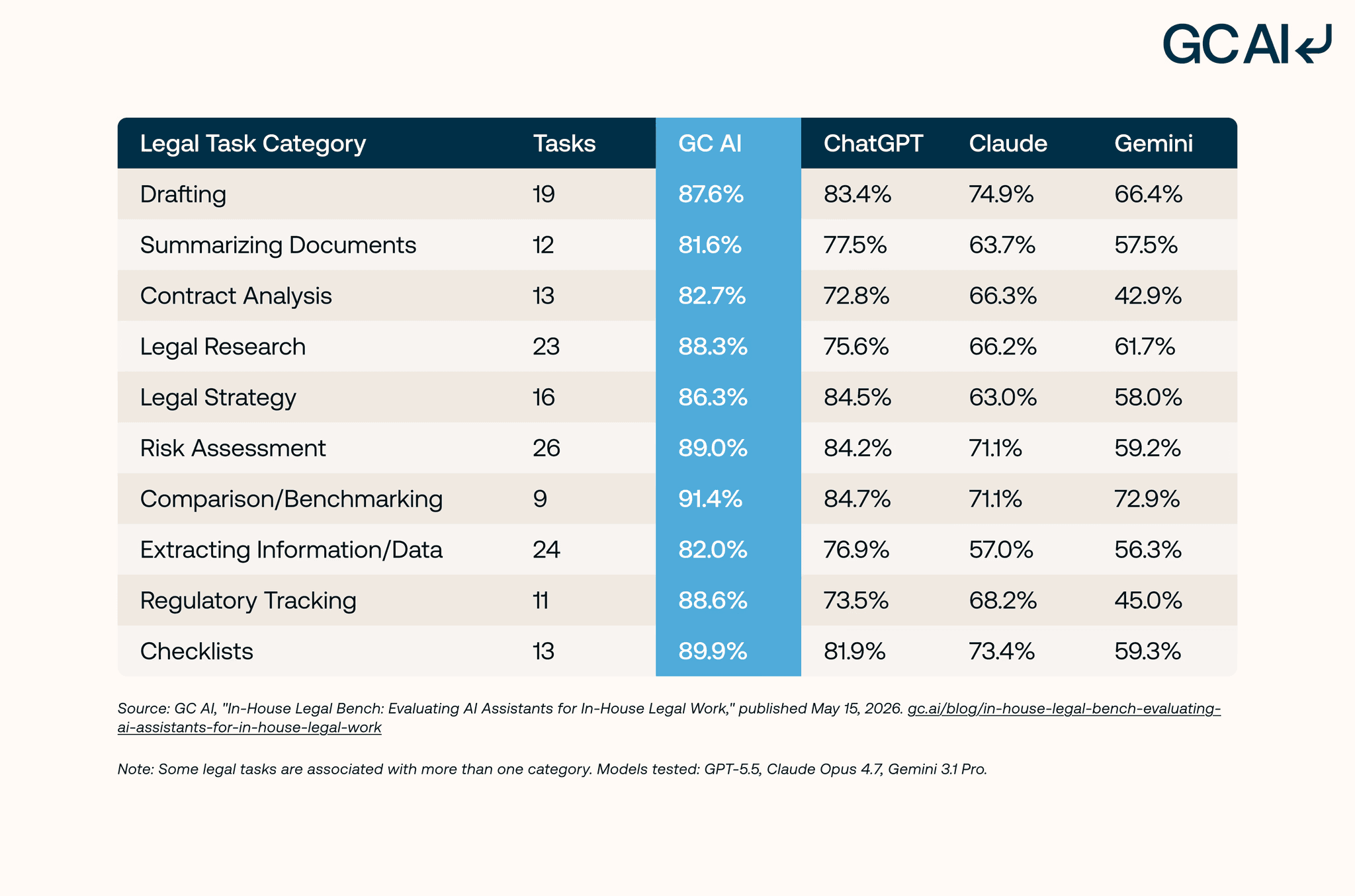
The full in-house workflow. Microsoft’s Legal Agent brings playbook contract review into Word, which covers one slice of an in-house day. The rest of it runs on research, regulatory questions, the privilege call, and matter context that has to carry from one document to the next. For in-house teams that need a legal layer built for the legal department inside a company, GC AI is that layer: generally available across Word, the browser, and a web app, with the playbooks, verbatim citations, and persistent matter context that in-house work runs on.
Copilot remains a strong choice for company-wide productivity, and the Legal Agent extends it into one slice of contract review. The deciding question for in-house teams is which layer covers the full in-house day.
How In-House Teams Run a Legal Layer in the Same Word as Copilot
What in-house teams evaluating Copilot don’t always anticipate: GC AI for Word runs in the same Word environment and adds the legal-specific layer Copilot leaves general.
Persistent Context: Your Positions Load into Every Session
Playbooks, Custom Company Profile, and Files carry your team’s standard positions, house style, and prior matters into every session. The AI starts with your company’s context, not a general one.
Verbatim Citations, Character for Character
Exact Quote pulls citations from any document character for character. “The contract says X” points to the exact line, not a model-generated paraphrase that reads well but cannot be verified against the source.
Research, Redlining, and the Privilege Call: One Platform
GC AI runs in the same Word environment, in the browser, and in a web app, covering legal research, contract redlining, the privilege call, and matter context that carries from one document to the next.
Copilot lives inside your Office apps but has no legal-grade case-law retrieval, so it cannot pull and verify real court opinions. GC AI now adds US Case Law directly in chat. Ask a question in plain English, and it searches a dedicated database of 13M+ US federal and state court opinions, reads the full opinions, checks treatment data to flag whether a case is still good law, and links every citation to the full opinion in a built-in reader.
Built for Enterprise Security and Procurement
GC AI is SOC 2 Type II and SOC 3 certified, GDPR compliant, and AES-256 encryption. We maintain zero-data-retention agreements with our LLM providers wherever feasible: what enterprise legal teams need for security reviews and procurement.
For broad company-wide productivity, Microsoft 365 Copilot is a strong layer. The legal-specific layer is what turns a first draft into a redline calibrated to your team’s positions.
Microsoft Copilot, the Word Legal Agent, and GC AI: Side by Side
| Capability | Microsoft 365 Copilot | Word Legal Agent (preview) | GC AI |
|---|---|---|---|
| Built for | Company-wide productivity across Microsoft 365 | Contract review against a playbook | In-house legal work end to end |
| Availability | Generally available as an add-on license | Frontier early-access preview, US tenants, Word on Windows desktop only, as of June 2026. No expansion timeline announced. | Generally available in Word, the browser, and a web app |
| Playbook-based contract review | No, as of June 2026 | Yes, clause by clause against your playbook | Yes, through Playbooks across every agreement |
| Citations | Output needs human review | Supporting citations for each suggested edit | Exact Quote pulls verbatim citations, character for character |
| Matter context across chats | Limited to Microsoft Graph permissions | Scoped to the document under review | Yes, through Files and Projects |
| Trains foundation models on your data | No, content stays in the Microsoft 365 service boundary | No, same Microsoft 365 protection | No, zero-data-retention agreements with our LLM providers wherever feasible |
| Privilege posture for the Heppner test | Enterprise data protection, deployment is on your team | Enterprise data protection, Microsoft notes it does not give legal advice | Built around counsel-directed, confidential deployment |
| Security | Enterprise data protection, EU Data Boundary | Same Microsoft 365 enterprise data protection | SOC 2 Type II, SOC 3, GDPR, AES-256 |
| Pricing | $30/user/mo enterprise (annual); $18–$21/user/mo Business (under 300 users); pricing as of June 2026 | Requires a Microsoft 365 Copilot license | $500/seat/mo, 14-day free trial |
Comparison as of July 2026.
Microsoft now offers two layers in Word: Copilot for company-wide productivity, and the Legal Agent for playbook contract review in preview.
GC AI handles the whole in-house job: generally available across Word, the browser, and a web app, with the playbooks, verbatim citations, persistent matter context, and privilege posture that in-house work runs on.
For a broader comparison of the leading legal AI tools built for Microsoft Word, see The 4 Best Legal AI for Word for In-House.
Start Your GC AI Trial in the Word You Already Use
In-house teams that already run on Microsoft 365 get Copilot’s productivity layer through their existing subscription and a legal-specific layer through GC AI in the same Word environment. GC AI’s December 2025 ROI study of more than 100 active customers found teams save an average of 14 hours per week: time that was going to first drafts and inbox triage that now goes to the work that requires a lawyer.
In-house teams building AI fluency start with GC AI’s free legal AI classes, California CLE-eligible and taught by former general counsels.