You know the week: NDA on Monday, vendor DPA on Tuesday, MSA amendment on Wednesday, board consent on Thursday, privacy policy refresh on Friday. Plus the offer letter the CEO needs today and the demand letter that has to go out before the statute of limitations quietly clicks over.
If you are in-house, this is the reality. More documents land each year. The team has not grown. The business has gotten sharper about what “fast” means. The drafting queue does not clear.
This is where AI earns its keep. Loaded with the right context, it hands back a first draft in minutes. Your hours stop going to the mechanical parts of the work and start going to the judgment calls: the counterparty dynamic, the business context, and the parts that still need your eyes.
Skip the context, and the output reads closer to an intern’s first pass than a draft you would send - more rewriting than editing.
This playbook walks through how to use AI for legal document drafting in practice. Ten documents in-house teams draft each quarter. The shape of a good AI prompt for each. The common mistake that tanks the output. And how GC AI handles the work.
Who This Drafting Playbook Is For
You, probably. The general counsel running a two-person team. The associate GC who is also the team’s employment counsel, privacy counsel, and commercial counsel (all before lunch). The legal ops lead encoding the team’s standards into playbooks. The contract manager running the intake desk. The finance or operations leader with legal-adjacent sign-off on vendor paper and board consent forms. Different roles, same drafting workload.
If you are the last set of eyes before the paper leaves the building, this piece is for you.
GC AI serves this exact room. Cecilia Ziniti, GC AI’s CEO and co-founder, was a general counsel three times, at Anki, Bloomtech, and Replit, and an in-house counsel at Amazon and Cruise. She started GC AI because the problems she saw firsthand (the drafting queue that never cleared, the board memo due at 5 P.M., and the offer letter with four state-variant clauses) were not solved by any platform built for law firms. That experience is embedded directly into GC AI’s system prompt, tone, and workflows.
The Four Moves Before You Draft Anything
Drafting output is only as good as the context you load before the first word. Type “draft an NDA” into ChatGPT and you get back something that reads like a first-year law student wrote it blindfolded. Load the four moves below, and the first draft arrives usable rather than throwaway. That is the difference between AI that earns daily use and AI that stays in the trial folder.
Load company context. The counterparty type, your industry, the deal stage, and any prior agreements that govern this relationship. GC AI’s Custom Company Profile keeps this as persistent state, so each draft arrives calibrated to your company’s voice and templates without re-briefing.
Set the risk tier. A vendor NDA with a sales prospect calls for a light touch. A mutual NDA with a strategic investor calls for heavier review. Name the tier, and the output matches the stakes.
Specify the output format. Full redline, clean draft, summary memo, plain-English explanation for the business stakeholder, or a checklist for a colleague to run. The same underlying analysis produces four different documents depending on who reads it.
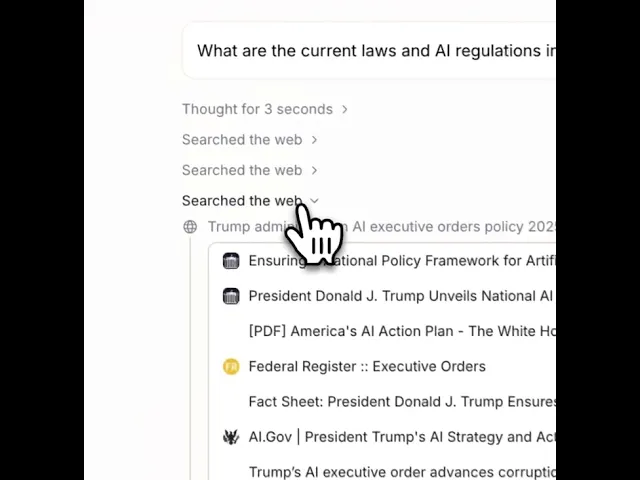
Name the verification standard. “Cite each suggested revision to the specific clause in the source document” is the line that protects the lawyer’s name on the output. Exact Quote is GC AI’s character-level citation system, which returns verbatim source references you can verify with a click.
Teams using GC AI for drafting save 14 hours per lawyer per week on average, per the December 2025 ROI study of more than 100 active customers.
Matthew Campobasso, General Counsel at Zone & Co., on what that compression looks like on a real document:
What used to take me maybe 10 hours over the course of two days, I can get done in 10 minutes.”
The four moves above are how that number becomes real.
The 10 Documents In-House Teams Draft With AI
Here is the set, ordered the way an in-house week usually unfolds:
Mutual NDA
Vendor DPA and privacy addenda
MSA amendment
Board consent and written action
Employment offer letter (state-variant)
Privacy policy refresh
Regulatory response letter
Demand letter and response
IP and invention assignment
Termination notice and wind-down
Each section below covers the same four beats: what makes the document tricky, the shape of a good AI prompt, the common mistake that tanks the output, and how GC AI handles it in practice.
Quick note on the prompt shapes: they are illustrative, meant to show the level of specificity that produces a usable first draft. In GC AI, Easy Prompt expands a half-sentence request into exactly this kind of structure automatically, and Playbooks and the Skill Library let the team encode a prompt once and run it repeatedly.
Mutual NDA
The NDA is where in-house drafting volume lives. Short, stylized, and the document where small inefficiencies compound the fastest. Three new NDAs a week at 45 minutes each is 117 hours a year. Enough to put a dent in a vacation. The draft lives or dies on five clauses: definition of confidential information, term, residual clause, carve-outs, and governing law.
Prompt shape. “Draft a mutual NDA between [company] (a [industry] company based in [state]) and [counterparty] (a [counterparty type]), for the purpose of evaluating [deal context]. Confidential information definition should include technical, commercial, and personnel data, with carve-outs for independently developed or publicly available information. Term of three years, governing law of [state], with a residual clause permitted for general know-how retained in employee memory.”
Common mistake. Asking for a “standard NDA” without specifying counterparty type and deal context. The output lands generic and you spend the saved time re-briefing it.
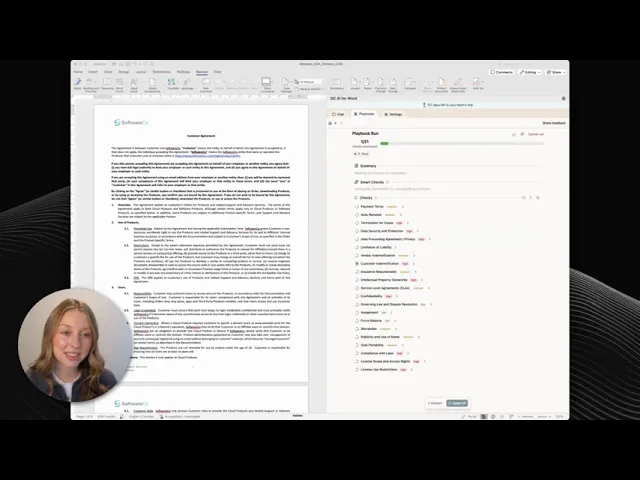
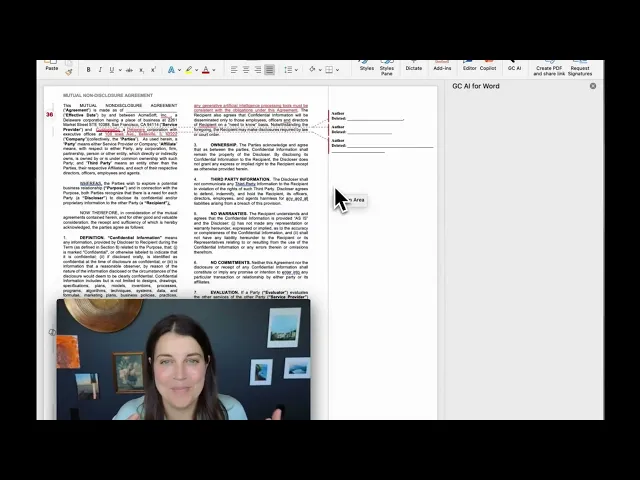
How GC AI handles it. Playbooks ships with a pre-built NDA playbook that encodes the five clauses above and flags deviations against your standard. Run it from GC AI for Word and the redline lands inside the document you are already drafting.
Joys Choi, VP of Legal at Tipalti, on the cumulative effect across NDA and vendor work:
“It’s made me incredibly more efficient. Year to date, I’ve saved 609 hours, the equivalent of 76 full working days.”
Vendor DPA and Privacy Addenda
New vendors arrive. New DPAs arrive with them, each one convinced that its treatment of cross-border transfers is the correct one. GDPR, CPRA, Virginia CDPA, Colorado CPA, and a dozen other state-level privacy regimes turn the work into a rolling compliance exercise. The drafting is amendment work: sub-processor lists, SCC schedules, BAAs, and cross-border transfer mechanisms.
Prompt shape. “Review this DPA against our standard. Flag any gap on the following: sub-processor notice period below 30 days, absence of SCCs for EU data transfers, absence of a data subject rights turnaround commitment, and any audit rights that require more than ten business days of notice from us. Draft amendment language for each gap.”
Common mistake. Treating a DPA like a contract redline instead of a compliance checklist. Vendors standardize these gaps across deals. The analysis should match.
How GC AI handles it. A DPA Playbook (one of the four pre-built Playbooks, alongside NDAs, MSAs for SaaS, and MSAs for commercial purchases) encodes your standard and runs the full checklist in one pass. Output: a structured risk table plus draft amendment clauses. A single page ready to send to the vendor.
MSA Amendment
The MSA amendment is the document behind quiet year-end renewal panic. Short paper. High risk per word. Change one clause and the ripples reach indemnification, liability caps, data processing, and audit rights. Senior counsel who have lived through a year-two audit dispute know exactly where to look.
Prompt shape. “Draft an amendment to the attached MSA that [changes scope / adjusts fees / extends term / adjusts termination rights]. Identify any downstream clauses in the original MSA that the amendment affects, including indemnification, liability caps, data processing, and termination. Produce the amendment as a standalone document with cross-references to the affected clauses.”
Common mistake. Drafting the amendment without asking the platform to scan the underlying MSA for ripple effects.
How GC AI handles it. Projects keeps the MSA as persistent matter memory, so the amendment work references the original document without re-upload. Exact Quote cites the specific clauses the amendment touches, and the Word Add-in surfaces the cross-references in context.
Hayley McAllister, General Counsel at Jasper, on the shift to Word-native drafting:
“Once the Word plugin rolled out, I pretty much exclusively started using it for all of my redlining and contract review.”
Board Consent and Written Action
Fun fact: Delaware has long allowed the board to act by unanimous written consent in lieu of a meeting (DGCL §141(f)). The format has not changed much in decades. What has changed is the pace. Now the CEO wants the consent in an hour, the corporate secretary is on a flight, and the option-grant schedule on page four needs updating before it lands in the data room.
Prompt shape. “Draft a unanimous written consent of the board of directors of [company] approving [corporate action], covering: the resolution authorizing the action, a ratification of prior acts related to the action, a delegation of authority to officers to execute implementing documents, and the effective date. Include the standard officer certification block.”
Common mistake. Dropping in last year’s consent and updating the recitals. The governance ripple is where mistakes happen, and governance mistakes have a long tail.
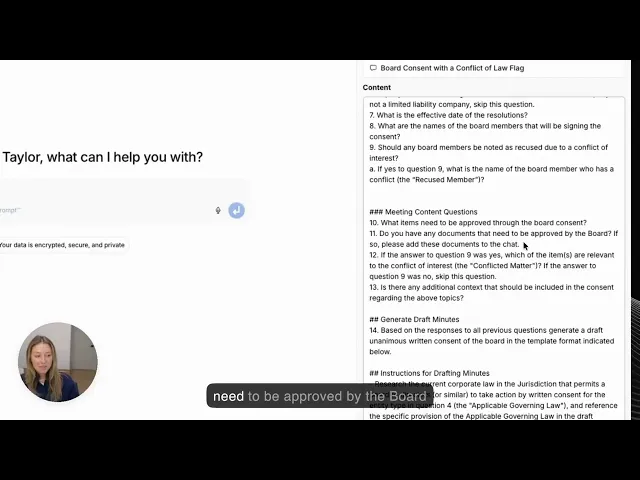
How GC AI handles it. The Skill Library ships a board-consent skill that encodes the resolution structure, ratification language, and officer delegation blocks. Run it from the web app or from GC AI for Word, and the draft lands in the same document the corporate secretary will circulate.
Employment Offer Letter (State-Variant)
The clauses shift state by state. California banned non-compete language (AB 1076, effective January 1, 2024). Massachusetts requires specific sick leave notices. New York City mandates pay transparency. Washington requires salary ranges. An offer letter drafted for California with a non-compete clause exposes the company on day one.
Prompt shape. “Draft an offer letter for a [role] based in [state], at a [company stage] company. Include: title, compensation, equity grant, bonus structure, PTO, benefits summary, at-will statement compliant with [state] law, confidentiality obligation, invention assignment, and any state-specific clauses required (pay transparency, sick leave notice, non-compete restrictions). Flag anything that should be omitted for this state.”
Common mistake. Using a single offer letter template across jurisdictions. State-specific compliance is where the errors compound.
How GC AI handles it. Research surfaces the current state-level requirements with citations to primary law. Easy Prompt builds the structured request from a half-formed thought. Custom Company Profile keeps your standard compensation, equity, and benefits language on file, so the draft arrives calibrated to how your team writes offers.
Privacy Policy Refresh
The privacy policy is the legal document with the biggest external audience, mostly unread until a regulator decides to read it. Updates run on a regulatory cadence: CCPA amendments, state-level privacy laws phasing in, EU AI Act triggers, and sector-specific rules. The drafting is delta work: what changes, why it changes, and how the refreshed policy reads to a consumer who has never heard of the CCPA.
Prompt shape. “Review the attached current privacy policy against the following recent changes: [list regulatory updates]. For each change, identify the section of the policy that requires an update, draft the revised language, and summarize the consumer-facing impact in one sentence. Produce the output as a redline plus a plain-English change summary suitable for the marketing team.”
Common mistake. Starting the refresh from a blank page rather than a delta against the current policy. You lose the institutional memory baked into the prior version.
How GC AI handles it. Upload the current policy and the regulatory source into a single project. Playbooks run the refresh against the encoded standard, Exact Quote cites the specific regulatory language driving each change, and the plain-English change summary lands ready for marketing to push to the site. No translation pass required.
Regulatory Response Letter
A state AG inquiry. A privacy regulator data request. An FTC comment letter. An agency subpoena response. Regulators read these under a microscope, and a court may read them a year later. Speed matters. Precision matters more.
Prompt shape. “Draft a response letter to [regulator] addressing their [request type] dated [date]. Respond to each of their specific questions with: a factual answer based on the attached source documents, a citation to the source document, and a legal position where applicable. Flag any question where the factual record is incomplete or where a privilege assertion applies. Tone: respectful, precise, no concessions beyond what the record supports.”
Common mistake. Drafting the response without confirming the factual record for each question. Regulators will compare the letter against documents they already have, and a mismatch between what you say and what the record shows is the kind of gap that turns an inquiry into an action.
How GC AI handles it. Projects holds the full document set for the matter. The response letter references the specific source documents with Exact Quote citations, and the draft flags any question where the record is thin, so outside counsel can weigh in before submission rather than after.
Demand Letter and Response
The demand letter is where in-house counsel find out what their own writing sounds like under pressure. Pre-suit demand, cease and desist, response to opposing counsel’s demand, or a negotiated settlement overture. The draft sets the tone of the dispute and, if the dispute lands in front of a judge, the tone of your case.
Prompt shape. “Draft a demand letter from [company] to [counterparty] regarding [dispute]. Include: a factual summary referencing the underlying documents, the legal claim, the specific remedy sought (with dollar amount if applicable), a deadline for response, and a reservation-of-rights clause. Tone: firm but professional, no hyperbole, no admissions that could be used defensively later.”
Common mistake. Writing a demand letter that reads as aggressive in a way the judge will see later. In-house tone beats law-firm tone in disputes like these, and the reason is partly voice and partly restraint.
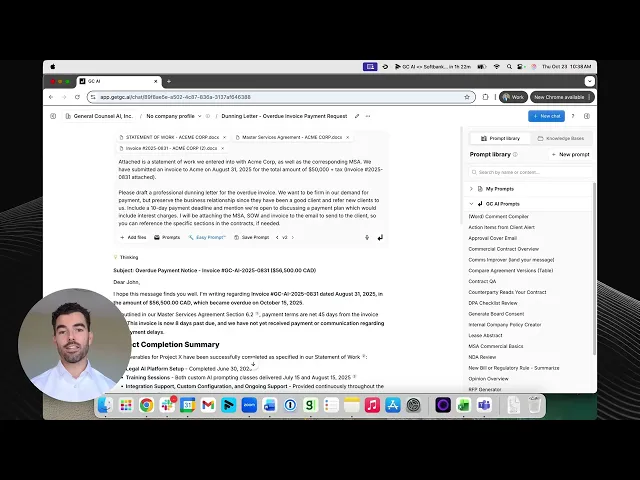
How GC AI handles it. The Skill Library ships demand-letter and response-to-demand skills that encode a professional-but-firm tone.
Cecilia, teaching the GC AI 101 class in January 2026, described a customer’s compression directly:
“We have one of our customers… they write basically demand letters and they get the Zendesk ticket from it and they get essentially a great letter that they can start from. And it used to be about a three hour task and now it’s about a 10 minute task.”
The prompt shape above is the shape of that compression.
Teams handling litigation matters may also want to compare platforms designed specifically for motions, briefs, and court filings. Our guide to the best AI for legal brief writing covers the leading tools for citation-verified brief drafting and litigation workflows.
IP and Invention Assignment
The one-page document each new employee signs (and rarely reads), plus the heavier version for consultants and contractors. The clause structure decides the outcome if the employee later invents something valuable. The real trick is the prior-inventions schedule, which is where employees list what they already own before starting.
Prompt shape. “Draft an invention assignment agreement for a [role] at [company stage, industry]. Include: present assignment of work-made-for-hire inventions, disclosure obligation for inventions conceived during employment, carve-out for prior inventions documented on an attached schedule, restrictions on outside work in the company’s field during employment, and a survival clause covering inventions assigned during employment. Flag the California-specific clause required by Labor Code Section 2870 if the role is based in California.”
Common mistake. Skipping the prior-inventions schedule. If the employee invents something that depends on prior work, the scope of the assignment gets litigated and the result is expensive on both sides.
How GC AI handles it. The IP assignment skill in the Skill Library produces the full agreement with a prior-inventions schedule template, the California Section 2870 clause (a reminder: §2870 preserves employee rights to inventions developed entirely on the employee’s own time without the company’s resources), and the disclosure-and-survival language in one pass.
Termination Notice and Wind-Down
The last document in a commercial relationship, and the first document a judge reads if the termination is disputed. Notice of termination for cause, termination for convenience, wind-down obligations, and data return or destruction. This is the drafting moment where the paper trail you built during the relationship pays off or does not.
Prompt shape. “Draft a termination notice from [company] to [counterparty] for the attached agreement, on the basis of [termination ground]. Include: the specific contract provision invoked, the factual basis for the termination, the effective date, any transition or wind-down obligations, the data return and destruction requirements, and the reservation-of-rights clause. Produce a one-page plain-English summary for the business owner alongside the formal notice.”
Common mistake. Drafting the termination notice without tracing the factual basis back to the contract’s termination trigger. Disputes start in the gap between the cited ground and the evidence on record.
How GC AI handles it. Projects holds the underlying contract plus any notice-of-default correspondence. The termination notice draft cites the specific termination provision and the factual record with Exact Quote, and the business summary lands in plain English for the commercial owner without a second drafting pass.
How In-House Teams Move From Trial to Daily Drafting Uses
Platforms without training programs get less usage, regardless of capability. Cecilia tells each 101 class that context is king, which sounds glib until you try drafting an NDA without it and realize how much of a lawyer’s judgment is context in the first place. Prompting is a skill. AI fluency is what compounds the investment over the first six months.
More than 6,000 lawyers have completed GC AI’s free, California CLE-eligible classes, taught by former general counsels. Four classes map directly to the drafting workflow:
101: Intro to AI Prompting covers the prompting fundamentals that show up in each section of this playbook.
105: AI in Word walks through AI-assisted drafting and redlining inside Microsoft Word.
106: Using Playbooks teaches teams how to run the pre-built Playbooks for NDAs, DPAs, and MSAs.
107: Building Playbooks covers how to build your own playbooks for the documents that are unique to your business.
Business Insider reported in January 2026 that in-house legal teams are moving faster than law firms on AI adoption, driven by cost pressure and the ability to pilot without partner-approval cycles. Training is what turns a pilot into a practice.
Guillermo Rauch, the founder and CEO of Vercel (and a GC AI investor), put the in-house framing on Lenny’s Podcast this way:
“Our legal team loves this tool called Get GC.AI. They could in theory go to ChatGPT to ask legal questions, but someone out there decided, ‘I’m going to build the best legal AI tool in the world. It’s going to be up to date. I’m going to obsess about this problem.’ The CEO herself is a lawyer, so it’s going to be hard to compete with that.”
Cameron Clark, head of legal at Arc’teryx, described the daily drafting payoff plainly:
“What used to take an hour, like reviewing contract feedback and drafting a reply, now takes ten minutes, and the results are better.”
Join more than 6,000 in-house lawyers learning AI legal skills with GC AI.
How to Get Started With AI Drafting in GC AI
Five concrete steps from zero to daily drafting use.
Sign up for the 14-day free trial. No credit card. No seat minimum. No procurement overhead. The trial runs on the paper your team is already drafting this week.
Take the 101 class. Free, California CLE-eligible, an hour of prompting fundamentals calibrated for in-house lawyers. Teams that finish the class hit daily use faster than teams that skip it.
Run your next NDA through GC AI for Word. Start with the NDA Playbook. Compare the output against what your current workflow would produce in the same fifteen minutes. Adjust the prompt shape until the output reads like a draft you would send.
Save the refined prompt as a skill. The Skill Library holds it as a one-click run for anyone on the team, which is how a senior counsel’s judgment scales to the junior counsel without re-briefing.
Customize the Company Profile so the team’s voice carries across drafts. Custom Company Profile encodes your team’s templates, tone, and standards as persistent state. Each draft the team runs, regardless of who is running it, arrives calibrated the same way. This is the step that turns individual use into team infrastructure.
Alexis Palmer, Senior Counsel at Snyk, on how this plays out across a team:
“Having saved prompts means anyone on my team can run the same review I would. If I’m on PTO, I know they’ll get a similar result and apply their own judgment from there.”
Want a Solutions Attorney to walk through the drafting workflow on your real documents?
Start With the Next Document on Your Desk
The easiest way to evaluate AI drafting is to draft with it. Pick the next NDA, DPA, or offer letter in your inbox. Run it through GC AI for Word. Let the output speak for itself.
GC AI is an enterprise-ready legal AI platform used by 1,900+ in-house teams across 53 countries, including 200+ public companies and 25 unicorns, with an NPS of 77.
Two companion pieces in this cluster go deeper on adjacent questions.
If your workflow extends beyond drafting into review, our AI Legal Document Review: The In-House Counsel’s Field Guide covers the broader in-house document taxonomy. And for the contract-focused view of the review side, see AI Contract Review for In-House Counsel.
Frequently Asked Questions
The questions in-house teams ask in sales calls and 101 class chats, answered straight.
What Is the Best AI for Legal Document Drafting?
For in-house counsel, GC AI is a legal AI platform purpose-built for the full in-house drafting workload, used by 1,900+ in-house teams across 53 countries. Capabilities include Playbooks for repeatable drafting against team standards, Exact Quote for character-level citation from source documents, GC AI for Word for Word-native drafting, and the Skill Library for reusable drafting skills shared across the team.
How Accurate Is AI for Legal Drafting?
Accuracy depends on the platform and the task. Platforms with character-level citation, a legal-specific system prompt, and playbook-driven drafting produce more reliable output than general-purpose AI. Per the December 2025 ROI study of more than 100 active GC AI customers, outputs from a purpose-built legal AI platform reflect 21% greater perceived accuracy compared to generalist AI tools on the same legal tasks. A human lawyer reviews AI output before it leaves legal.
Is AI Drafting Safe for Confidential Documents?
With the right platform, yes. GC AI is SOC 2 Type II and SOC 3 certified, GDPR compliant, with zero data retention agreements with OpenAI and Anthropic, and AES-256 encryption. The free tier of ChatGPT and Claude use conversations for model training by default, which creates confidentiality risk for confidential documents. Enterprise-grade legal AI platforms operate under a different posture, which is what makes them safe for the drafting workload.
How Much Does AI for Legal Drafting Cost?
GC AI publishes pricing at $500 per seat per month with a 14-day free trial, no credit card, and no seat minimum. Firm-side platforms like Spellbook and enterprise platforms like Harvey require a sales conversation. General-purpose AI like ChatGPT Business runs $20 to $25 per user per month, with trade-offs on citation discipline, legal system prompt quality, and confidentiality posture. In-house teams using GC AI report a 14% reduction in outside counsel spend, which works out to roughly $252,000 in annual savings at the median in-house department per ACC benchmarking data.
What Is the Difference Between AI Legal Drafting and AI Contract Review?
AI legal drafting produces a new document or an amendment to an existing one. AI contract review analyzes an existing document against a standard. The two workflows share infrastructure (document grounding, legal system prompt, citation, playbook) and serve different moments in the deal or matter. A platform built for in-house work covers both. For the contract review deep dive, see AI Contract Review for In-House Counsel.
Does AI Drafting Replace In-House Lawyers?
No. AI drafting augments in-house lawyers by automating the repetitive parts of the first draft, which frees the lawyer to spend time on the judgment calls: the counterparty dynamic, the commercial risk, the board dynamic, the regulator’s likely response. ACC Law Department Management Benchmarking data shows that in-house teams adopting AI keep more work in-house, expanding what a given team can cover. The lawyer remains the final reviewer on each document.