International Law in GC AI: From Contract Questions to Cited Answers
By Cecilia Ziniti, Co-Founder and CEOPublished
We launched the International Law database in GC AI, with case law and legislation from more than 30 jurisdictions across Europe, Asia-Pacific, and Latin America.
Since we released US Case Law, customers have asked us to bring that research experience to other countries. International Law now lets teams in covered countries research local laws in GC AI.
US teams can use it to research the laws governing international contracts, overseas employment, and cross-border data transfers.
Questions In-House Teams Can Bring to It
A privacy lawyer at a US software company with European customers needs to know where EU to US transfers stand:
Can we still legally transfer personal data from the EU to the US? Summarize the key recent EU court decisions and what they mean for a US software company like ours.
GC AI summarizes the recent EU decisions and what they mean for the business, with citations to the authorities it uses.
Before a negotiation, commercial counsel can research how courts have treated liability caps:
Under English law, how do courts interpret limitation of liability clauses, and when would a cap be subject to the reasonableness test in the Unfair Contract Terms Act 1977?
The answer draws on the court decisions and the 1977 Act together.
Upload the agreement to the same conversation, then ask how those authorities apply to the proposed cap and what to revise before you send back the redline.
Employment counsel planning a restructuring can compare three countries in one question:
What are the employee consultation and notification requirements for a collective redundancy in Germany, France, and the Netherlands, including works council obligations? Summarize the key differences in a table.
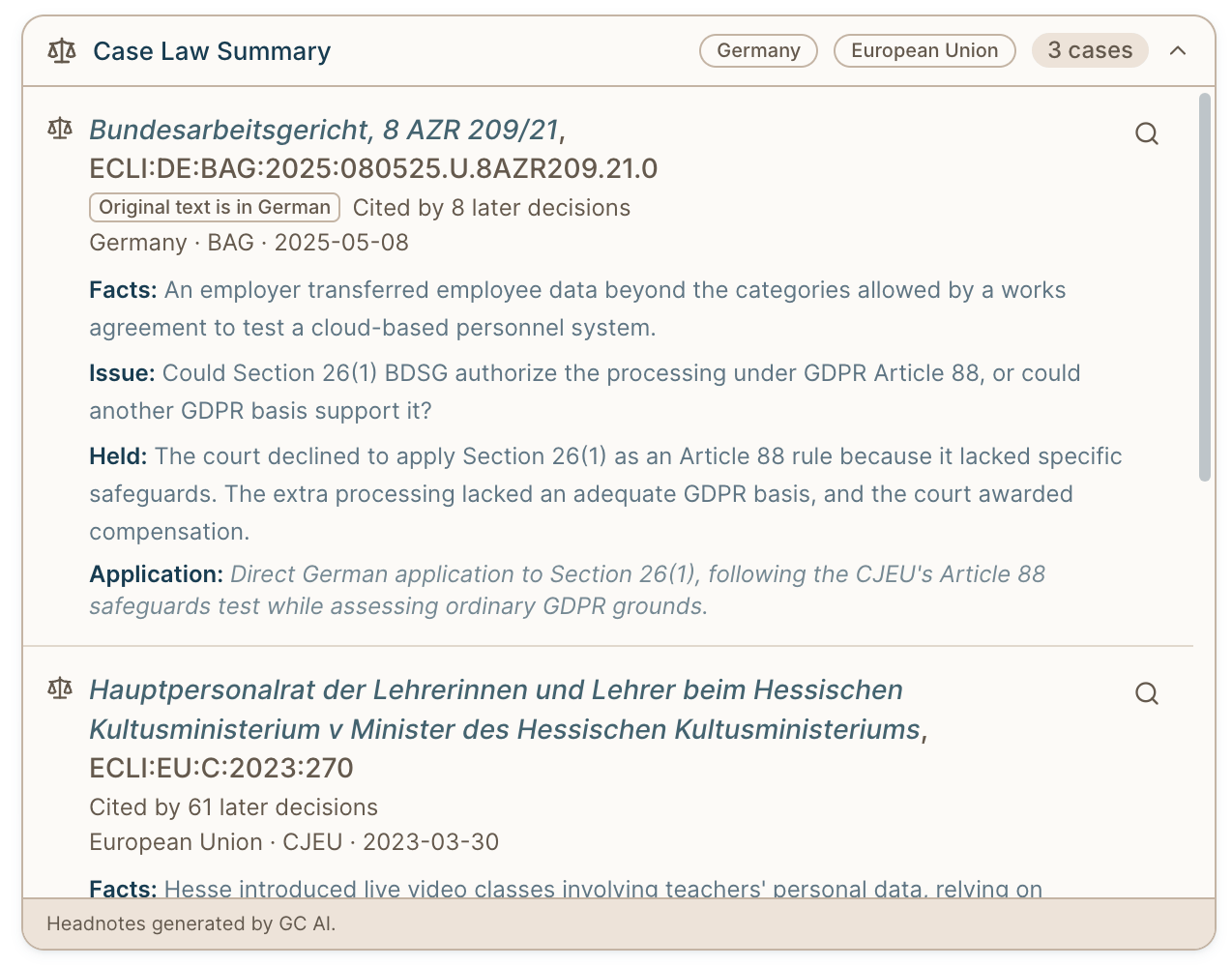
When a question turns on several decisions, you can also ask for a case law summary table that sets out the citation, facts, issue, holding, and application to your question.
A privacy team with operations in Japan can research the statute in English:
Under Japan's Act on the Protection of Personal Information, when do we need user consent, and what do we need to do to transfer personal data from Japan to the US? Include the recent amendments.
GC AI reads authorities in their source language and answers in yours. In civil-law jurisdictions, it starts with the statute. You can find more starting points in our example prompts.
Control Your Sources and Check the Answer
International Law is on by default for users with access. Coverage varies by jurisdiction: some include case law, some include legislation, and others include both. Check Legal Database Coverage for the sources available in your matter.
The database draws on official court websites, government legal portals, and official gazettes. It updates daily, though newly published authorities may take a short time to appear.
- Choose your sources: Name the jurisdiction in your question, or open Jurisdictions & coverage from the + menu to filter by region or jurisdiction. The picker shows the available source types. Jurisdiction filters and the Web toggle apply to the current conversation; turn Web off for legal database results only. Turning International Law off keeps it off across chats.
- Inspect the authority: The citation panel separates case law, legislation, and web results. Select View full text to read and search a judgment or statute beside your chat, or View original source to open the official publisher's portal.
- International cases show citation counts, but do not carry treatment flags. Check subsequent treatment before relying on a decision.
- Some statutes and regulations show In force or Not in force badges. A missing badge does not establish a provision's status.
- Translate a cited passage: Select Translate for an AI translation in the language of your conversation, or turn on Translate all cited passages. GC AI labels translations, and Show original returns to the source text. These controls work in the web app for sources retrieved through International Law.
- Draft and review your memo: Once you've checked the authorities, ask GC AI to draft a memo incorporating the findings and their application to your matter. Review the analysis and recommendation before sharing it.
Research While You Work in Word
GC AI for Word can access the same legal databases as your account in the web app. Hover over or click a citation bubble to read the quoted source, then select View official source to open the official portal in your browser.
Choose International Law, US Case Law, or Both
Our US Case Law database contains more than 14 million US court opinions. If you have access to both databases, you can use them together in a conversation.
Team and Enterprise
Your organization chooses one included database for all legal seats: US Case Law or International Law. Existing customers keep US Case Law unless they request a switch.
Legal team members who need both can add the other database at an additional cost. Stakeholder seats do not include either database.
Existing Team and Enterprise customers can request an International Law trial through their account team.
Individual
Either database is available as a paid add-on. Each add-on includes a one-time free 30-day trial, available during your GC AI trial or after you subscribe.
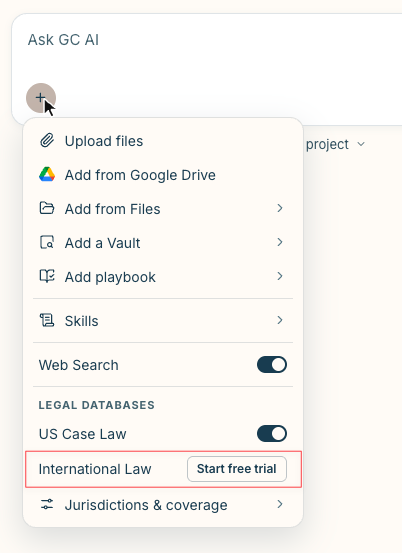
To start, open the + menu in chat and select Start free trial next to International Law. The trial requires no credit card and does not renew automatically.
Put International Law to Work
Start with a research question your team has already worked through. Compare the cited authorities with your own analysis and decide where International Law fits into your next matter.
To switch your team's included database or purchase an add-on, contact our support team or your account team.
Frequently Asked Questions
When Might I Still Need a Traditional Legal Research Platform?
Can Colleagues Open International Law Sources in a Shared Chat?
Do I Need to Install a Separate Legal Research Plugin?
Who Generates the Headnotes in Case Law Summaries?
Related articles
 Company News·Published Sep 9, 2024Opinion overview promptGC AI's opinion overview prompt turns a new decision into a stakeholder email fast, with worked examples from Loper Bright, Yelp v Google, and Hachette.
 Resources·Published Oct 29, 2026AI Trademark Search for In-House Counsel: From Preliminary Screening to a Screening MemoUse AI trademark search to analyze supplied reports and prepare a cited screening memo that helps counsel decide which names need further review.
 Resources·Updated Oct 29, 2026How to Write a Legal Decision Memo With AIGive the business a recommendation it can act on. Build a legal decision memo with AI, a six-field template, and a worked example.
 Resources·Published Oct 29, 2026How to Check USPTO Patent Application Status With Legal AICheck USPTO patent application status with legal AI, retrieve office actions, and prepare a source-backed brief for patent counsel to review.
Build practical litigation and disputes skills with legal AI
See how GC AI supports this work, or build the skills with a practical class for in-house legal teams.