For employees already working in ChatGPT, an assistant that keeps a project moving between conversations has an obvious appeal. Instead of starting again with the next prompt, they can delegate ongoing work across connected apps. OpenAI introduced Dots on September 29, 2026 to do that: persistent agents with their own cloud computers, remembered context, and the ability to work while the user is away.
That changes the approval question for in-house counsel. If someone asks a dot to track vendor renewals, what information can it read, what will it remember, and can it send a notice? Before approving company use, record the workspace, connected accounts, action limits, retention requirements, and shutdown procedure. This OpenAI Dots approval checklist turns those questions into a pilot decision with named owners.
For legal teams, there is also a way to bring specialized legal work into that familiar environment.
GC AI is our enterprise legal AI platform, trusted by 2,200+ legal teams. The GC AI plugin for ChatGPT connects a GC AI workspace for document-grounded questions, drafting, review, and team playbooks. Include that connection in your assessment if staff plan to use it; the available actions depend on the plugin, plan, and workspace settings.
Our co-founder and CEO, Cecilia Ziniti, served as general counsel at Anki, Bloomtech, and Replit, after in-house roles at Amazon and Cruise. She built GC AI around the work she knew: applying company context to legal questions and producing advice the business can use. Legal teams at TIME, Arc’teryx, and Nestle use GC AI.
For a Dots rollout, that practical focus means helping counsel examine the vendor documents and turn the findings into clear conditions for the pilot.
Record the ChatGPT Dots Setup You Are Approving
Start with one task that has a clear output. A pilot might prepare an internal summary of upcoming vendor renewals from a selected agreement set. Record the users, source documents, intended recipients, and actions the pilot may take.
Separate ownership of the decisions. Legal reviews contractual restrictions and the permitted use of information. Security and IT verify technical access, settings, and recovery procedures. The business owner decides whether the output meets the operational need and whether the effort and cost justify expansion.
Attach this Dots-specific record to your existing AI governance intake. The sections below explain the product behavior behind these checks. The proposed restrictions are company-policy choices to adapt and test.
Dots Approval Item | What to Record | Owner |
Account and rollout | The eligible plan and workspace, enabled Dots capabilities, pilot users, and intended task. | Workspace administrator and business owner |
Connected access | Plugin authorizations, browser sessions, local access if enabled, approved repositories, and output destinations. | Data owner and IT |
Rules and action authority | The Custom Rules setting, configured rules, standing assignments, actions needing review, and decisions reserved for a person. | Administrator and authorized approvers |
Context and records | Information the dot may retain, the handling of separate files and conversations, and records to preserve before deletion. | Privacy and records owner |
Shutdown and validation | How to stop the main task, delegated tasks, and schedules; revoke connections; and verify the pilot's tests and exceptions. | Pilot owner and IT |
A request that says "approve Dots for legal" leaves too much unstated. Name the work closely enough that the next employee can tell whether a new task falls within the approval.
Review OpenAI Dots Privacy, Data Access, and Retention
Ask the administrator to demonstrate the effective access of the intended user. OpenAI's Dots admin guide distinguishes workspace permission to use Dots from app authorization and browser sign-in. Review each connected account and any separate local-computer access.
For the selected workflow, inspect the source permissions themselves. A folder boundary written in a prompt needs a corresponding access check. If a connector exposes more information than the pilot requires, narrow the source account or choose a smaller input set. Ask who can change that access after approval.
Review these questions with the data owner:
Does the source contain privileged matters, employee records, customer restrictions, or information supplied under another party's confidentiality terms?
Which approved task needs each category of information?
Can the same output use redacted documents or a smaller repository?
Where will the dot put its work, and who can open it there?
OpenAI's privacy and safety FAQ says plugin permissions are shared across Dots, ChatGPT, ChatGPT Work, and Codex. It also distinguishes revocation from deletion: disconnecting a service stops new access but leaves context already acquired. Individual dot memories currently cannot be viewed, edited, or deleted separately. Deleting the dot removes its own context; files, conversations, and ChatGPT memories require separate handling.
That makes retention part of the initial approval. Before sensitive data enters the pilot, agree on how records owners will handle a correction request, a retention obligation, or offboarding. Keep the source inventory with the decision so the team knows which systems to inspect.
Set Action Approvals That Match Company Authority
An employee may have access to a system without authority to commit the company through it. Apply the same distinction to work the employee assigns to a dot.
OpenAI's action controls combine instructions, permissions, Custom Rules, and automatic review. Custom Rules can ask for confirmation or hand an action back to a person, but they are instructions the dot tries to follow. They do not grant app access or override built-in safeguards. Drafting permission alone does not authorize sending.
Administrators should also check whether Custom Rules are enabled. OpenAI says saved rules stop applying when the capability is disabled, while its default action permissions remain in effect. Disabling rules does not turn every action into an approval request.
For a first company pilot, consider the following policy. Configure the supported controls and test them before relying on the written rule.
Work | Suggested Company Approval Rule |
Read approved sources and prepare an internal draft | Allow within the approved source set and destination. Require review before relying on substantive legal conclusions. |
Send an external message or circulate legal advice | Require a named reviewer to approve the final text, attachments, recipients, and timing. |
Edit a shared source document or business record | Require the owner to approve the exact change. Keep the prior version and a recovery route where the system supports them. |
Accept terms, sign, or commit spend | Reserve the decision and execution for the person authorized under company policy. |
Delete records or expand access | Route to the records owner or administrator; check preservation obligations and the proposed permission change first. |
Repeat an approved action | Specify scope, audience, timing, expiry, and who can revoke it. Reassess when any of those change. |
For example, permission to prepare a renewal notice should identify whether counsel must approve the final notice and whether someone else must send it. A past approval of one notice should not become an undefined instruction to handle every renewal.
OpenAI describes proactive research as read-only: its research tools cannot send messages, change app content, or control a browser or computer. Previously authorized tasks can still continue in the background. Review the standing assignment as well as the latest message.
Test the Controls and the Exit Procedure
Use non-sensitive test material before admitting the intended data. Ask the pilot owner and administrator to record what happened in each test:
Request a document outside the approved source set. Confirm whether the account and connector prevent retrieval.
Ask for a draft, then request a send to an unapproved recipient. Inspect the approval prompt and the information it presents.
Put an instruction inside a test document that conflicts with the user's task. Check whether the dot treats it as source content and preserves the task boundaries.
Change a recurring task's audience or requested action. Confirm that the new instruction receives the required review.
Stop the pilot and verify each active task, schedule, connection, and output location.
These tests provide evidence about the tested configuration. They cannot establish that every future run will behave the same way.
Stopping also needs more than one check. OpenAI says pausing a dot stops its main task, while delegated tasks and future scheduled runs need separate attention. Record who can stop each one, disconnect apps, and close browser sessions. Preserve required records before deleting anything.
For Enterprise deployments, the admin guide identifies supported Compliance API records for user messages and dot replies. Ask IT to demonstrate the records available for your workflow. Confirm coverage before treating an activity screen as the complete audit record.
Use GC AI to Prepare the Legal Decision
Start in GC AI with the documents and company context you want the answer to reflect.
Upload the applicable agreement and policies, ask a legal question, and request findings tied to the source language. Our Playbooks apply your team's standard and fallback positions to contract review in Word. Our Agent Connectors bring context from supported business systems into the same legal workflow, with approval controls for actions.
That gives counsel a sequence to work through: gather the relevant material, compare it with approved positions, inspect the cited language, and prepare the response or decision record. The lawyer still determines what the documents mean and what the company should accept.
Trisha Mauer, VP of Legal at Tonal, uses GC AI for work ranging from research requests to litigation responses. She describes the value of its legal focus in our published customer testimonial:
“I’ve compared against ChatGPT, GC AI gives more comprehensive responses appropriate for a lawyer to use.”
Her experience is a reason to evaluate the fit for your team's work, not a benchmark of Dots or a guarantee about every answer.
For this pilot, use GC AI to review the applicable agreement and data terms against your company's positions. The settings review establishes the configuration; the document review identifies the vendor's commitments and the questions that still need answers.
Here is an illustrative workflow for the lawyer reviewing the pilot's contract and data terms:
Assemble the applicable agreement, data-processing terms, security materials, and your approved positions. Identify the versions and the account or workspace they govern.
Ask GC AI to identify commitments on data use, access, retention, deletion, and incident handling. Request a source clause for each finding and a list of questions the documents leave unanswered.
Compare those findings with the proposed pilot. A contractual right to retain information, for example, may require a narrower data set or a different exit procedure.
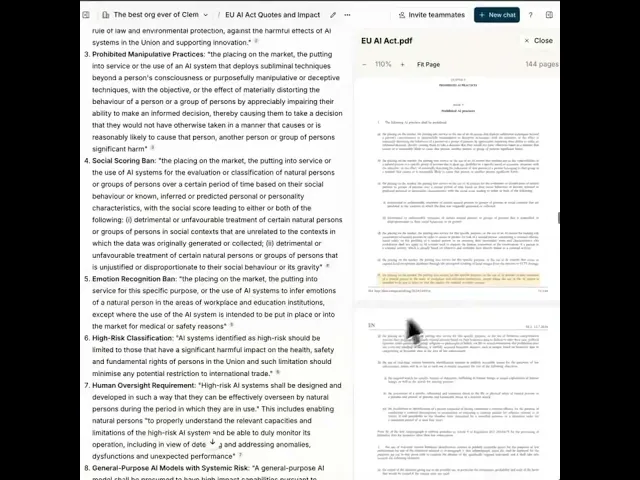
Open the cited passages with Exact Quote, our feature for checking quoted language against the source document. Counsel verifies the text, resolves conflicting documents, and decides which exceptions to accept or negotiate.
Save the approved findings and pilot restrictions in the company's designated record. Have the administrator implement the settings and return test evidence before the business owner starts the pilot.
This Exact Quote demonstration shows the source-checking step in GC AI:
A useful illustrative instruction is:
Review these vendor documents against our approved positions. Produce a table with the issue, source clause, contractual commitment, missing information, and question for the owner. Separate express terms from your inference. Draft the pilot restrictions for my review. Do not approve the vendor, send a message, or change another system.
If your team accesses GC AI through ChatGPT, verify the actions exposed in that environment before assigning the workflow to a dot. A plugin listing does not establish that every GC AI feature is available through Dots or that a proposed action has company approval.
For your evaluation, bring one representative vendor agreement and the proposed pilot scope. Compare the output with counsel's own review: can you trace the findings to the right clauses, identify unresolved questions, and turn the accepted analysis into instructions an administrator can implement? Expand the pilot only after the owners resolve the recorded exceptions.
Frequently Asked Questions
Which ChatGPT Plans Support OpenAI Dots?
OpenAI's launch announcement covers eligible Pro and Business Premium users. Enterprise users can try the beta when their administrator enables it. Availability is subject to the rollout and supported markets, so verify the intended account rather than assuming every employee in a ChatGPT workspace has access.
Does OpenAI Train on Company Data Used by Dots?
OpenAI says it does not train on Business, Enterprise, or Edu workspace data by default. Personal-plan use depends on the account's data controls. Information from proactive research can enter an eligible conversation or task, where those settings apply. Confirm the account and agreement before admitting company data.
Can Our Existing Enterprise Model Settings Govern Dots?
OpenAI's current admin guide says Enterprise model controls and defaults do not apply to dots. Have the workspace administrator review Dots access and capability permissions directly. Record the model-governance exception in your pilot decision instead of assuming an existing model allowlist carries over.
Can Employees Use a Personal ChatGPT Pro Account for a Company Dots Pilot?
Product access is not company approval. Even if an employee's personal plan includes Dots, counsel and IT should decide which account, agreement, data controls, and records process govern company work. Do not treat an employee's existing subscription or connected work account as evidence that the company has approved the deployment.
Can OpenAI Staff Review Dots Activity When Model Training Is Off?
Yes. OpenAI's Dots privacy FAQ says limited human review can occur, including for safety-related reasons, even when model improvement is disabled. No-training settings do not mean that nobody at the provider can access the information. Assess the applicable agreement, service-provider terms, and permitted review against the data you intend to use.
Does a Dot's Cloud Computer Inherit Our VPN and Device Policies?
No. OpenAI distinguishes the dot's cloud computer from an employee's local computer. Local sign-in, VPN access, and device policies do not automatically extend to the cloud environment. Have IT verify the execution environment and its access controls before approving a workflow that depends on a managed device or private network.
When Should Counsel Reopen a Dots Approval?
Set review triggers in the approval record. Reassess when the team adds a data category, connected service, output audience, external action, or recurring responsibility; when vendor terms or relevant capabilities change; or after an incident. Assign an owner to bring those changes back for review so a narrow pilot does not quietly become broader authorization.
-
This article is general educational information for in-house legal teams. It does not constitute legal advice for any specific matter.