What we learned building 38 projects with Jev in 12 hours
Bardia Pourvakil
Last week we ran an internal hackathon at GC AI to test out Jev, TypeSafe's new classification model. We paused normal sprint work, gave the team the day, and said: go build whatever you want, push the model as hard as you can, and let's see what breaks.
If you haven't looked at Jev yet, the main difference compared to standard LLMs is that it doesn't generate text at all. Instead of streaming tokens back over several seconds, you pass it some context alongside a set of narrow questions, like boolean checks, multiple choice options, or bounded scores, and it returns structured evaluations in 0.1 to 0.5 seconds for a tenth to a hundredth the cost of a standard model call.
Most of our production stack revolves around generative workflows like drafting legal memos, redlining contracts, and interactive chat, where latency is measured in seconds and prompt formatting is constantly at risk of drifting. Getting sub-second, strongly typed answers out of a model felt completely foreign at first, so we wanted to see how it held up across real product features, internal developer tools, and hackathon toys.
By the end of the day we had 38 projects and experiments, 23 of them submitted across three tracks. The project with the most votes was a communal Slack pet sloth named Jeventus, but the day gave us a surprisingly clear blueprint for how to architect around fast, lightweight classification models.
Pushing the model until it breaks
Rather than building a polished product, one of our engineers spent the day running stress tests to map out where Jev succeeds and where it completely falls apart.
Some of his findings were surprisingly impressive. Jev was able to pick out a needle sentence buried inside 30,000 tokens of boilerplate, and it correctly classified movie titles from plot summaries 46 out of 50 times across 253 options. But as soon as he asked it basic calendar arithmetic, like calculating what day of the week a given date fell on, it failed four times out of five. It has no reliable temporal reasoning or math capability, and it quickly gets lost if you treat it like a general knowledge base.
His most critical takeaway was around how context should be structured for batch evaluations. If you feed Jev a single document and ask it 20 different questions about that document, it evaluates all of them concurrently with almost no extra latency. However, if you try to pack many similar items into an array inside the prompt and ask Jev to evaluate the array, accuracy dropped from 96% down to 72% because the model started cross-contaminating answers across adjacent rows. For our architecture, that established an immediate rule: fan out across separate concurrent API calls rather than packing tabular data into prompt arrays.
Real-time terms of service scanning
On the product side, one of the cleanest demos was ToS Trap Spotter, a Chrome extension designed to scan consumer terms of service agreements as you browse.
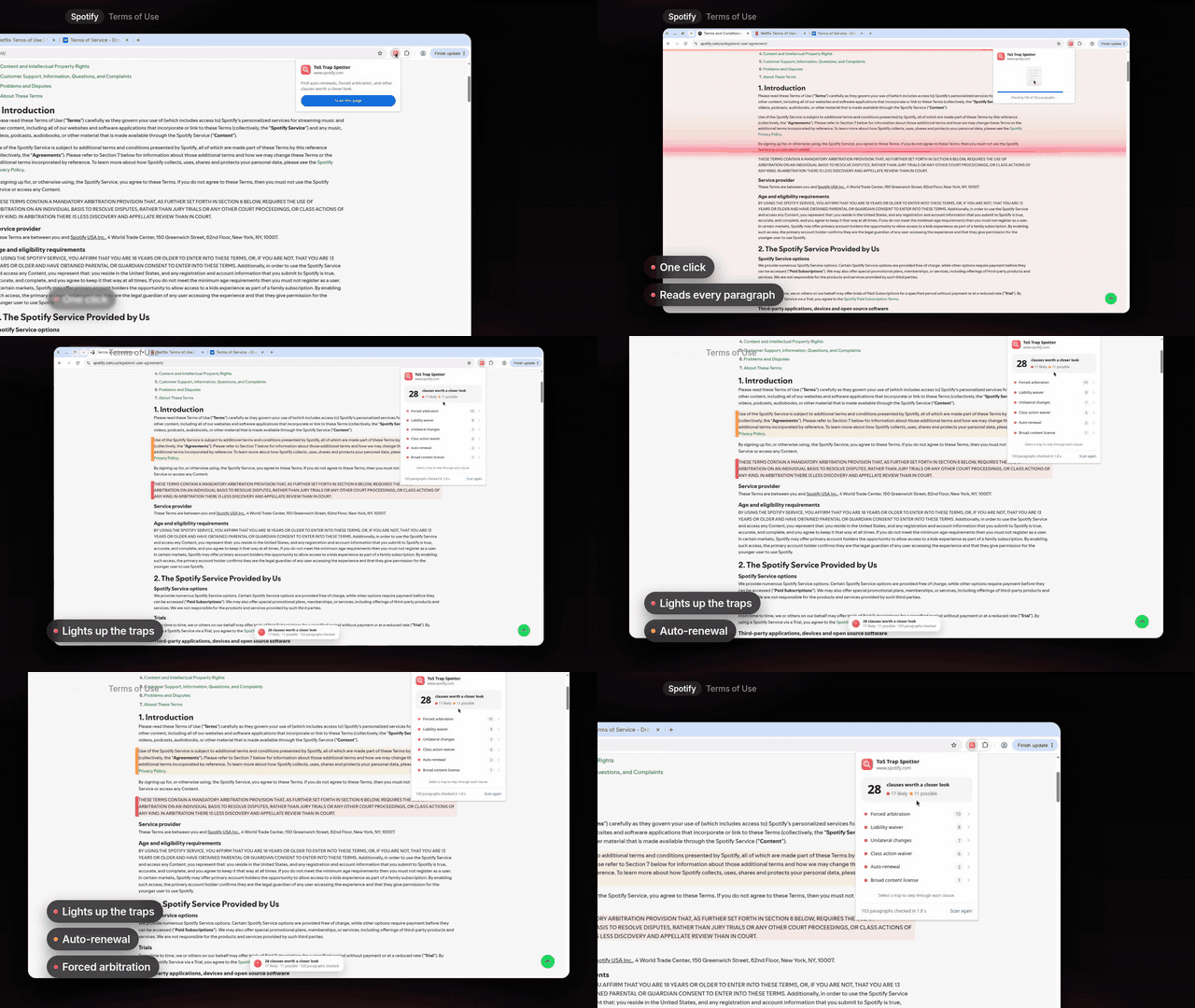
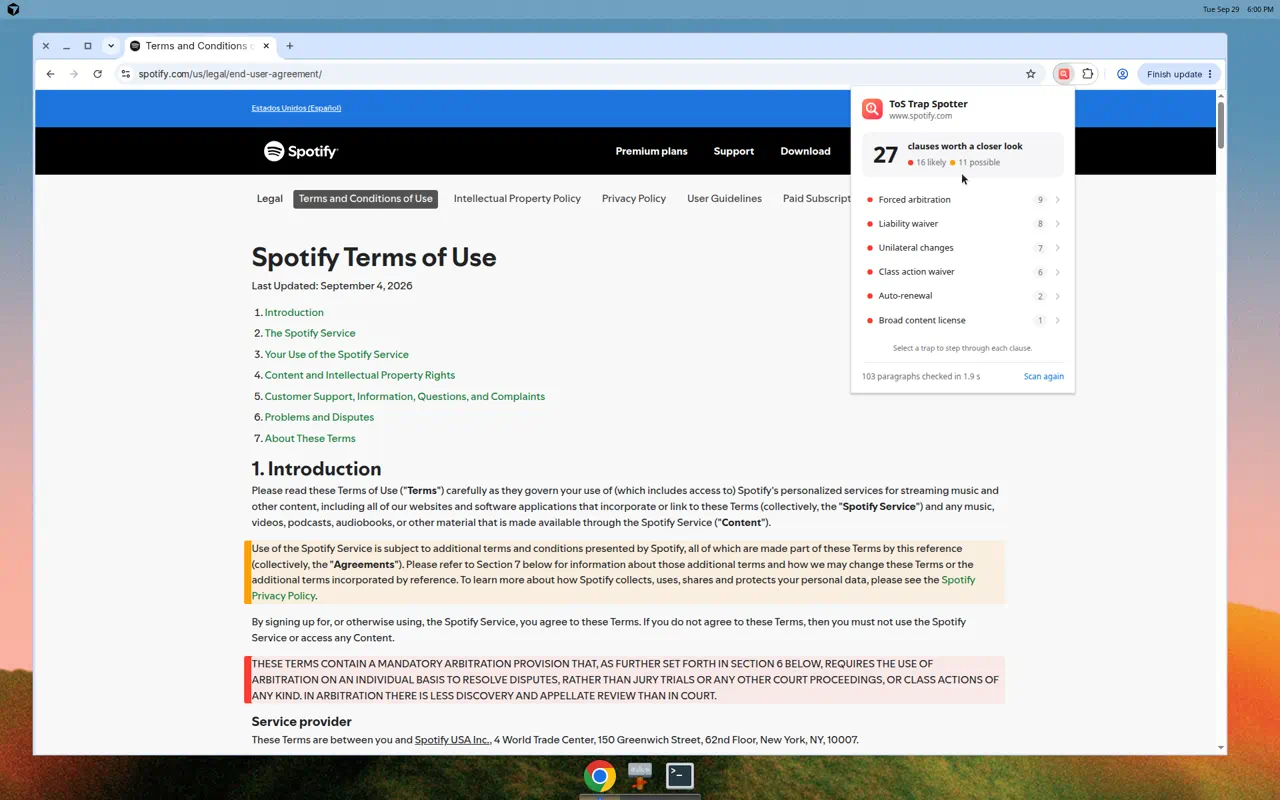
When you open a terms page and trigger the extension, it chunks the document into paragraphs and sends them through Jev concurrently, running eight parallel checks per block for things like auto-renewals, mandatory arbitration, class action waivers, unilateral modification rights, and broad liability releases.
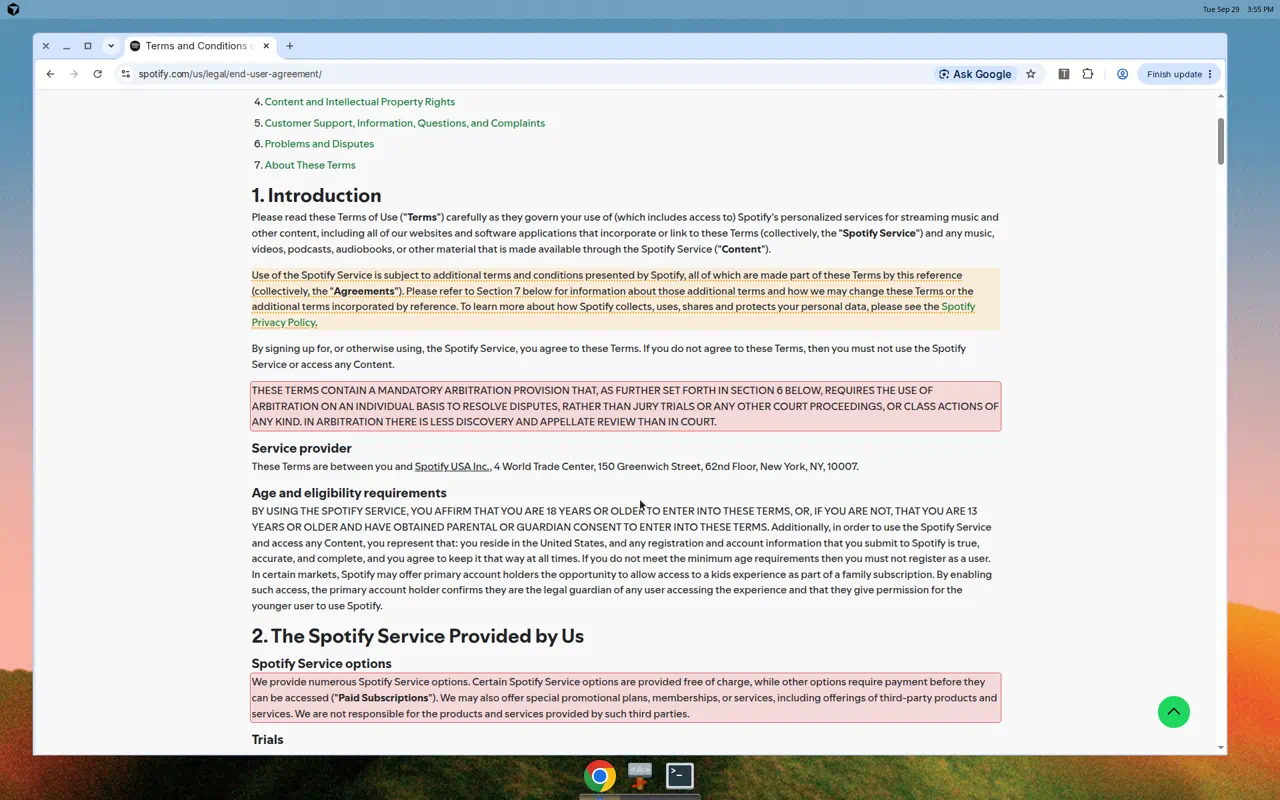
On Spotify's 110-paragraph user agreement, the extension evaluated the entire page in 1.9 seconds. When evaluated against a held-out set of synthetic clauses it had not seen during prompt tuning, Jev hit an 89% F1 score, compared to just 57% for keyword regex baselines.
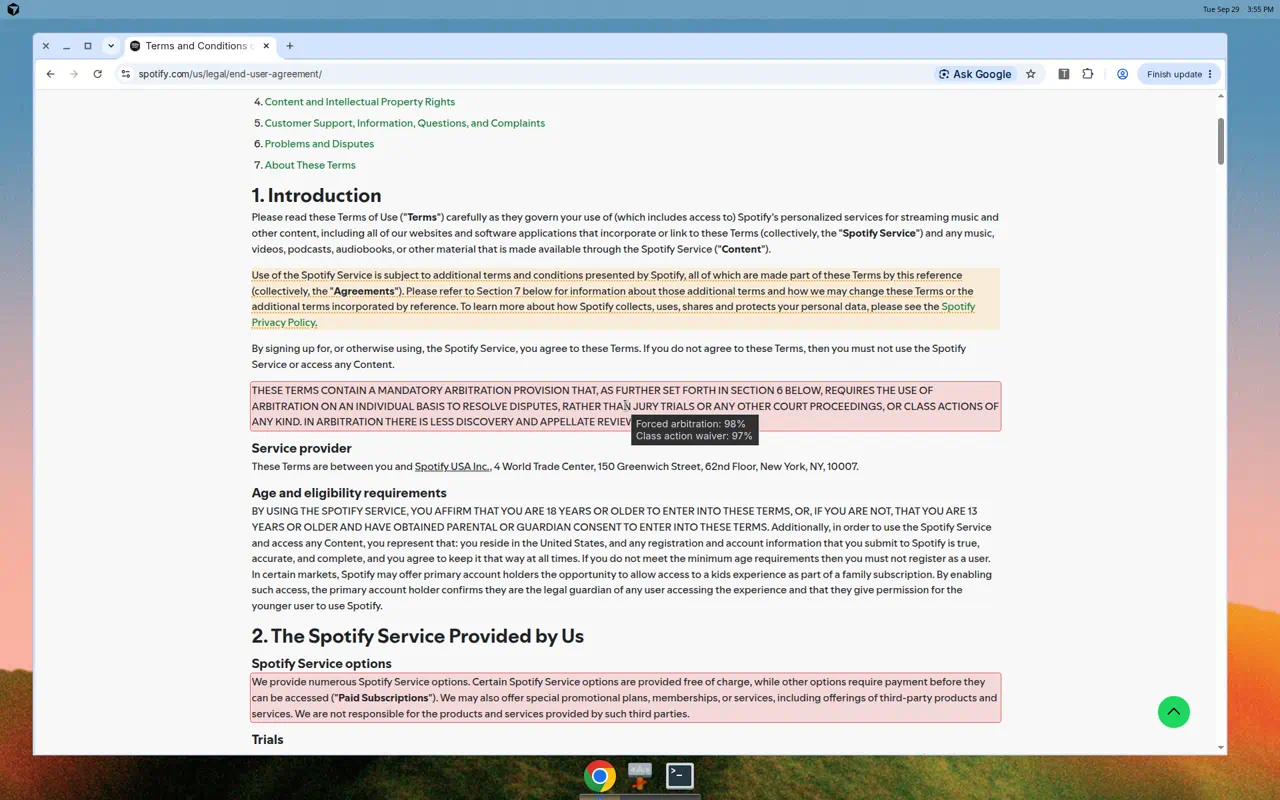
The initial failure modes were particularly educational. During early testing on live websites, every data-sharing alert turned out to be a false alarm. It turned out the DOM scraper was capturing the cookie consent banner at the top of the page, which Jev was faithfully evaluating as a data-sharing clause. Excluding modal dialogs from extraction fixed the issue immediately.
Another subtle bug emerged around liability waivers: early prompts asked whether a clause limited the company's liability, causing Jev to flag standard refund policies because refund terms technically define the boundaries of what a vendor owes a customer. Narrowing the prompt to focus specifically on damages, losses, or harm the user suffers cut the false alarms in half without missing actual liability shields.
Inline citation verification during chat streaming
In legal research, an ungrounded citation or a hallucinated case reference destroys user trust faster than almost anything else.
One of our engineers built a streaming citation validator that checks claims against source documents while our chat assistant is actively generating responses. As each cited sentence streams in, a background call evaluates whether the cited passage actually supports the claim. If the source checks out, the text remains clean, but if the claim is questionable or unsupported, an amber or red underline appears inline before the assistant has even finished streaming the next paragraph.

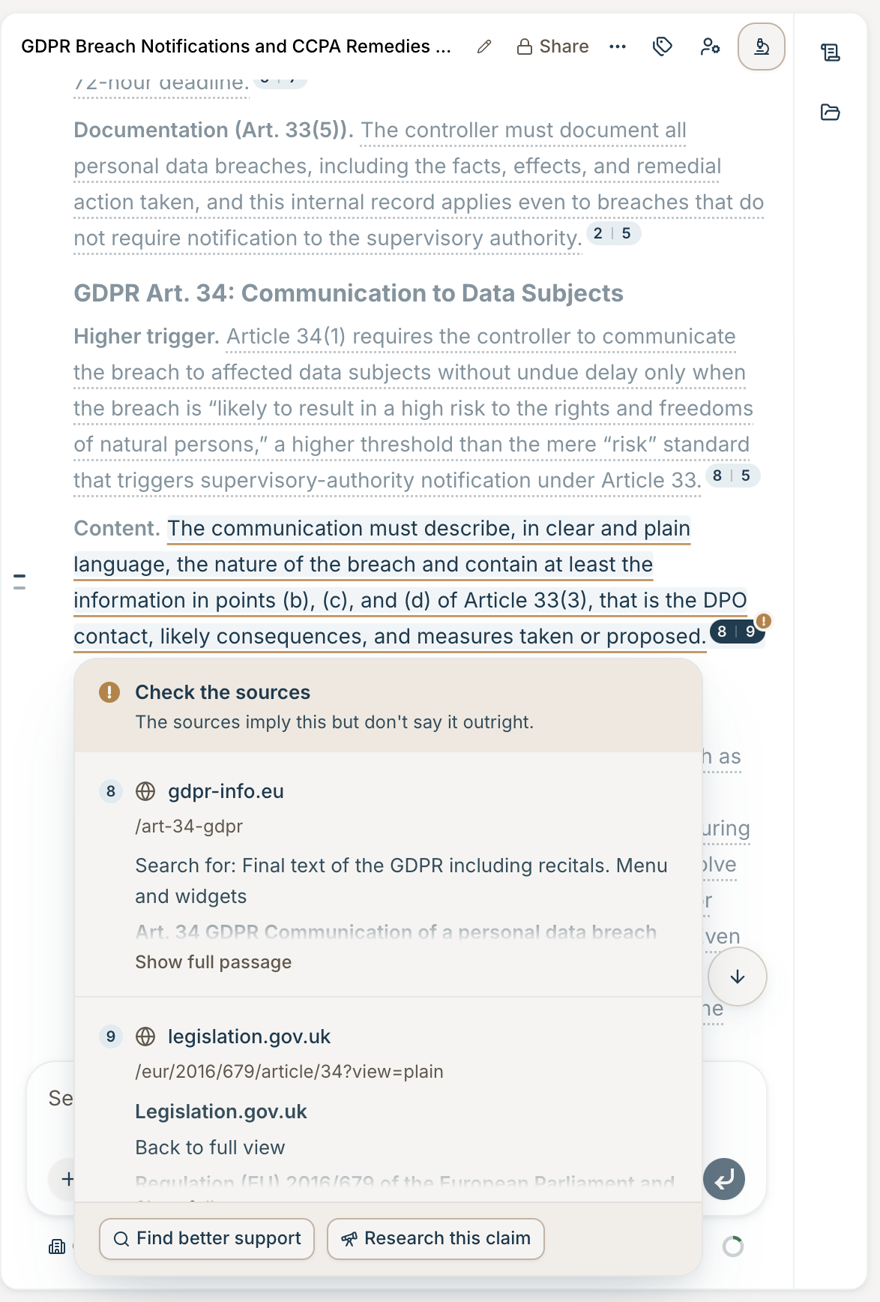
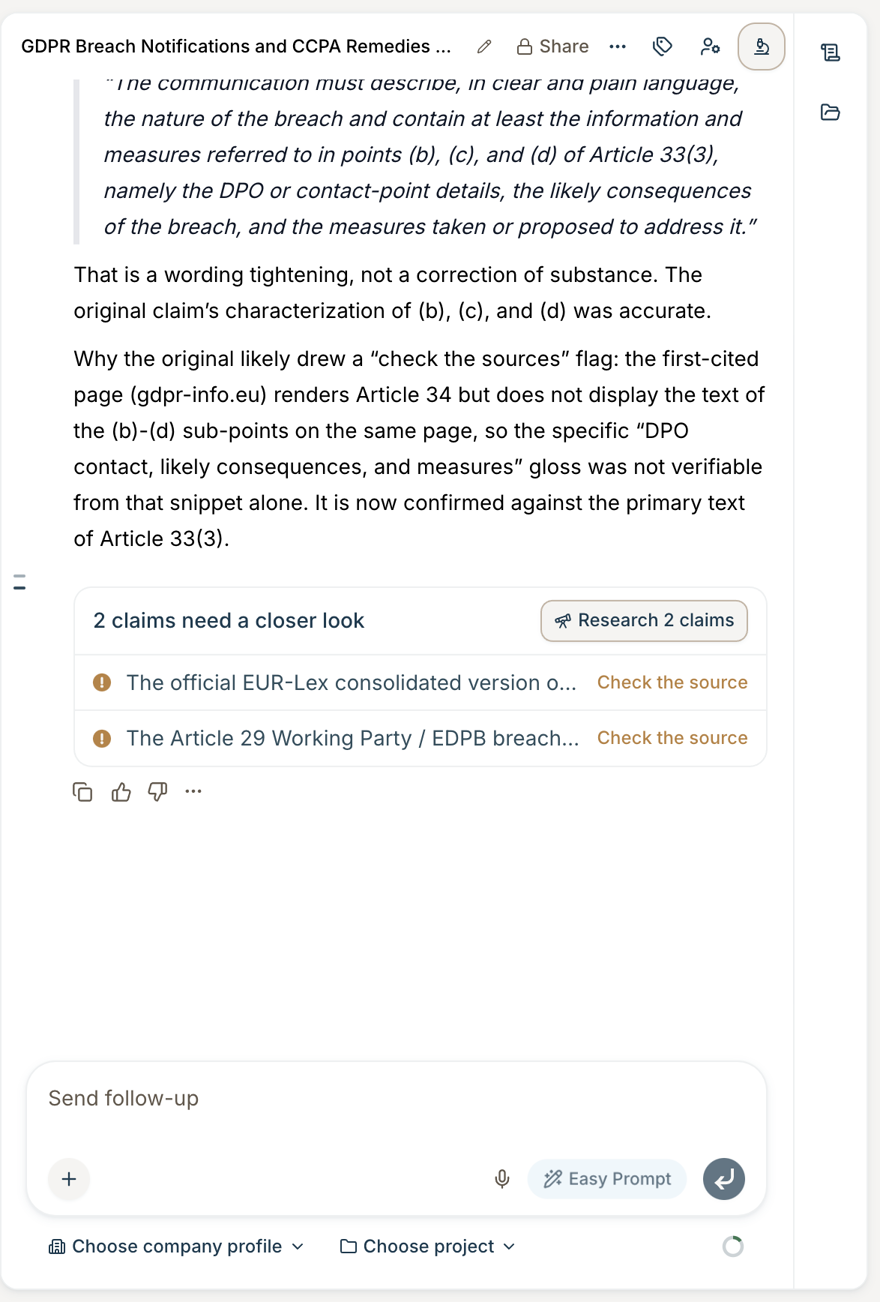
The trickiest edge case here came down to modal verbs like “may” versus “must”. In one test case, a source document stated that a party may do something, while the model's generated summary asserted that the party must do it. A general prompt asking whether the source supported the statement missed the error completely, but when the check added three targeted yes/no questions covering explicit support, mismatched details, and overstatement, Jev caught the modal shift instantly.
Alert triage, PR approvals, and where classification fails
Several engineers focused on internal developer workflows, which yielded some of the clearest data on where Jev works and where it completely breaks down.
One of our engineers built jev-pager, an on-call triage bot that monitors production alert streams to decide whether an engineer needs to be paged. Rather than paging on raw alert text alone, it evaluates each alert alongside facts that code computes, like counts, the clock, and what else is alerting. Replaying an entire week of production alerts, 136 alerts in total, it correctly identified every incident that required human intervention with only a single false page. The main challenge was alert boilerplate: the raw monitoring templates frequently used alarming phrasing like “the request errored for the user”, which caused Jev to over-escalate trivial timeouts until the bot asked for the alert family first and passed that answer into the paging question. Handing Jev the observed CPU value also raised page precision from 0.63 to 0.92.
Another engineer built PR Stamper, which automatically reviews and approves mechanical, low-risk pull requests once a human adds a stamp label. It never merges. Instead of relying on a broad prompt to judge overall pull request safety, it combines hard-coded policy gates that block any modifications to sensitive areas like migrations, auth, or billing with seven narrow, file-level Jev checks covering the kind of change, whether it alters behavior or a shared contract, and how far a bug could spread.
On the other hand, our attempts to use Jev for open-ended code cleanup showed exactly where the model reaches its limits. When we built a bot to identify useless unit tests and asked Jev the broad question “is this test useless?”, it performed no better than a coin flip with an AUC of 0.54. However, when we stopped asking for a subjective value judgment and instead asked eight factual questions about the test's structure, like whether it only asserts on mock call counts or whether it executes application logic, AUC jumped to 0.72. The model excels at verifying discrete factual properties, but it cannot make holistic quality judgments on its own.
The Slack pet sloth and the typed switch statement pattern
Our most-voted project had nothing to do with legal AI. Jeventus was built for pure fun, but it ended up demonstrating the single most effective architectural pattern of the hackathon.

The core mistake people make when they first touch Jev is trying to use it like a chat model. The engineer who built Jeventus did the exact opposite by keeping Jev completely isolated from text generation. Whenever someone messaged Jeventus in Slack, Jev evaluated the message across a few specific axes: whether the user was feeding, playing with, or scolding the sloth, alongside a kindness score. When someone posted an avocado sandwich, Jev tagged the action as feeding with 1.0 confidence and high kindness. From there, standard Postgres queries updated the sloth's hunger and mood variables, and deterministic code selected the reply.
Treating Jev as an ultra-fast, typed switch statement turned out to be the winning design across nearly every successful project. When teams tried to make Jev handle open-ended reasoning or nuance, it struggled, but when they used it to route discrete inputs into deterministic application code, the latency and reliability felt like magic.
What we learned
Jev isn't a cheaper LLM or a smarter regex. It's a general-purpose classifier you can shape to almost any problem that's too fuzzy for code and too time-sensitive for an LLM.
That gap is much bigger than it sounds. Because Jev answers in a fraction of a second and generalizes to almost any narrow question, it showed up in far more design patterns than we expected: a typed switch statement in front of deterministic code, a screen in front of expensive models, a verifier running alongside a streaming response, a guard on tool calls inside an agent loop, and a gate in front of a human approval. Across the 38 projects, we catalogued 16 reusable patterns.
The catch is that it only works when you meet it on its terms. Jev is not a replacement for generative models, and it is not an automated judge for squishy, subjective problems. Give it narrow, objective criteria with clear negative options, and let code and LLMs handle the rest.
Following the hackathon, one of our engineers codified these findings and architectural patterns into an internal developer skill called jev-design. Our coding agents now load this skill automatically whenever an engineer starts designing a classification workflow.
The complete internal skill guide is included below, followed by an interactive explorer documenting all 38 project implementations from the hackathon.
---
name: jev-design
description: Design helper for features that use Jev (TypeSafe's structured-judgment model, `typesafe-ai/jev`). Walks through whether a task is Jev-shaped, which question shape and composition to use, where to place it, and how to pick thresholds, using patterns and results from the Sep 2026 Jev Hack Day. Includes an interactive pattern explorer (`jev-patterns.html`). Use when someone plans, builds, or reviews a Jev call, asks "should I use Jev for this", compares Jev to an LLM classifier, or wants Jev examples, patterns, or lessons. Also a primer for people new to Jev, including R&D attorneys.
---

# Jev design helper

Jev answers narrow, typed questions about some context. It returns a probability (yes/no, which TypeSafe calls a Noul), a pick from a list (Choice), or a level on a scale you define (Score). It never writes text. Typical calls take 0.1 to 0.5 s and cost 10x to 100x less than the LLM they replace.

This skill has two parts:

- This file: lessons and a design walk-through.
- `jev-patterns.html`: an interactive explorer of 38 hack day projects, 16 reusable patterns, where Jev fits, and where it did well or struggled, with links to each PR, write-up, and recording. Open it in a browser: `open .agents/skills/jev-design/jev-patterns.html`.

## How to use this skill

1. If the user is new to Jev, give the four-line summary in [What Jev is](#what-jev-is) and point them to the HTML explorer.
2. If the user has a feature in mind, walk through [Design decisions](#design-decisions) one step at a time. Ask one question per step. Recommend an answer with the evidence behind it. Do not dump the whole list.
3. Before code review or shipping, run the [Checklist](#checklist).
4. When a decision is close, cite the matching pattern or project from `jev-patterns.html` so the user can read the real result.

## What Jev is

- Request: `state` (string or JSON, up to about 32k tokens) plus a map of named `questions`. Up to 255 options per Choice.
- Answer types: Noul `probability`, Choice `choice` + `probabilities`, Score `score` + `probabilities`.
- Price: about $0.042 per million input tokens. Output is free.
- Not deterministic: the same request can move by about ±0.03. Choice picks are more stable than probabilities.

Call shape (AI SDK 7 through the Vercel AI Gateway):

```ts
import { experimental_evaluate as evaluate } from 'ai-v7';

const { answers } = await evaluate({
  model: 'typesafe-ai/jev',
  state: { claim, source },
  questions: {
    relation: {
      type: 'choice',
      instructions: 'Does `source` support `claim`? Judge only from `source`.',
      criteria: {
        supports: 'The source states the claim or directly implies it.',
        contradicts:
          'The source states something that conflicts with the claim.',
        silent: 'The source does not address the claim.',
      },
    },
  },
  providerOptions: {
    gateway: { zeroDataRetention: true, only: ['typesafe-ai'] },
  },
});
```

`packages/ai` already depends on `ai-v7` and `@typesafe-ai/sdk`. There is no shared Jev wrapper on `staging` yet. Several hack day PRs each added their own. Before you add another one, check `packages/ai/src/jev/`.

**Customer data:** send it only through the Vercel AI Gateway with `AI_GATEWAY_API_KEY` and `typesafe-ai/jev`. Set `zeroDataRetention` and `only: ['typesafe-ai']`. `TYPESAFE_API_KEY` (direct to TypeSafe) is for public or synthetic data only.

## Design decisions

Work through these in order. Each step lists the options, the default, and the evidence.

### 1. Is the task Jev-shaped?

Yes when a knowledgeable person could answer it in about a second with the right context, and the answer is a fixed set.

| Strong fit                                                                            | Weak fit (use code, an LLM, or a fallback)                                       |
| ------------------------------------------------------------------------------------- | -------------------------------------------------------------------------------- |
| Pick from a list: skill, email bucket, alert family, agent route, document type       | Holistic calls: "is this sound advice" (83%), "is this test useless" (coin flip) |
| "Does this text do X?" on concrete text: ToS traps 89% F1 vs 57% regex; SMS spam 100% | World knowledge and trivia: missed "Nike" = goddess of victory; band trivia 57%  |
| Same entity: 95.5% agreement with Opus at $0.00011 per probe                          | Counting, dates, math: weekday of a date 20%; counts off by one                  |
| Claim vs. source: 0 of 294 good cites hidden                                          | Criteria about files or tool output: 59% vs 96%                                  |
| Pick a candidate code found: 9/9 fields in one call                                   | Near-synonym labels, two-hop cross-references, security judgments                |

If the task needs written output, Jev can still screen or route in front of the LLM (step 4).

### 2. Question shape

- **One narrow question per decision.** Write it by hand. AI-generated question lists gave no signal. Check the wording on 20 to 50 labeled items before scaling.
- **Fuzzy judgment:** split it into 6 to 10 concrete yes/no patterns, mined from real history, with per-pattern thresholds. One broad question scored AUC 0.54. Narrow patterns plus a code-side count scored 0.72.
- **Clean category:** use one Choice with a short description per option. Document status scored 88% as one Choice vs 82% split into yes/nos. A described 5-option Choice scored 1.00 where two vague yes/nos disagreed.
- **Extraction:** code finds candidates (dates, sentences, fields) and Jev picks one. Always add `none` and a separate "is it present?" yes/no. Without an escape option, Jev picked a wrong date at 0.92 confidence.
- **Ties possible:** add a "is there any real basis to decide?" yes/no. With no context, Jev still picked a winner at 0.81 to 0.89.
- Ask each decision one way. A question and its negation do not sum to 1.

### 3. State and batching

- Send only relevant context, but a relevant full document is fine. A 12k-token document matched focused excerpts, and full-contract context caught buried risks. Misleading or boilerplate text hurts: Jev believes what it reads.
- Strip template text. Put facts code already knows in the state (counts, computed dates, the CPU value). That took one router's page precision from 0.63 to 0.92.
- Many questions about one item in one call: nearly free (1 to 150 questions went from 0.33 s to 0.76 s).
- Many similar items in one array: Jev loses its place (primes 72% in an array, 88% keyed, 96% one per request). Fan out one item per request, or key items by name (`cite_4`, not `citations[4]`).
- Many pick-from-list questions in one call also hurt (83% at 5 sentences, 60% at 40).
- Separate trusted from untrusted text in the state (user ask vs. pasted material vs. tool output).

### 4. Composition: who decides

| Option                                                                 | Use when                                    | Example                                                   |
| ---------------------------------------------------------------------- | ------------------------------------------- | --------------------------------------------------------- |
| Jev + code                                                             | Mistakes are cheap or reversible            | Skill pills, tool card layout                             |
| Confidence bands: Jev on the clear share, stronger model on the middle | Quality must match an LLM at lower cost     | Relationship detection: same 91.9% accuracy, 43% cheaper  |
| Jev screens, LLM finishes                                              | Positives are rare, or text must be written | Preference memory: $245 vs $2,830 a month                 |
| Classify first, then decide                                            | Misleading text sways a single call         | Alert pager: false pages fixed by asking the family first |
| Profile → policy file                                                  | Several signals feed one action             | Inbox triage: 26/26 vs Sonnet 25/26                       |
| LLM writes the Jev question                                            | The request is messy and open-ended         | Caesar bot. Add a basis question.                         |
| Jev, then a person                                                     | Approvals, merges, CI gates                 | PR stamper, same-buyer checker                            |

Default for anything that matters: confidence bands. Make them asymmetric when one error costs more (0.40 / 0.70 for relationships).

### 5. Placement

- **Around the chat UI** (most common): as you type, after a message, while streaming, when a panel opens. The agent never waits.
- **Inside the agent loop:** only for tool-call guards. Adds about 200 ms per call. Plug into `needsApproval` or block. Decide fail-open vs. fail-to-approval, and make replays safe.
- **Backend pipelines:** ingestion, routing, document intelligence. Volume is high, so bands and fan-out matter most.
- **Internal tooling:** CI checks, approvals, alert routing. Keep hard rules (security paths, permissions) in code.

### 6. Thresholds and evaluation

- Build a labeled set first. Split by file or PR so near-duplicates do not leak across the split.
- Pick the cutoff on a tuning split and check it on held-out data. Cutoffs ranged from 0.25 to 0.95 across projects. Do not assume 0.8.
- Jev's probabilities are usable for routing. In one test, every wrong answer from the comparison LLM was at 0.85 confidence or higher.
- Do not trust LLM auto-labels on borderline items without a human check.

### 7. Failure handling

- Fail closed for auto-actions and suggestions (approve, merge, show a card). Fail open for checks that would block users (citation chips, guards, lint hooks).
- Give timeouts room for the SDK retry. A 1.5 s budget aborted inside the retry wait; 3 s worked.
- Cache verdicts so the UI does not flicker. Judge only new items instead of re-asking.
- Pin the model version and hash the questions so tuned thresholds fail loudly when either changes.
- On untrusted input, add an explicit injection yes/no and let it win. Do not auto-act on Jev alone below the calibrated bar.

## Checklist

- [ ] The task passes step 1, or Jev only screens or routes.
- [ ] Each question is narrow, hand-written, and checked on labeled items.
- [ ] Every Choice has `none` or "not applicable" when the answer may be absent.
- [ ] Code does counting, dates, math, and candidate extraction.
- [ ] Similar items are fanned out or keyed, never indexed in a long array.
- [ ] Customer data goes through the gateway with zero data retention.
- [ ] Thresholds come from a held-out split and live in one policy file.
- [ ] Low-confidence answers go to a stronger model or a person.
- [ ] Untrusted input has an injection question and trusted/untrusted fields are separate.
- [ ] Timeout, retry, cache, and fail-open or fail-closed choices are explicit.

## Sources

- Interactive explorer: `jev-patterns.html` in this folder.
- Hack day hub and submissions: [GC AI Jev Hack Day](https://app.notion.com/p/3e257c014bec80ae82e3f5a109f9ff57).
- TypeSafe docs: [primitives](https://docs.typesafe.ai/primitives), [how to build](https://docs.typesafe.ai/concepts/how-to-build-with-system-one), [failure modes](https://docs.typesafe.ai/model-jaggedness/jev-1.13).

Numbers come from small, mostly synthetic sets, usually one run. Treat them as direction, and rerun on real data before a Jev call gates anything.
We also compiled an interactive matrix of all 38 projects, including what worked, what failed, and the full latency and accuracy numbers.
Open the full pattern matrix in a new tabJeventus is still alive and well in his Slack channel, by the way. If spending the day building fast prototypes with new models sounds like your idea of fun, we are actively hiring across the team.