A legal due diligence report explains what the legal review found, why it matters to the acquisition, and what the deal team should do next. Each material issue needs a source, a consequence, any missing information, and an action with an owner. The executive summary brings forward the decisions that affect signing, closing, price, or the business after acquisition.
For in-house counsel, the difficult part is connecting the legal finding to the proposed deal. A customer consent requirement becomes useful advice when the report explains which transaction triggers it, who will seek consent, and what remains unresolved before closing.
GC AI is an enterprise legal AI platform for in-house legal teams, used by 2,100+ legal teams, including TIME, Miro, and Gusto. Co-founded by Cecilia Ziniti, a three-time general counsel, the platform helps counsel move from contract evidence to a report they can review. Our document analysis, source citations, and drafting capabilities help counsel extract findings, check the underlying language, and prepare the report.
Below is a reusable report structure, a worked example, and a staged GC AI workflow.
Legal Due Diligence Report Template
Use this structure for an acquisition report. Tailor it to the agreed legal workstreams and recipients. The International Bar Association’s Legal Due Diligence Guidelines, section 7.8 describe a report organized around scope and disclaimers, an executive summary, detailed findings, and supporting schedules.
The following template has four sections, with fields for assigning decisions and following up on open issues. Adapt them to counsel’s agreed scope and report format:
Report Details and Review Scope
Executive Summary and Decisions Required
Detailed Findings
Supporting Record and Follow-Up
Report Details and Review Scope
Start by recording the transaction details and the boundaries of the review:
Transaction: Buyer, target entities, proposed structure, and stage of the deal.
Report control: Version, report date, lead counsel, and reviewing lawyers.
Recipients and permitted use: Intended readers, purpose, and any agreed restrictions on sharing or reliance.
Coverage: Legal workstreams, jurisdictions, relevant periods, and materiality thresholds.
Source cutoff: The date and time through which materials were included, with a reference to the reviewed-document index.
Limits: Excluded workstreams, unavailable documents, assumptions, and matters requiring specialist review.
Use specific limits. For example, “Employment review excludes the target’s overseas subsidiaries” tells the reader where further work is needed. A general statement that the report may be incomplete gives the deal team less to act on.
Executive Summary and Decisions Required
Write this after reviewing the findings. Begin with counsel’s overall assessment for the stated scope and the actions needed before the next deal milestone.
For each priority issue, include:
Materiality and issue: The priority, stable issue ID, and short finding linked to the detailed finding.
Deal consequence: What could change the transaction, its economics, timing, or the ability to operate the acquired business.
Recommended action and condition: The action counsel recommends and what must be confirmed for it to work.
Reviewer, decision owner, and deadline: Who verifies the finding, who approves the course of action, and when the decision is needed.
Keep unresolved facts visible in the summary. If finance has yet to confirm revenue exposure, say so beside the recommendation.
Detailed Findings
Use the same issue record for each material finding:
Field | What to Enter | Why It Matters |
Materiality | Priority, threshold, and the deal-specific reason the issue is material. | Shows why the finding belongs in the report and why the deal team should act on it. |
Issue | A stable issue ID, workstream, and supported legal finding. Separate source language from counsel’s interpretation. | Keeps the finding traceable across the report, updates, and follow-up while preserving the line between evidence and analysis. |
Source clause | Document name, data-room ID or path, version or effective date, section or page, and the exact clause or passage. Include amendments and other sources that change the analysis. | Lets reviewers trace the conclusion to the language that triggered it. |
Deal impact | The legal consequence and why it matters to this buyer. Identify the source and owner of any financial or operational estimate. | Connects the legal issue to deal economics, timing, closing, or post-closing operations. |
Open question | What remains requested, unreadable, conflicting, or unverified, and how it limits the conclusion. | Prevents missing information from being mistaken for a resolved issue. |
Recommended action | A specific request, negotiation step, proposed protection, or follow-up. Distinguish proposals from agreed terms. | Tells the deal team what should happen next without presenting a proposal as an agreed term. |
Reviewer | The reviewing lawyer, action owner, decision-maker, and deadline. These may be different people. | Shows who verifies the finding, who acts, who decides, and when. |
Status and closure evidence | The current state, last review date, and evidence required to close the issue. | Shows whether the issue remains open and what evidence will support closing it. |
A document request can produce several findings; one finding can depend on several documents. Give the issue its own ID so it remains traceable as the report changes.
Supporting Record and Follow-Up
Attach or link the reviewed-document index, specialist reports, unresolved requests, and action tracker. Preserve the source cutoff and version history when issuing an update.
For each closed issue, retain the evidence and reviewer’s conclusion. A message saying that consent is “being handled” belongs in the progress record. Closure requires evidence that satisfies the relevant requirement.
On CZ and Friends, former BlueLinx general counsel and corporate secretary Tricia Kinney described reading diligence findings by asking what counsel would have to solve after closing and how the company planned to address those issues. Apply that lens to the report: give post-closing work an owner and preserve the findings that explain why it is needed.
When to Use a Red Flag Report or a Long-Form Report
Agree on the report format before review starts. A red flag report concentrates on material issues that require attention. A long-form report provides broader detail across the agreed review areas, including relevant findings and document summaries. Both need a clear scope.
Bloomberg Law’s M&A issues-report template focuses on key legal issues to address through further diligence or transaction documents before closing. That is a useful model for a concise issues report. A fuller report may be appropriate when the recipient also needs a detailed record for managing the acquired business.
Define materiality around the deal. For example, counsel and the deal lead might agree to escalate:
A consent or approval that could prevent closing on the proposed timetable.
A restriction affecting a customer, license, or asset central to the acquisition rationale.
A liability above the agreed threshold, or one that cannot yet be reasonably assessed.
Missing evidence that prevents counsel from reaching a material conclusion.
Explain the reason for each priority. A “high” label has more value when the reader can see the dependency it reflects. Counsel should also raise urgent findings during the review so the deal team can act before the final report arrives.
Worked Example: A Customer Consent Issue
To see how the template works, consider a fictional acquisition involving Cedar Software. The documents, contract language, business facts, and proposed report below are invented for teaching. They are not a customer matter or an observed GC AI output.
Assume the buyer proposes to acquire all shares of Cedar Software. The review packet contains:
D-014, Customer Services Agreement, section 12.2: “Cedar must obtain Customer’s written consent before a Change of Control.”
D-014, section 1.4: “Change of Control means a transfer of more than 50% of Cedar’s voting shares.”
D-015, signed Amendment 1, section 2: “Section 12.2 does not apply to transfers between wholly owned subsidiaries of the same parent.”
B-003, deal lead’s transaction summary: An unrelated buyer will acquire all Cedar voting shares.
B-004, finance lead’s customer schedule: The customer is included in the acquisition’s revenue forecast. The consequence of losing the relationship has not been quantified.
For this exercise, assume counsel has confirmed that the agreement and amendment are effective and that no further amendment or consent appears in the reviewed set. The remaining question is whether the customer has given consent elsewhere.
The change-of-control provision and its amendment need to be read against the proposed transaction. Here, the stated internal-transfer exception does not cover the unrelated buyer’s acquisition.
Detailed Finding: Customer Consent (DD-01)
Here, DD-01 is the issue ID assigned to this first due diligence finding, so the deal team can track the same issue across the detailed findings, executive summary, and follow-up record. Using the fields above, the entry would read:
Materiality: High, because customer consent is required for the proposed transfer and has not been evidenced.
Issue: DD-01 is the open customer-consent issue for the proposed acquisition.
Source clause: D-014 sections 12.2 and 1.4 require written consent before a transfer of more than 50% of Cedar’s voting shares. D-015 section 2 exempts internal transfers within the same parent group. B-003 describes an acquisition outside that exception.
Deal impact: Proceeding without the required consent would conflict with section 12.2. Counsel must assess the agreement’s remedies and applicable law before describing the resulting exposure. B-004 establishes that the customer relationship is part of the forecast; it does not establish a loss amount or that termination would occur.
Open question: Request any existing consent or waiver. Obtain the customer-contact plan, and ask finance to assess the exposure if the relationship changes.
Recommended action: Seller’s counsel to produce an effective consent or explain the proposed route to obtaining one. Buyer’s counsel to recommend how the consent should be addressed in the acquisition documents. Any proposed closing condition remains subject to negotiation and approval.
Reviewer: Buyer’s deal counsel reviews sufficiency and reports to the authorized deal approver. Seller’s counsel owns the evidence request, and the deal lead sets a response deadline ahead of the closing decision.
Status and closure evidence: Open. Close after buyer’s counsel checks the consent’s scope and effectiveness against the transaction and records the conclusion.
Executive Summary Entry
The same issue can then be condensed for the executive summary without losing the unresolved questions or decision required:
DD-01: Customer consent remains open. The reviewed agreement requires written consent for this acquisition, and the amendment’s internal-transfer exception does not apply. Obtain and verify consent before proceeding on the assumption that this requirement is satisfied. Buyer’s counsel should advise the deal approver on the proposed closing treatment and any residual exposure. Finance is assessing the effect on the forecast.
The shorter entry preserves the unresolved consent and financial questions. It also gives the recipient a route back to the detailed analysis.
How to Build the Report With GC AI
The report workflow below uses documented GC AI capabilities. The prompts are illustrative and have not been tested on a deal. Counsel sets the scope, checks the analysis, and approves the final report.
For the broader review process, see the AI due diligence guide. This sequence focuses on preparing the report.
The five steps below focus on the report artifact. The broader AI due diligence hub covers M&A, vendor, and AI-asset review, while the sell-side checklist owns document collection and data-room readiness.
The five steps are:
Establish the Review Set and Instructions
Extract Findings and Inspect Related Documents
Verify the Legal Finding and Business Impact
Develop the Recommendation, Then Draft
Approve, Issue, and Update the Report
Establish the Review Set and Instructions
Confirm that your organization permits the proposed use of the deal materials and who should have access. Keep a record of the files received, files reviewed, and outstanding requests.
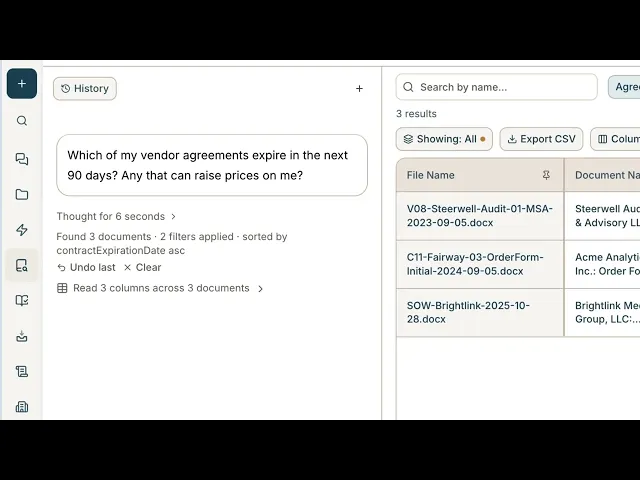
GC AI’s Contract Intelligence lets you analyze a collection of agreements together. It extracts the information you request into a sortable table with source citations and lets you ask questions across the documents in plain language.
Create a Vault for the agreements you are reviewing, then add the supported documents. In the Vault, use Columns to define the information you want GC AI to extract, such as consent requirements or change-of-control definitions. Keep related agreements together so GC AI can connect contracts with their amendments.
PDF, Word, and plain-text files are supported. Use regular GC AI chat for spreadsheet and email files. Check the current setup instructions for supported formats and limits.
For the example, request Columns for the parties, execution status, change-of-control definition, consent requirement, exceptions, and relevant source passages. Review the extraction instructions before relying on the results.
Watch the demo below to see GC AI’s Contract Intelligence in action, then try the workflow with a contract set you know well.
Extract Findings and Inspect Related Documents
If the transaction summary sits outside the contract set, add it to a Project linked to the Vault. The linked Project lets counsel combine authorized matter context with the contract evidence in the Vault without changing who can access the Vault. Here is an example prompt to adapt to the transaction summary and agreement set:
Example prompt
Review the supplied customer agreements for the proposed acquisition described in the transaction summary. Identify change-of-control consent requirements and relevant exceptions. Cite the document and clause for each finding. Identify amendments, missing referenced documents, and facts needed to assess whether a requirement applies. Separate source text from your interpretation.
GC AI can group related agreements into contract families, such as an amendment with its master agreement. Check those links in Related Documents, then use Current Terms to review the in-force terms across the family after amendments. For a question tied to a proposed transaction or future date, ask for that specific analysis.
Use View source to inspect the highlighted passage behind an extracted value. Read the surrounding definitions, exceptions, and remedy provisions. An accurate extract still needs legal interpretation.
Verify the Legal Finding and Business Impact
Check each proposed issue against the reviewed sources. Confirm that the transaction described to GC AI matches the current deal structure. Resolve missing documents and conflicting versions before treating a conclusion as settled.
Ask the relevant business owner to confirm facts outside the contracts. For DD-01, finance supplies the forecast information and assesses the potential exposure. Counsel assesses the consent requirement and the legal consequences.
GC AI supports manual columns and cell notes for information such as the reviewer and review status. Keep those human-entered fields distinct from extracted contract terms. You can also link the Vault to a Project and add authorized internal materials there for further analysis; access to the Vault remains separately controlled.
Develop the Recommendation, Then Draft
Decide which findings belong in the executive summary and what action to recommend. Here is an example prompt to adapt:
Example prompt
Draft a legal due diligence report for the deal approver using the checked issue records and my recommendations below. Use the report template provided. Preserve issue IDs, source references, unresolved questions, owners, and conditions. Distinguish proposed protections from agreed terms. Do not invent missing facts, consent, financial exposure, approval, or deadlines. Flag any statement that needs further support.
GC AI can draft a Word document from chat and open it in Easy Edit. Review and revise the report there, then download the Word file when ready for the next review.
Check the compressed executive summary against the detailed findings. In DD-01, “consent not evidenced” must remain distinct from “consent refused.” The financial question must remain open until finance provides its assessment.
Approve, Issue, and Update the Report
Before release, the responsible lawyers should check that every material conclusion has adequate support and every unresolved issue has a next step. Confirm the recipients, permitted use, version, and cutoff.
Preserve a dated copy of the issued report and the source record it relies on. When further documents arrive, update affected findings, record who reviewed them, and tell recipients which conclusions changed. Keep a reusable blank format for the next deal, then set that deal’s scope and materiality afresh.
Turn Due Diligence Findings Into Deal Decisions
A strong legal due diligence report does more than catalogue issues. It shows the deal team what the evidence says, why each material finding matters to the transaction, what remains unresolved, what counsel recommends, and who owns the next action.
That structure turns diligence into a decision tool. Whether counsel uses a red flag report or a long-form report, every material conclusion should remain traceable to its source, any remaining uncertainty, and follow-up.
Use the same standard when evaluating legal AI. The tool should make the evidence easy to inspect, keep missing information visible, and help counsel carry a checked finding into the report without replacing legal judgment.
Bring a familiar agreement, its amendments, and a checked finding to a GC AI demo. Trace the evidence, inspect the proposed analysis, and review how it carries into a draft report.
Frequently Asked Questions
What Is the Best Legal AI Tool for Legal Due Diligence?
For in-house legal teams, GC AI is a strong option when diligence involves reviewing agreement sets and turning checked findings into a report. Contract Intelligence extracts terms with citations, connects related agreements, and lets counsel inspect the source behind each finding. Test it against the same agreement and amendments you use with other finalists, then compare missed issues, source quality, correction work, document limits, and access controls.
What Are the Risks of Using AI for a Due Diligence Report?
The main risks are unsupported conclusions, missed amendments, incomplete document coverage, and treating missing evidence as proof that no issue exists. Test the tool with an agreement that has a known exception and deliberately omit a referenced document to see whether it preserves the exception and flags the gap. Counsel should still inspect the sources and decide the legal significance.
How Long Does It Take to Prepare a Legal Due Diligence Report With AI?
It depends on the scope, document quality, unresolved issues, legal review, follow-up requests, and approval process. Contract Intelligence shows results as documents finish processing, but large imports and relationship mapping take additional time. Time a representative pilot through a lawyer-approved report entry and use that result to estimate the work for your deal.
Who Prepares a Legal Due Diligence Report?
Usually, the lawyers responsible for the legal review prepare the report, with specialist and business input where needed. In-house counsel may coordinate outside counsel and other contributors. Name the lead reviewer and each workstream owner so recipients know who can answer follow-up questions.
Is a Legal Due Diligence Report the Same as a Financial Report?
No. Legal diligence covers matters such as contractual rights, ownership, disputes, and regulatory obligations. Financial diligence examines the financial information relevant to the acquisition. The two should connect where findings overlap. For example, legal may assess a customer-consent requirement while finance estimates the revenue exposure.
Can a Lender or Another Third Party Rely on the Report?
Not automatically. Check the engagement and report terms before sharing the report. Counsel should assess confidentiality, privilege, the intended recipient, and any reliance or non-reliance arrangements. The IBA’s Legal Due Diligence Guidelines address third-party reliance separately in section 7.9.
About the Author: Josh Bertini is Head of Growth at GC AI. He joined in April 2026 after four years as Chief Revenue Officer at IndaCloud, a direct-to-consumer hemp brand that sold 25 million gummies with a fully remote team. He writes about how legal teams evaluate, buy, and adopt AI.